# Cross-channel media stream relay (/en/realtime-media/broadcast-streaming/build/connect-across-channels/cross-channel-media-relay/electron)
> For AI agents: see the complete documentation index at [llms.txt](/llms.txt).
Some special use-cases require cross-channel media stream forwarding functionality. Video SDK enables you to relay the media stream of a host, from a source channel, to multiple target channels simultaneously. This functionality allows you to realize the following interactions:
* The hosts publish and receive each other's audio and video streams while engaging in *cross-channel* real-time interaction.
* The audience receive all audio and video streams from hosts and watch multiple hosts interact at the same time.
Due to its real-time and interactive nature, this feature enriches live broadcasts and game-play, It is especially suitable for live scenes such as co-hosting PK and online choir. It provides the audience with a better viewing experience, while bringing more traffic and revenue to the hosts.
Cross-channel media stream relay is included in Agora's policy of [10,000 free minutes](/en/api-reference/faq/account/billing_free) every month. For usage beyond the free quota, please refer to [Pricing](../../reference/pricing).
## Prerequisites [#prerequisites-5]
* Ensure that you have implemented the [SDK quickstart](../../index) in your project.
* Contact [technical support](https://agora-ticket.agora.io/) to activate the cross-channel media stream relay feature.
## Implement cross-channel media stream relay [#implement-cross-channel-media-stream-relay-5]
The following figure shows the workflow you implement to facilitate cross-channel media stream relay:
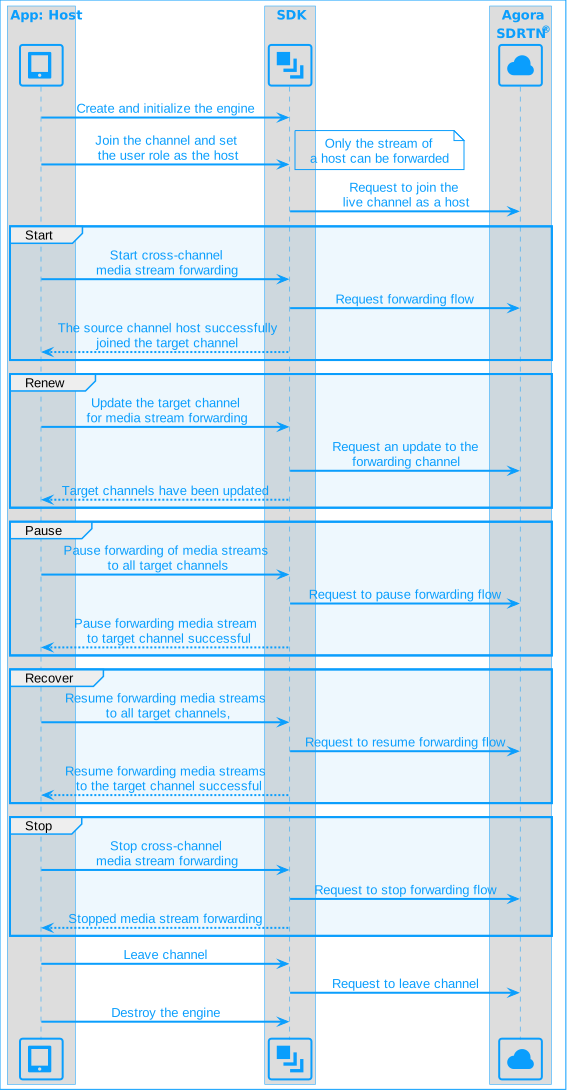
To implement cross-channel media stream relay in your app, take the following steps:
1. Start cross-channel media stream relay
After joining a channel, call `startOrUpdateChannelMediaRelay` to configure the source and target channel information and start forwarding a media stream.
```typescript
const srcChannelId = "srcChannel";
const destChannelId = "destChannel";
const uid = 0;
const token = "insert-your-token";
// Start cross-channel media stream forwarding
rtcEngine.startOrUpdateChannelMediaRelay({
// Configure source channel information srcInfo
srcInfo: {
channelName: srcChannelId,
uid: uid,
token: token,
},
// Configure the target channel information destInfos
destInfos: [
{
channelName: destChannelId,
token: '', // A token to join the target channel
uid: 0, // SDK randomly assigns a uid
},
],
// Number of target channels
destCount: 1,
});
```
2. Update media stream relay channels
To forward the stream to multiple target channels or exit the current forwarding channel after staring channel media relay, call `startOrUpdateChannelMediaRelay` again to add or remove target channels for forwarding.
The updated configuration completely **replaces** the previous configuration.
3. Pause or resume media stream relay
To pause forwarding the media stream to all target channels, call `pauseAllChannelMediaRelay`.
```typescript
rtcEngine.pauseAllChannelMediaRelay();
```
To resume forwarding the media stream to all target channels, call `resumeAllChannelMediaRelay`.
```typescript
rtcEngine.resumeAllChannelMediaRelay();
```
4. Stop cross-channel media stream relay
To stop forwarding the media stream, call `stopChannelMediaRelay`. When forwarding stops, the host exits all target channels.
```typescript
rtcEngine.stopChannelMediaRelay();
```
If this method fails, call `leaveChannel` to leave the channel and stop cross-channel media stream relay.
5. Monitor cross-channel media stream status
During cross-channel media stream relay, the SDK reports changes in the status of media stream relay through the `onChannelMediaRelayStateChanged` callback. Implement the relevant business logic based on the [status codes](#status-codes).
```typescript
// Register event callback
rtcEngine.registerEventHandler(
onChannelMediaRelayStateChanged: (state: ChannelMediaRelayState, code: ChannelMediaRelayError) => {
console.log(`Cross-channel media stream forwarding status:${state},Error Code:${code}`);
},
);
```
### Development considerations [#development-considerations-5]
* In live broadcast use cases, only users with the role of host can call `startOrUpdateChannelMediaRelay` to initiate cross-channel media stream forwarding.
* Call `startOrUpdateChannelMediaRelay` **after** successfully joining a channel; otherwise, the method call fails.
* Within a single channel, multiple hosts can forward media streams. Each host can forward a media stream to up to six target channels.
* This feature does not support String-type `uid`. To use cross-channel co-hosting, you must also use an int-type `uid` in regular co-hosting. Otherwise, cross-channel co-hosting will not work.
## Reference [#reference-5]
This section contains content that completes the information on this page, or points you to documentation that explains other aspects to this product.
### Status codes [#status-codes-4]
The main media stream forwarding states and their corresponding status codes are as follows:
| Media stream forwarding status | status code |
| :------------------------------------------------------------------------------------------------------------------------------------------------------------------------------------------------------ | :-------------------------------------- |
| The source channel starts transmitting data to the target channel. | `RelayStateRunning`(2) and `RelayOk`(0) |
| Cross-channel media stream forwarding encounters an exception. You can troubleshoot based on the [error code](https://api-ref.agora.io/en/video-sdk/electron/4.x/API/enum_channelmediarelayerror.html). | `RelayStateFailure`(3) |
| Media stream forwarding has stopped. | `RelayStateIdle`(0) and `RelayOk`(0) |
### Sample project [#sample-project-4]
Agora provides an open-source [ChannelMediaRelay](https://github.com/AgoraIO-Extensions/Electron-SDK/blob/main/example/src/renderer/examples/advanced/ChannelMediaRelay/ChannelMediaRelay.tsx) sample project for your reference. Download the project or view the source code for a more detailed example.
### API reference [#api-reference-5]
* [`startOrUpdateChannelMediaRelay`](https://api-ref.agora.io/en/video-sdk/electron/4.x/API/class_irtcengine.html#api_irtcengine_startorupdatechannelmediarelay)
* [`stopChannelMediaRelay`](https://api-ref.agora.io/en/video-sdk/electron/4.x/API/class_irtcengine.html#api_irtcengine_stopchannelmediarelay)
* [`pauseAllChannelMediaRelay`](https://api-ref.agora.io/en/video-sdk/electron/4.x/API/class_irtcengine.html#api_irtcengine_pauseallchannelmediarelay)
* [`resumeAllChannelMediaRelay`](https://api-ref.agora.io/en/video-sdk/electron/4.x/API/class_irtcengine.html#api_irtcengine_resumeallchannelmediarelay)
* [`onChannelMediaRelayStateChanged`](https://api-ref.agora.io/en/video-sdk/electron/4.x/API/class_irtcengineeventhandler.html#callback_irtcengineeventhandler_onchannelmediarelaystatechanged)
* [`ChannelMediaRelayConfiguration`](https://api-ref.agora.io/en/video-sdk/electron/4.x/API/class_channelmediarelayconfiguration.html)
* [`ChannelMediaInfo`](https://api-ref.agora.io/en/video-sdk/electron/4.x/API/class_channelmediainfo.html)