# Beauty Effect (Beta) (/en/realtime-media/broadcast-streaming/build/apply-effects-and-enhancements/beauty-effect)
> For AI agents: see the complete documentation index at [llms.txt](/llms.txt).
This feature is supported only on Web.
The Beauty Effect extension enables your users to apply beauty effects to their videos. They can adjust settings for whitening, skin smoothing, acne removal, and redness to achieve a natural beauty effect.
<_PlatformTabsGroup groupMode="structured" canonicalPlatform="web" platforms="["web"]" showTabs="false">
<_PlatformPanel platform="web">
<_PlatformProcessedMarker groupMode="structured" canonicalPlatform="web" platform="web" />
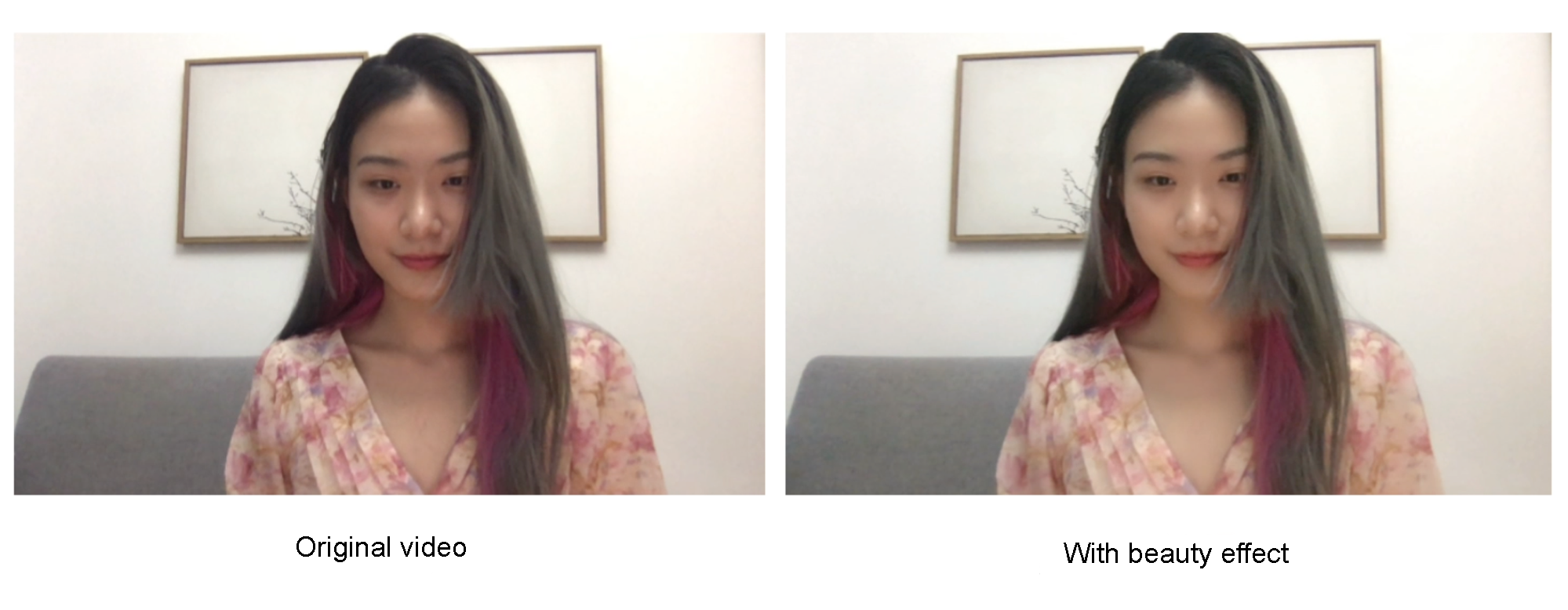
Try out the [online demo](https://webdemo.agora.io/beauty-extension/index.html).
For integrating the Beauty Effect extension, Agora recommends upgrading to version 4.12.0 or later of the Web SDK.
## Understand the tech [#understand-the-tech]
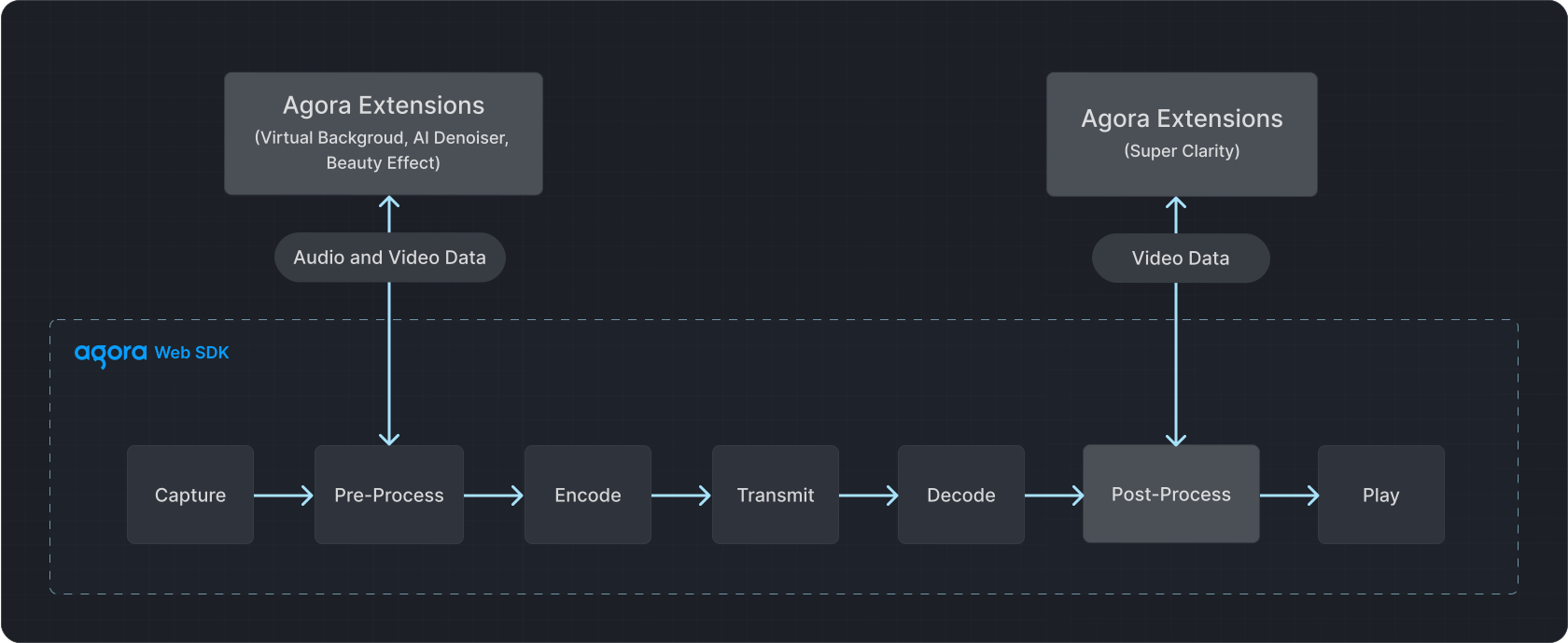
The media transmission pipeline of the Agora Web SDK consists of capture, pre-processing, encoding, transmission, decoding, post-processing, and playback stages. In the pre-processing stage, the Beauty Effect extension processes video data to apply the desired effects.
## Prerequisites [#prerequisites]
Ensure that you have implemented the [SDK quickstart](../../index) in your project using the Web SDK version 4.12.0 or later.
## Implement beauty effects [#implement-beauty-effects]
This section shows you how to integrate Beauty Effect extension into your project and apply beauty effects.
### Integrate the extension [#integrate-the-extension]
To integrate the extension, take the following steps:
1. Run the following command to install the extension:
```typescript
npm install agora-extension-beauty-effect
```
2. Use either of the following methods to integrate the extension.
* **Method 1**: Add the following code to your JavaScript file:
```typescript
import BeautyExtension from "agora-extension-beauty-effect";
```
* **Method 2**: Import it into the HTML file using a `
```
### Register the extension [#register-the-extension]
After calling `AgoraRTC.createClient()` to create a client object, instantiate a new `BeautyExtension` object. To register the beauty extension, call `AgoraRTC.registerExtensions()` and pass the `BeautyExtension` object you created.
```typescript
// Create Client
var client = AgoraRTC.createClient({mode: "rtc", codec: "vp8"});
// Create BeautyExtension instance
const extension = new BeautyExtension();
// Register extension
AgoraRTC.registerExtensions([extension]);
```
### Enable the extension [#enable-the-extension]
To enable the extension, follow these steps:
1. Call `extension.createProcessor` to create a `BeautyProcessor` instance.
```typescript
const processor = extension.createProcessor();
```
2. After creating the local camera video track, use the `pipe()` method to pass the video track through the beauty pre-processor. Then, direct the processed video track to `videoTrack.processorDestination`, integrating it back into the SDK's media processing pipeline.
```typescript
localTracks.videoTrack.pipe(processor).pipe(localTracks.videoTrack.processorDestination);
```
3. Call `processor.enable()` to activate the beauty effects.
```typescript
await processor.enable();
```
If you do not call `processor.enable()` before calling `setOptions()`, the SDK uses the default values of the beauty parameters in `BeautyEffectOptions`.
### Apply a beauty effect [#apply-a-beauty-effect]
Call `processor.setOptions` to set beauty parameters:
```typescript
processor.setOptions({
// Contrast
lighteningContrastLevel: 2,
// Brightness
lighteningLevel: 0.7,
// Smoothness
smoothnessLevel: 0.6,
// Sharpness
sharpnessLevel: 0.5,
// Redness
rednessLevel: 0.5
});
```
Refer to the [API reference](#api-reference) for details.
### Complete sample code [#complete-sample-code]
This section presents the minimum code to integrate the Beauty Effect extension into your project. Copy the following into your script file:
**Complete sample code for beauty effect extension**
```js
import AgoraRTC from "agora-rtc-sdk-ng";
import BeautyExtension from "agora-extension-beauty-effect";
// Create a Client
var client = AgoraRTC.createClient({mode: "rtc", codec: "vp8"});
// Create an instance of BeautyExtension
const extension = new BeautyExtension();
// Register the extension
AgoraRTC.registerExtensions([extension]);
// Create an instance of BeautyProcessor
const processor = extension.createProcessor();
var localTracks = {
videoTrack: null,
audioTrack: null
};
async function start() {
// Create local microphone and camera tracks
localTracks.audioTrack = localTracks.audioTrack ||
await AgoraRTC.createMicrophoneAudioTrack();
localTracks.videoTrack = localTracks.videoTrack ||
await AgoraRTC.createCameraVideoTrack({cameraId: videoSelect.value, encoderConfig: '720p_2'});
localTracks.videoTrack.play("local-player");
if (processor && localTracks.videoTrack) {
// Inject the extension into the SDK's video processing pipeline
localTracks.videoTrack.pipe(processor).pipe(localTracks.videoTrack.processorDestination);
// Enable beauty effects
await processor.enable();
}
}
// Set beauty parameters
async function setBeautyOptions() {
processor.setOptions({
lighteningContrastLevel: 2,
lighteningLevel: 0.7,
smoothnessLevel: 0.6,
sharpnessLevel: 0.5,
rednessLevel: 0.5
});
}
```
## Reference [#reference]
This section contains content that completes the information in this page, or points you to documentation that explains other aspects to this product.
* For a working example, check out the [Beauty Effect demo](https://webdemo.agora.io/beauty-extension/index.html).
### Considerations [#considerations]
* **Browser support**:
* The Beauty Effect extension supports the latest versions of Chrome, Firefox, and Safari.
* For the best beautification experience, Agora recommends using the latest version of Chrome on desktop.
* Safari versions below 15.4 are not supported due to a [known WebKit issue](https://bugs.webkit.org/show_bug.cgi?id=181663) that causes a black screen.
* Enabling beauty mode on mobile devices is not recommended.
* **Device requirements**:
The Beauty Effect extension has high performance requirements. Agora recommends the following:
* Intel Core i5 2-core processor or above.
* 8GB of RAM or more.
* 64-bit operating system.
* **Browser settings**:
Ensure that browser hardware acceleration is enabled when using the extension.
* **Beauty Effect extension and SDK**:
The Beauty Effect extension encapsulates the beauty function built into Web SDK 4.x (enabled by `setBeautyEffect`) and upgrades the beauty algorithm. If you use the beauty function built into the SDK, Agora recommends upgrading to v4.12.0 or above and using the Beauty Effect extension implementation. The built-in beauty function will be gradually discontinued.
* **Using multiple extensions**:
If you need to use multiple media processing extensions simultaneously, Agora recommends an Intel Core i5 4-core or higher processor. When multiple extensions are enabled, other running programs that occupy significant system resources may cause audio and video freezes in your app.
### API reference [#api-reference]
This section provides the API reference for the Beauty Effect extension.
#### `IBeautyExtension` [#ibeautyextension]
An Agora Video SDK extension for adding and managing beauty effects in real-time video streams.
##### `createProcessor` [#createprocessor]
Creates an `IBeautyProcessor` object.
```typescript
createProcessor(): IBeautyProcessor;
```
#### `IBeautyProcessor` [#ibeautyprocessor]
##### `setOptions` [#setoptions]
Sets beauty parameters.
```typescript
setOptions(options:BeautyEffectOptions):void;
```
* **parameter**:
* `options`: Beauty parameters, see [BeautyEffectOptions](#beautyeffectoptions) for details.
##### `enable` [#enable]
Turns on beauty mode.
```typescript
enable(): void | Promise;
```
If `setOptions()` is not called before this method, the SDK uses default values of the beauty parameters in [BeautyEffectOptions](#beautyeffectoptions).
##### `disable` [#disable]
Turns off beauty mode.
```typescript
disable(): void | Promise;
```
##### `release` [#release]
Releases all resources used by the extension, including the created web worker.
```typescript
release(): Promise;
```
Repeatedly creating the `IBeautyProcessor` extension object without releasing its resources may lead to memory exhaustion.
##### `onoverload` [#onoverload]
When the system computing performance cannot meet the processing requirements, the SDK triggers `onoverload`.
```typescript
onoverload?: () => void;
```
Agora recommends calling `disable` within this event callback function to cease beautification and provide a UI prompt.
#### Type definition [#type-definition]
#### `BeautyEffectOptions` [#beautyeffectoptions]
Beauty parameters used in the [setOptions](#setoptions) method.
```typescript
export type BeautyEffectOptions = {
lighteningContrastLevel: 0 | 1 | 2;
lighteningLevel: Number,
smoothnessLevel?: Number;
sharpnessLevel?: Number;
rednessLevel?: Number;
};
```
<_PlatformProcessedMarker close="true" />