# AI Noise Suppression (/en/realtime-media/broadcast-streaming/build/apply-effects-and-enhancements/ai-noise-suppression/javascript)
> For AI agents: see the complete documentation index at [llms.txt](/llms.txt).
AI Noise Suppression enables you to suppress hundreds of types of noise and reduce distortion in human voices when multiple people speak at the same time. In use-cases such as online meetings, online chat rooms, video consultations with doctors, and online gaming, AI Noise Suppression makes virtual communication as smooth as face-to-face interaction.
AI Noise Suppression reduces the following types of noise:
* Television
* Kitchen
* Street, such as birds chirping, traffic, and subway sounds
* Machine, such as fans, air conditioners, vacuum cleaners, and copiers
* Office, such as keyboard and mouse clicks
* Household, such as doors opening, creaking chairs, crying babies, and house renovations
* Constant knocking
* Beeps and clapping
* Music
You can choose following noise reduction strategies:
* Default: Reduces noise to a comfortable level without distorting human voice.
* Custom: A more enhanced or customized noise reduction strategy for your business use-case. Contact [support@agora.io](mailto\:support@agora.io) for details.
Want to try out AI Noise Suppression? Use the online demo.
## Understand the tech [#understand-the-tech-8]
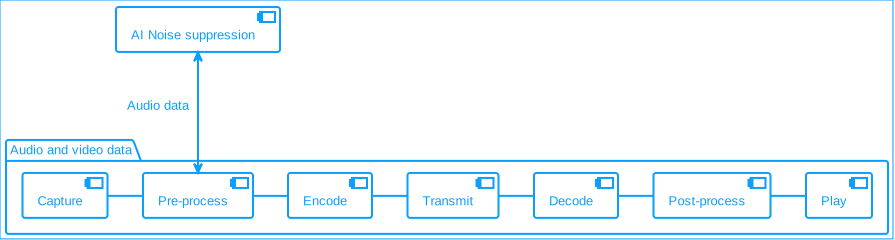
In the pre-processing stage, AI Noise Suppression uses deep learning noise reduction algorithms to modify data in the extensions pipeline.
**AI noise suppression**
## Prerequisites [#prerequisites-8]
Ensure that you have implemented the [SDK quickstart](../../index) in your project.
## Enable AI Noise Suppression [#enable-ai-noise-suppression-8]
This section shows you how to integrate AI Noise Suppression into your app.
1. Configure the noise suppression extension
This code initializes the AI Noise Suppression extension, checks compatibility, and sets up a noise reduction processor for the local microphone track. It registers the extension, checks compatibility, and initializes the AI noise processor.
```typescript
function AgoraExtensionComponent() {
const extension = useRef(new AIDenoiserExtension({assetsPath:'./node_modules/agora-extension-ai-denoiser/external'}));
const processor = useRef();
useEffect(() => {
const initializeAIDenoiserProcessor = async () => {
AgoraRTC.registerExtensions([extension.current]);
if (!extension.current.checkCompatibility()) {
console.error("Does not support AI Denoiser!");
return;
}
if (localMicrophoneTrack)
{
console.log("Initializing an ai noise processor...");
try {
processor.current = extension.current.createProcessor();
localMicrophoneTrack.pipe(processor.current).pipe(localMicrophoneTrack.processorDestination);
await processor.current.enable();
} catch (error) {
console.error("Error applying noise reduction:", error);
}
}
};
void initializeAIDenoiserProcessor();
return () => {
const disableAIDenoiser = async () => {
processor.current?.unpipe();
localMicrophoneTrack?.unpipe();
await processor.current?.disable();
};
void disableAIDenoiser();
};
}, [localMicrophoneTrack]);
}
```
2. Change the noise reduction mode
This function changes the noise reduction mode based on the provided mode.
```typescript
const changeNoiseReductionMode = (mode: AIDenoiserProcessorMode) => {
processor.current.setMode(mode)
}
```
3. Change the noise reduction level
This function changes the noise reduction level based on the provided level.
```typescript
const changeNoiseReductionLevel = (level: AIDenoiserProcessorLevel) => {
processor.current.setLevel(level)
}
```
## Reference [#reference-8]
This section completes the information on this page, or points you to documentation that explains other aspects about this product.