# Media Push Overview (/en/api-reference/api-ref/media-push)
> For AI agents: see the complete documentation index at [llms.txt](/llms.txt).
This article contains detailed help for the Media Push RESTful APIs.
## Authentication [#authentication]
The RESTful APIs require basic HTTP authentication. You need to set the `Authorization` parameter in every HTTP request header. For how to get the value for Authorization, see [RESTful API authentication](./restful-authentication).
## Understand the tech [#understand-the-tech]
You can implement different types of Media Push depending on the live streaming use-case requires transcoded or non-transcoded streaming. Transcoding is essentially an encoding and decoding function used to mix multiple audio and video streams into one audio and video stream, which can guarantee the synchronization of multiple hosts' live streams seen by the audience. Therefore, generally speaking, in the case of multiple-hosts live streaming, you need to enable transcoding when pushing streams to CDN; in the case of single-host live streaming, only one media stream is pushed to the CDN, so you do not need to enable transcoding.
Processing the media streams and pushing it to the CDN creates a Media Push task (shown as "Converter" in the rest of the article) in the Agora channel. You can control a Converter through the following methods:
* `Create`: Create a Converter for your project, and set up the relevant configuration of transcoded or non-transcoded streaming. The media stream in the channel is processed by the Converter according to this configuration and then pushed to the CDN.
* `Delete`: Destroy the specified Converter. The user's media stream in this channel will no longer be processed by the Converter or pushed to the CDN after you destroy the Converter.
* `Update`: Update the specified Converter configuration.
* `Get`: Get the streaming status of the specified Converter.
## Create: Create a Converter [#create-create-a-converter]
### HTTP request [#http-request]
```html
POST https://api.agora.io/{region}/v1/projects/{appId}/rtmp-converters
```
The Agora RESTful API only supports HTTPS with TLS 1.0, 1.1, or 1.2 for encrypted communication. Requests over plain HTTP are not supported and will fail to connect.
#### Path parameter [#path-parameter]
* `appId`: (Required) String. The **App ID** provided by Agora. You can get an App ID after creating a project in the Agora console. An App ID is the unique identification of a project.
* `region`: (Required) String. The region that the Converter was created in. Agora supports the creation of Converters in different regions. Currently, four regions are supported:
* `cn`: China Mainland
* `ap`: Asia, excluding Mainland China
* `na`: North America
* `eu`: Europe
- Please ensure that the region you set is the same region as where your CDN originates is located.
- Please make sure the value of `region` is lowercase.
#### Query parameters [#query-parameters]
`regionHintIp`: (Optional) String. The IP address of the CDN source station. It must be a valid IPv4 address. This parameter can help ensure the stability of the RTMP stream.
```html
POST https://api.agora.io/{region}/v1/projects/{appId}/rtmp-converters?regionHintIp={regionHintIp}
```
#### Request header [#request-header]
* `Content-Type`: `application/json`
* `Authorization`: The value of this field must refer to the [Authentication instructions](./restful-authentication).
* `X-Request-ID`: The UUID (Universal Unique Identifier) that identifies this **request**. Agora server generates a UUID to pass in and returns `X-Request-ID` field in the response header.
> Agora recommends that you assign a value to `X-Request-ID`. Agora server returns an `X-Custom-Request-ID` field in the response header for trouble shooting.
#### Request body [#request-body]
You can implement different types of Media Push depending on the live streaming use-case requires transcoded or non-transcoded streaming. Generally speaking, in the case of multiple-hosts live streaming, you need to enable transcoding when using Media Push RESTful APIs; in the case of single-host live streaming, only one media stream is pushed to the CDN, so you do not need to enable transcoding. For details, see [Media Push Features](/en/realtime-media/media-push#key-features).
**Media Push with transcoding**
The request Body is the `converter` field of JSON Object type. The field structure is shown in the following figure:
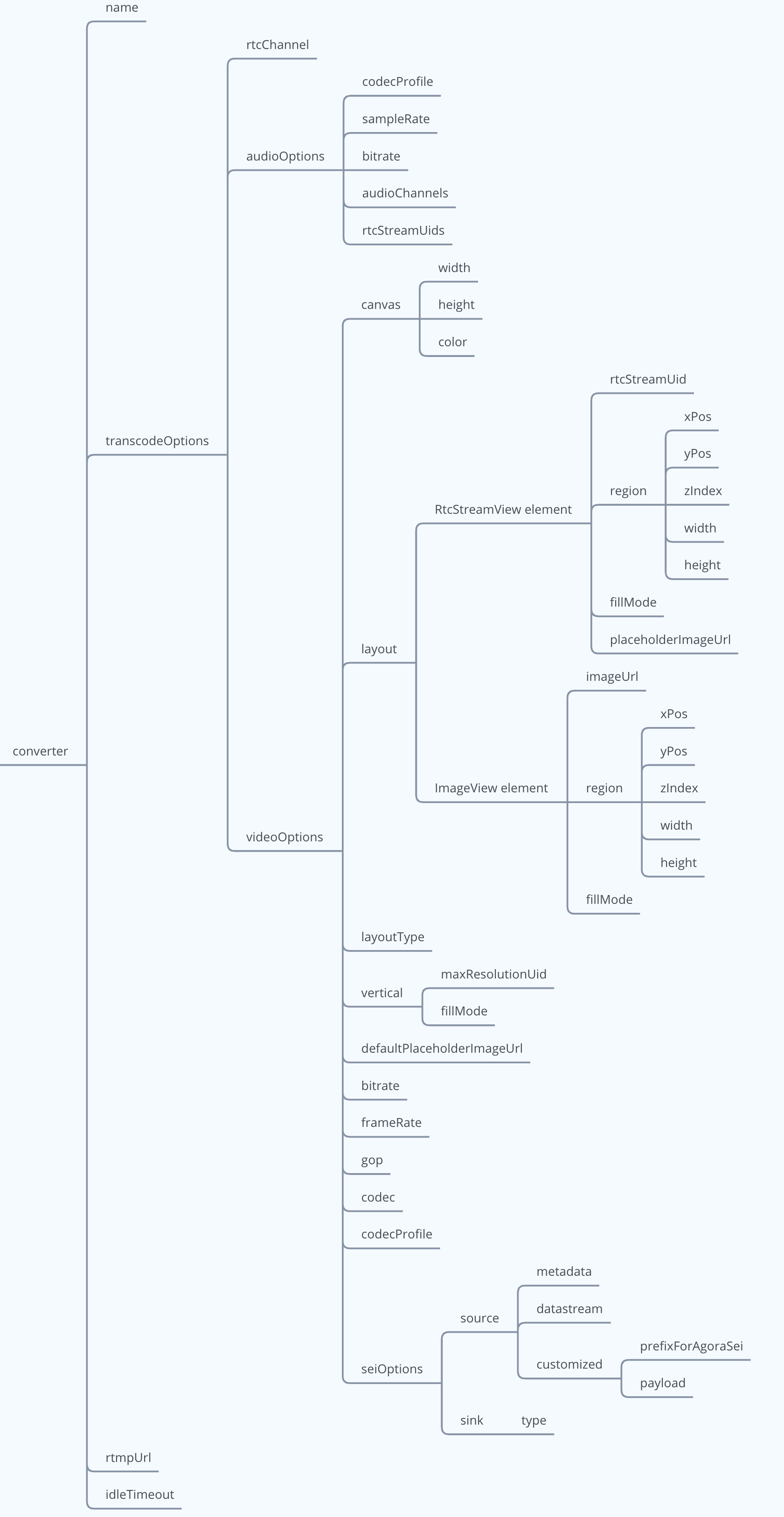
Details for these fields are shown in the following table:
| Field | Type | Descriptions |
| :--------------------------------------------------------- | :--------------------- | :-------------------------------------------------------------------------------------------------------------------------------------------------------------------------------------------------------------------------------------------------------------------------------------------------------------------------------------------------------------------------------------------------------------------------------------------------------------------------------------------------------------------------------------------------------------------------------------------------------------------------------------------------------------------------------------------------------------------------------------------------------------------------------------------------------------------------------------------------------------------------------------------------------------------------------------------------------------------------------------------------------------------------------------------------------------------------------------------------------------------------------------------- |
| name | (Optional) String | The name of the Converter. The maximum length is 64 characters. The supported character set range is:- All lowercase English letters (a-z)
- All uppercase English letters (A-Z)
- Numbers 0-9
- "-", "\_"The field is empty when no value is passed. Multiple converters with an empty name field can be created under a project. Two converters cannot have the same name, however; you will receive a response status code of `409` (Conflict) if you try to create a converter with the same name as one that already exists under that project.
To avoid repeatedly creating multiple Converters and repetitively pushing streams, please use the `name` field to manage the Converters under the specified project. Agora recommends that you combine "channel name (`rtcChannel`)" and "Converter feature" to assign a value to the `name`. For example, `show68_horizontal` and `show68_vertical` would represent converters for the user screen created in channel `show68` with horizontal and vertical layouts, respectively.
|
| transcodeOptions | (Required) JSON Object | The Converter’s transcoding configuration.- When the `audioOptions` and `videoOptions` fields in `converter.transcodeOptions` are not defined, the converter will output a video stream only (without audio).
- When there is no `rtcStreamUids` field in the `converter.transcodeOptions.audioOptions` field, Agora will mix the audio streams of all users in the channel and output the mixed audio stream through the Converter.
- When there is an `rtcStreamUids` field in the `converter.transcodeOptions.audioOptions` field, Agora will mix the audio stream of the specified user and output the mixed audio stream through the Converter. |
| transcodeOptions.rtcChannel | (Required) String | The Agora channel name. This is the channel to which the stream processed by the Converter belongs. The maximum length of the string is 64 characters, and the following character sets (89 characters in total) are supported:- All lowercase English letters (a-z)
- All uppercase English letters (A-Z)
- Numbers 0-9
- The space character "!", "#", "$", "%", "&", "(", ")", "+", "-", ":", ";", "\<", "=", ".", ">", "?", "@", "\[", "]", "^", "\_", " \{", "}", "\|", "\~", "," |
| transcodeOptions.audioOptions | (Optional) JSON Object | The audio transcoding configuration of the Converter. See [audioOptions](./restful-type-definition#audiooptions) for details.
* There is no need to set `audioOptions` and related fields in a video stream only (without audio) use-case.
* In an audio & video use-case, `audioOptions` is a required field. If there is no field setting requirement, you can set `audioOptions` to empty, for example: "audioOptions":\{}.
|
| transcodeOptions.videoOptions | (Optional) JSON Object | The video transcoding configuration of the Converter.
* There is no need to set `videoOptions` and related fields in an audio stream only (without video) use-case.
* In an audio & video use-case, `videoOptions` is a required field and cannot be empty.
|
| transcodeOptions.videoOptions.canvas | (Required) JSON Object | The video canvas. See [canvas](./restful-type-definition#canvas) for details. |
| transcodeOptions.videoOptions.layoutType | (Optional) Number | The screen layout type of the output video:- `0` or empty: (Default) Custom layout, which is set through the`transcodeOptions.videoOptions.layout` parameter.
- `1`: Vertical layout. Specify one user to display in the large window on the left side of the screen, while the other users are vertically arranged in the small windows on the right side of the screen. For details, see [Set Vertical Layout](/en/realtime-media/media-push/reference/set-vertical-layout). |
| transcodeOptions.videoOptions.layout | (Optional) JSON Array | The content description of the video screen on the canvas. Two elements are supported: RtcStreamView and ImageView.
If `layoutType` is 0 or empty, this field is required.
|
| transcodeOptions.videoOptions.layout.RtcStreamView element | None | The video screen of each user on the canvas. See [RtcStreamView](./restful-type-definition#layout) for details. |
| transcodeOptions.videoOptions.layout.ImageView element | None | The video image on the canvas, which can be used as a watermark. See [ImageView](./restful-type-definition#layoutimageview) for details. |
| transcodeOptions.videoOptions.vertical | (Optional) JSON Object | Vertical layout. This parameter must be set when `layoutType` is 1. See [vertical](./restful-type-definition#vertical) for details. |
| transcodeOptions.videoOptions.defaultPlaceholderImageUrl | (Optional) String | The default user screen background image URL address. Supports images in JPG, PNG and GIF formats. This controls what happens when a user in a channel stops publishing their video stream:- If this field is set, the user's window switches to this background image.
- If this field is not set, the user's window initially displays the last frame of the user's video. Once the layout refreshes, the window displays the background color of the canvas. |
| transcodeOptions.videoOptions.bitrate | (Required) Number | The encoding bitrate (Kbps) of the video. The value range is \[1,10000]. |
| transcodeOptions.videoOptions.gop | (Optional) Number | The GOP of the video. The default value is the value of `frameRate` \* 2. |
| transcodeOptions.videoOptions.frameRate | (Optional) Number | The encoding frame rate (fps) of the video. The value range is \[1,30]. The default value is 15. |
| transcodeOptions.videoOptions.codec | (Optional) String | The video codec type of the output video stream. The following values are supported:- (Default) H.264
- H.265 |
| transcodeOptions.videoOptions.codecProfile | (Optional) String | The encoding specification of the video. The following values are supported:* `high` (Default): High video codec profile, generally used for high-resolution broadcasts or television.
* `baseline`: Baseline video codec profile, generally used for video calls on mobile phones.
* `main`: Main video codec profile, generally used for mainstream electronics, such as MP4 players, portable video players, PSPs, and iPads.
If `codec` is set to `H.256`, `codecProfile` is automatically set to `main`.
|
| transcodeOptions.videoOptions.seiOptions | JSON Object | Sets the user SEI information carried in the output video stream. The default is empty. If it is not set, it means that no SEI information is output. See [seiOptions](./restful-type-definition#seioptions) for details. |
| rtmpUrl | (Required) String | The address of Media Push. It must be a valid RTMP address with a length of 1,024 characters or less. |
| idleTimeOut | (Optional) Number | The maximum time (seconds) that the Converter is idle. Idle means that all users corresponding to the media stream processed by the Converter have left the channel. After the idle state exceeds the set `idleTimeOut`, the Converter will be destroyed automatically. |
| jitterBufferSizeMs | (Optional) Int | Network delay (ms) from the receiver to the jitter buffer. The default value is 1000. The value range is \[0, 1000].- The Media Push service rounds up to the nearest 100 multiples with the value you set.
- If the value is set to 0, jitter buffer delay does not take effect. Agora recommends that you do not set the `jitterBufferSizeMs` to 0 because poor network may cause low audio quality. |
**Media Push without transcoding**
The request body is the `converter` field of JSON Object type. The field structure is shown in the following figure:
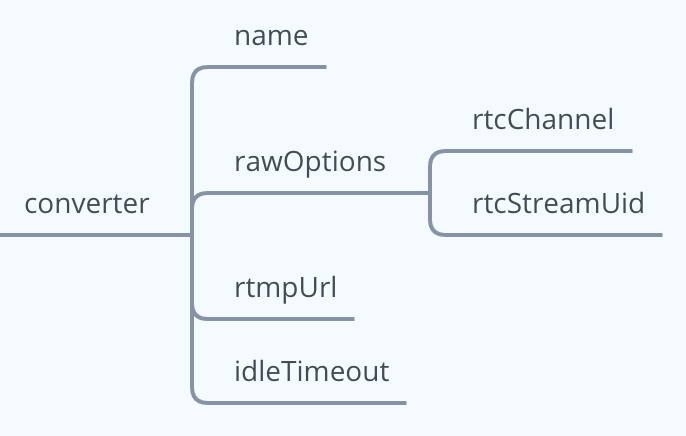 Details for these fields are shown in the following table:
| Field | Category | Description |
| :---------------------- | :-------------------- | :------------------------------------------------------------------------------------------------------------------------------------------------------------------------------------------------------------------------------------------------------------------------------------------------------------------------------------------------------------------------------------------------------ |
| name | String | The name of the Converter. |
| rawOptions | (Required)JSON Object | Media Push configuration for the Converter. |
| rawOptions.rtcChannel | String | The Agora channel name. The channel to which the stream processed by the Converter belongs. |
| rawOptions.rtcStreamUid | Number | The UID of the user to which the media stream belongs. |
| rtmpUrl | (Required)String | The CDN streaming address. |
| idleTimeOut | Number | The maximum time (s) that the Converter is idle. Idle means that all users of the corresponding media streams processed by the Converter have left the channel. When the Converter is in the idle state for longer than `idleTimeout`, the Converter is automatically destroyed and the streaming stops. |
| jitterBufferSizeMs | (Optional) Int | Network delay (ms) from the receiver to the jitter buffer. The default value is 1000. The value range is \[0, 1000].- The Media Push service rounds up to the nearest 100 multiples with the value you set.
- If the value is set to 0, jitter buffer delay does not take effect. Agora recommends that you do not set the `jitterBufferSizeMs` to 0 because poor network may cause low audio quality. |
### HTTP response [#http-response]
All possible response status codes. See [Status codes](#status-codes) for details.
#### Response header [#response-header]
* `X-Request-ID`: The UUID (Universal Unique Identifier) that identifies this **request**. This value is the same as the `X-Request-ID` in the header of this request. If there is an error in the request, please print out the value in the log to troubleshoot the problem.
> If the response status code of this request is not 2XX, this field may be missing from the response header.
* `X-Resource-ID`: The UUID (Universal Unique Identifier) that identifies the **ID** of the Converter updated in this request.
#### Response body [#response-body]
If the status code is 2XX, the request is successful. The field structure is shown in the following figure:
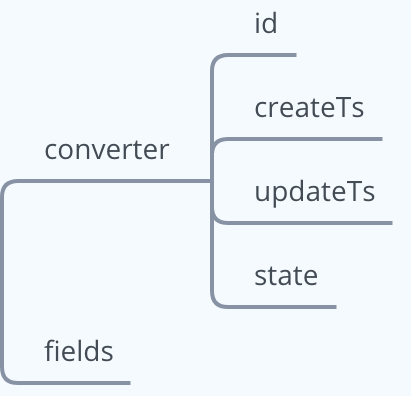
Details for these fields are shown in the following table:
| Field | Type | Descriptions |
| :--------- | :----- | :---------------------------------------------------------------------------------------------------------------------------------------------------------------------------------------------------------------------------------------------------------------------------------------------------------------------------------------------------------------------------------------------------------------------------------------- |
| `id` | String | The ID of the Converter. This is a UUID (Universal Unique Identifier) generated by the Agora server to identify a created Converter. |
| `createTs` | Number | The Unix timestamp(seconds) when the Converter was created. |
| `updateTs` | Number | The Unix timestamp(seconds) when the Converter configuration was last updated. |
| `state` | String | The running status of the Converter:- `connecting`: Connecting to the Agora streaming server and the CDN server.
- `running`: The Agora streaming server is pushing the streams.
- `failed`: The Media Push fails. |
| `fields` | String | The field mask of the converter JSON Object. See [Google protobuf FieldMask Document](https://developers.google.com/protocol-buffers/docs/reference/google.protobuf#fieldmask) for details. This is used to describe the set of fields contained in the returned `converter`. In this example, `fields` specifies that the Agora server returns a subset of the `id`, `createTs`, `updateTs` and `state` fields in the `converter` field. |
If the status code is not 2XX, the request fails. The body contains a String type `message` field that describes the specific reason for the failure.
```json
{
"message": "Invalid authentication credentials."
}
```
### Request example [#request-example]
**Custom layout for Media Push with transcoding**
This example shows that the video of the two specified users in the `show68` channel are mixed with a custom layout and pushed to the CDN. The audio of all users in the channel is also mixed.
```json
{
"converter": {
"name": "show68_vertical",
"transcodeOptions": {
"rtcChannel": "show68",
"audioOptions": {
"codecProfile": "LC-AAC",
"sampleRate": 48000,
"bitrate": 48,
"audioChannels": 1
},
"videoOptions": {
"canvas": {
"width": 360,
"height": 640
},
"layout": [
{
"rtcStreamUid": 201,
"region": {
"xPos": 0,
"yPos": 0,
"zIndex": 1,
"width": 360,
"height": 320
},
"fillMode": "fill",
"placeholderImageUrl": "http://example.agora.io/user_placeholder.jpg"
},
{
"rtcStreamUid": 202,
"region": {
"xPos": 0,
"yPos": 320,
"zIndex": 1,
"width": 360,
"height": 320
}
}
],
"codecProfile": "High",
"frameRate": 15,
"gop": 30,
"bitrate": 400,
"seiOptions": {}
}
},
"rtmpUrl": "rtmp://example/live/show68"
}
}
```
The sample code for setting SEI information (`seiOptions`) is as follows:
```json
{
"converter": {
"transcodeOptions": {
"videoOptions": {
"seiOptions": {
"source": {
"metadata": true,
"datastream": true,
"customized": {
"payload": "example"
}
},
"sink": {
"type": 100
}
}
}
}
}
}
```
**Vertical layout for Media Push with transcoding**
This example shows that the video of the two specified users in the `show68` channel are mixed with a vertical layout and pushed to the CDN. The audio of two specified users in the channel are mixed.
```json
{
"converter": {
"name": "show68_vertical",
"transcodeOptions": {
"rtcChannel": "show68",
"audioOptions": {
"codecProfile": "HE-AAC",
"sampleRate": 48000,
"bitrate": 128,
"audioChannels": 1,
"rtcStreamUids": [
201,
202
]
},
"videoOptions": {
"canvas": {
"width": 360,
"height": 640,
"color": 0
},
"layout": [
{
"rtcStreamUid": 201,
"region": {
"xPos": 0,
"yPos": 0,
"zIndex": 1,
"width": 360,
"height": 640
},
"fillMode": "fill",
"placeholderImageUrl": "http://example/host_placeholder.jpg"
},
{
"rtcStreamUid": 202,
"region": {
"xPos": 0,
"yPos": 320,
"zIndex": 1,
"width": 360,
"height": 320
}
}
],
"codec": "H.264",
"codecProfile": "high",
"frameRate": 15,
"gop": 30,
"bitrate": 400,
"layoutType": 1,
"vertical": {
"maxResolutionUid": 201,
"fillMode": "fill",
"refreshIntervalSec": 4
},
"defaultPlaceholderImageUrl": "http://example/host_placeholder.jpg",
"seiOptions": {
"source": {
"metadata": true,
"datastream": true,
"customized": {
"payload": "example"
}
},
"sink": {
"type": 100
}
}
}
},
"rtmpUrl": "rtmp://example/live/show68",
"idleTimeout": 300
}
}
```
**Media Push without transcoding**
This example shows that the media stream of the specified user in the `show68` channel is pushed to the CDN.
```json
{
"converter": {
"name": "show68_vertical",
"rawOptions": {
"rtcChannel": "show68",
"rtcStreamUid": 201
},
"rtmpUrl": "rtmp://example/live/global"
}
}
```
### Response example [#response-example]
```json
{
"converter": {
"id": "4c014467d647bb87b60b719f6fa57686",
"createTs": 1591786766,
"updateTs": 1591786766,
"state": "connecting"
},
"fields": "id,createTs,updateTs,state"
}
```
## Delete: Destroy the Converter [#delete-destroy-the-converter]
### HTTP request [#http-request-1]
```html
DELETE https://api.agora.io/{region}/v1/projects/{appId}/rtmp-converters/{converterId}
```
#### Path parameter [#path-parameter-1]
* `region`: (Required) String. The region where the Converter is created in, which must be the same as the `region` set when creating Converter.
* `appId`: (Required) String type parameter. The **App ID** provided by Agora. You can get an App ID after creating a project in the Agora console. An App ID is the unique identification of a project.
* `converterId`: (Required) String type parameter. The **ID** of the Converter.
#### Request header [#request-header-1]
* `Authorization`: The value of this field must refer to the [Authentication instructions](./restful-authentication).
* `X-Request-ID`: The UUID (Universal Unique Identifier) that identifies this **request**. Agora server generates a UUID to pass in and returns `X-Request-ID` field in the response header.
> Agora recommends that you assign a value to `X-Request-ID`. Agora server returns an `X-Custom-Request-ID` field in the response header for trouble shooting.
### HTTP response [#http-response-1]
All possible response status codes. See [Status codes](#status-codes) for details.
#### Response header [#response-header-1]
* `X-Request-ID`: The UUID (Universal Unique Identifier) that identifies this **request**. This value is the same as the `X-Request-ID` in the header of this request. If there is an error in the request, please print out the value in the log to troubleshoot the problem.
> If the response status code of this request is not 2XX, this field may be missing from the response header.
* `X-Resource-ID`: The UUID (Universal Unique Identifier) that identifies the **ID** of the Converter created in this request.
#### Response body [#response-body-1]
* If the status code is 2XX, the request is successful. The body is empty.
* If the status code is not 2XX, the request fails. The body contains a String type `message` field that describes the specific reason for the failure.
## Update: Update the Converter [#update-update-the-converter]
### HTTP request [#http-request-2]
```html
PATCH https://api.agora.io/{region}/v1/projects/{appId}/rtmp-converters/{converterId}
```
#### Path parameter [#path-parameter-2]
* `region`: (Required) String. The region where the Converter is created in, which must be the same as the `region` set when creating Converter.
* `appId`: (Required) String type parameter. The **App ID** provided by Agora. You can get an App ID after creating a project in the Agora console. An App ID is the unique identification of a project.
* `converterId`: (Required) String type parameter. The **ID** of the Converter.
#### Query Parameters [#query-parameters-1]
`sequence`: (Required) Number type parameter. The serial number of the `Update` request. The value must be greater than or equal to 0. Please make sure that the serial number of the next `Update` request is greater than the serial number of the previous `Update` request. The serial number can ensure that the Agora server updates the Converter according to the latest configuration you specify.
> Agora recommends that you fill in `sequence` sequentially, using 0 when calling Update for the first time, 1 for the second time, 2 for the third time, and so on. The Agora server will update the Converter according to the latest Update request (the largest serial number).
```html
PATCH https://api.agora.io/v1/projects//rtmp-converters/?sequence={sequence}
```
#### Request header [#request-header-2]
* `Content-Type`: `application/json`
* `Authorization`: The value of this field must refer to the [Authentication instructions](./restful-authentication).
* `X-Request-ID`: The UUID (Universal Unique Identifier) that identifies this **request**. Agora server generates a UUID to pass in and returns `X-Request-ID` field in the response header.
> Agora recommends that you assign a value to `X-Request-ID`. Agora server returns an `X-Custom-Request-ID` field in the response header for trouble shooting.
#### Request body [#request-body-1]
For details about the fields, see the [Create request body](#request-body).
> `Update` method does not support updating the following configurations of a Converter:
>
> * `name`
> * `idleTimeOut`
> * `transcodeOptions.rtcChannel`
> * `transcodeOptions.audioOptions`
> * `transcodeOptions.audioOptions.codecProfile`
> * `transcodeOptions.audioOptions.sampleRate`
> * `transcodeOptions.audioOptions.bitrate`
> * `transcodeOptions.audioOptions.audioChannels`
> * `transcodeOptions.videoOptions.codec`
> * `transcodeOptions.videoOptions.codecProfile`
* After calling the `Create` method to create a Converter that outputs video stream only or audio stream only, you cannot update it to a Converter that outputs audio stream only or video stream only through the `Update` method.
* When using Media Push with vertical layout (`layoutType` is `1`), you can only update the `rtmpUrl` field.
### HTTP response [#http-response-2]
All possible response status codes. See [Status codes](#status-codes) for details.
#### Response header [#response-header-2]
* `X-Request-ID`:The UUID (Universal Unique Identifier) that identifies this **request**. This value is the same as the `X-Request-ID` in the header of this request. If there is an error in the request, please print out the value in the log to troubleshoot the problem.
> If the response status code of this request is not 2XX, this field may be missing from the response header.
* `X-Resource-ID`: The UUID (Universal Unique Identifier) that identifies the **ID** of the Converter updated in this request.
#### Response body [#response-body-2]
If the status code is 2XX, the request is successful. The field structure is shown in the following figure:

Details of these fields are shown in the following table:
| Field | Type | Descriptions |
| :--------- | :----- | :---------------------------------------------------------------------------------------------------------------------------------------------------------------------------------------------------------------------------------------------------------------------------------------------------------------------------------------------------------------------------------------------------------------------------------------------- |
| `id` | String | The ID of the Converter. This is a UUID (Universal Unique Identifier) generated by the Agora server to identify a created Converter. |
| `createTs` | Number | The Unix timestamp(seconds) when the Converter was created. |
| `updateTs` | Number | The Unix timestamp(seconds) when the Converter configuration was last updated. |
| `state` | String | The running status of the Converter:- `connecting`: Connecting to the Agora streaming server and the CDN server.
- `running`: The Agora streaming server is pushing the streams.
- `failed`: The Media Push Fails. |
| `fields` | String | The field mask of the converter JSON Object. See [Google protobuf FieldMask Document](https://developers.google.com/protocol-buffers/docs/reference/google.protobuf#fieldmask) for details. This is used to describe the set of fields contained in the returned `converter`.
Details for these fields are shown in the following table:
| Field | Category | Description |
| :---------------------- | :-------------------- | :------------------------------------------------------------------------------------------------------------------------------------------------------------------------------------------------------------------------------------------------------------------------------------------------------------------------------------------------------------------------------------------------------ |
| name | String | The name of the Converter. |
| rawOptions | (Required)JSON Object | Media Push configuration for the Converter. |
| rawOptions.rtcChannel | String | The Agora channel name. The channel to which the stream processed by the Converter belongs. |
| rawOptions.rtcStreamUid | Number | The UID of the user to which the media stream belongs. |
| rtmpUrl | (Required)String | The CDN streaming address. |
| idleTimeOut | Number | The maximum time (s) that the Converter is idle. Idle means that all users of the corresponding media streams processed by the Converter have left the channel. When the Converter is in the idle state for longer than `idleTimeout`, the Converter is automatically destroyed and the streaming stops. |
| jitterBufferSizeMs | (Optional) Int | Network delay (ms) from the receiver to the jitter buffer. The default value is 1000. The value range is \[0, 1000].- The Media Push service rounds up to the nearest 100 multiples with the value you set.
- If the value is set to 0, jitter buffer delay does not take effect. Agora recommends that you do not set the `jitterBufferSizeMs` to 0 because poor network may cause low audio quality. |
### HTTP response [#http-response]
All possible response status codes. See [Status codes](#status-codes) for details.
#### Response header [#response-header]
* `X-Request-ID`: The UUID (Universal Unique Identifier) that identifies this **request**. This value is the same as the `X-Request-ID` in the header of this request. If there is an error in the request, please print out the value in the log to troubleshoot the problem.
> If the response status code of this request is not 2XX, this field may be missing from the response header.
* `X-Resource-ID`: The UUID (Universal Unique Identifier) that identifies the **ID** of the Converter updated in this request.
#### Response body [#response-body]
If the status code is 2XX, the request is successful. The field structure is shown in the following figure:

Details for these fields are shown in the following table:
| Field | Type | Descriptions |
| :--------- | :----- | :---------------------------------------------------------------------------------------------------------------------------------------------------------------------------------------------------------------------------------------------------------------------------------------------------------------------------------------------------------------------------------------------------------------------------------------- |
| `id` | String | The ID of the Converter. This is a UUID (Universal Unique Identifier) generated by the Agora server to identify a created Converter. |
| `createTs` | Number | The Unix timestamp(seconds) when the Converter was created. |
| `updateTs` | Number | The Unix timestamp(seconds) when the Converter configuration was last updated. |
| `state` | String | The running status of the Converter:- `connecting`: Connecting to the Agora streaming server and the CDN server.
- `running`: The Agora streaming server is pushing the streams.
- `failed`: The Media Push fails. |
| `fields` | String | The field mask of the converter JSON Object. See [Google protobuf FieldMask Document](https://developers.google.com/protocol-buffers/docs/reference/google.protobuf#fieldmask) for details. This is used to describe the set of fields contained in the returned `converter`. In this example, `fields` specifies that the Agora server returns a subset of the `id`, `createTs`, `updateTs` and `state` fields in the `converter` field. |
If the status code is not 2XX, the request fails. The body contains a String type `message` field that describes the specific reason for the failure.
```json
{
"message": "Invalid authentication credentials."
}
```
### Request example [#request-example]
**Custom layout for Media Push with transcoding**
This example shows that the video of the two specified users in the `show68` channel are mixed with a custom layout and pushed to the CDN. The audio of all users in the channel is also mixed.
```json
{
"converter": {
"name": "show68_vertical",
"transcodeOptions": {
"rtcChannel": "show68",
"audioOptions": {
"codecProfile": "LC-AAC",
"sampleRate": 48000,
"bitrate": 48,
"audioChannels": 1
},
"videoOptions": {
"canvas": {
"width": 360,
"height": 640
},
"layout": [
{
"rtcStreamUid": 201,
"region": {
"xPos": 0,
"yPos": 0,
"zIndex": 1,
"width": 360,
"height": 320
},
"fillMode": "fill",
"placeholderImageUrl": "http://example.agora.io/user_placeholder.jpg"
},
{
"rtcStreamUid": 202,
"region": {
"xPos": 0,
"yPos": 320,
"zIndex": 1,
"width": 360,
"height": 320
}
}
],
"codecProfile": "High",
"frameRate": 15,
"gop": 30,
"bitrate": 400,
"seiOptions": {}
}
},
"rtmpUrl": "rtmp://example/live/show68"
}
}
```
The sample code for setting SEI information (`seiOptions`) is as follows:
```json
{
"converter": {
"transcodeOptions": {
"videoOptions": {
"seiOptions": {
"source": {
"metadata": true,
"datastream": true,
"customized": {
"payload": "example"
}
},
"sink": {
"type": 100
}
}
}
}
}
}
```
**Vertical layout for Media Push with transcoding**
This example shows that the video of the two specified users in the `show68` channel are mixed with a vertical layout and pushed to the CDN. The audio of two specified users in the channel are mixed.
```json
{
"converter": {
"name": "show68_vertical",
"transcodeOptions": {
"rtcChannel": "show68",
"audioOptions": {
"codecProfile": "HE-AAC",
"sampleRate": 48000,
"bitrate": 128,
"audioChannels": 1,
"rtcStreamUids": [
201,
202
]
},
"videoOptions": {
"canvas": {
"width": 360,
"height": 640,
"color": 0
},
"layout": [
{
"rtcStreamUid": 201,
"region": {
"xPos": 0,
"yPos": 0,
"zIndex": 1,
"width": 360,
"height": 640
},
"fillMode": "fill",
"placeholderImageUrl": "http://example/host_placeholder.jpg"
},
{
"rtcStreamUid": 202,
"region": {
"xPos": 0,
"yPos": 320,
"zIndex": 1,
"width": 360,
"height": 320
}
}
],
"codec": "H.264",
"codecProfile": "high",
"frameRate": 15,
"gop": 30,
"bitrate": 400,
"layoutType": 1,
"vertical": {
"maxResolutionUid": 201,
"fillMode": "fill",
"refreshIntervalSec": 4
},
"defaultPlaceholderImageUrl": "http://example/host_placeholder.jpg",
"seiOptions": {
"source": {
"metadata": true,
"datastream": true,
"customized": {
"payload": "example"
}
},
"sink": {
"type": 100
}
}
}
},
"rtmpUrl": "rtmp://example/live/show68",
"idleTimeout": 300
}
}
```
**Media Push without transcoding**
This example shows that the media stream of the specified user in the `show68` channel is pushed to the CDN.
```json
{
"converter": {
"name": "show68_vertical",
"rawOptions": {
"rtcChannel": "show68",
"rtcStreamUid": 201
},
"rtmpUrl": "rtmp://example/live/global"
}
}
```
### Response example [#response-example]
```json
{
"converter": {
"id": "4c014467d647bb87b60b719f6fa57686",
"createTs": 1591786766,
"updateTs": 1591786766,
"state": "connecting"
},
"fields": "id,createTs,updateTs,state"
}
```
## Delete: Destroy the Converter [#delete-destroy-the-converter]
### HTTP request [#http-request-1]
```html
DELETE https://api.agora.io/{region}/v1/projects/{appId}/rtmp-converters/{converterId}
```
#### Path parameter [#path-parameter-1]
* `region`: (Required) String. The region where the Converter is created in, which must be the same as the `region` set when creating Converter.
* `appId`: (Required) String type parameter. The **App ID** provided by Agora. You can get an App ID after creating a project in the Agora console. An App ID is the unique identification of a project.
* `converterId`: (Required) String type parameter. The **ID** of the Converter.
#### Request header [#request-header-1]
* `Authorization`: The value of this field must refer to the [Authentication instructions](./restful-authentication).
* `X-Request-ID`: The UUID (Universal Unique Identifier) that identifies this **request**. Agora server generates a UUID to pass in and returns `X-Request-ID` field in the response header.
> Agora recommends that you assign a value to `X-Request-ID`. Agora server returns an `X-Custom-Request-ID` field in the response header for trouble shooting.
### HTTP response [#http-response-1]
All possible response status codes. See [Status codes](#status-codes) for details.
#### Response header [#response-header-1]
* `X-Request-ID`: The UUID (Universal Unique Identifier) that identifies this **request**. This value is the same as the `X-Request-ID` in the header of this request. If there is an error in the request, please print out the value in the log to troubleshoot the problem.
> If the response status code of this request is not 2XX, this field may be missing from the response header.
* `X-Resource-ID`: The UUID (Universal Unique Identifier) that identifies the **ID** of the Converter created in this request.
#### Response body [#response-body-1]
* If the status code is 2XX, the request is successful. The body is empty.
* If the status code is not 2XX, the request fails. The body contains a String type `message` field that describes the specific reason for the failure.
## Update: Update the Converter [#update-update-the-converter]
### HTTP request [#http-request-2]
```html
PATCH https://api.agora.io/{region}/v1/projects/{appId}/rtmp-converters/{converterId}
```
#### Path parameter [#path-parameter-2]
* `region`: (Required) String. The region where the Converter is created in, which must be the same as the `region` set when creating Converter.
* `appId`: (Required) String type parameter. The **App ID** provided by Agora. You can get an App ID after creating a project in the Agora console. An App ID is the unique identification of a project.
* `converterId`: (Required) String type parameter. The **ID** of the Converter.
#### Query Parameters [#query-parameters-1]
`sequence`: (Required) Number type parameter. The serial number of the `Update` request. The value must be greater than or equal to 0. Please make sure that the serial number of the next `Update` request is greater than the serial number of the previous `Update` request. The serial number can ensure that the Agora server updates the Converter according to the latest configuration you specify.
> Agora recommends that you fill in `sequence` sequentially, using 0 when calling Update for the first time, 1 for the second time, 2 for the third time, and so on. The Agora server will update the Converter according to the latest Update request (the largest serial number).
```html
PATCH https://api.agora.io/v1/projects//rtmp-converters/?sequence={sequence}
```
#### Request header [#request-header-2]
* `Content-Type`: `application/json`
* `Authorization`: The value of this field must refer to the [Authentication instructions](./restful-authentication).
* `X-Request-ID`: The UUID (Universal Unique Identifier) that identifies this **request**. Agora server generates a UUID to pass in and returns `X-Request-ID` field in the response header.
> Agora recommends that you assign a value to `X-Request-ID`. Agora server returns an `X-Custom-Request-ID` field in the response header for trouble shooting.
#### Request body [#request-body-1]
For details about the fields, see the [Create request body](#request-body).
> `Update` method does not support updating the following configurations of a Converter:
>
> * `name`
> * `idleTimeOut`
> * `transcodeOptions.rtcChannel`
> * `transcodeOptions.audioOptions`
> * `transcodeOptions.audioOptions.codecProfile`
> * `transcodeOptions.audioOptions.sampleRate`
> * `transcodeOptions.audioOptions.bitrate`
> * `transcodeOptions.audioOptions.audioChannels`
> * `transcodeOptions.videoOptions.codec`
> * `transcodeOptions.videoOptions.codecProfile`
* After calling the `Create` method to create a Converter that outputs video stream only or audio stream only, you cannot update it to a Converter that outputs audio stream only or video stream only through the `Update` method.
* When using Media Push with vertical layout (`layoutType` is `1`), you can only update the `rtmpUrl` field.
### HTTP response [#http-response-2]
All possible response status codes. See [Status codes](#status-codes) for details.
#### Response header [#response-header-2]
* `X-Request-ID`:The UUID (Universal Unique Identifier) that identifies this **request**. This value is the same as the `X-Request-ID` in the header of this request. If there is an error in the request, please print out the value in the log to troubleshoot the problem.
> If the response status code of this request is not 2XX, this field may be missing from the response header.
* `X-Resource-ID`: The UUID (Universal Unique Identifier) that identifies the **ID** of the Converter updated in this request.
#### Response body [#response-body-2]
If the status code is 2XX, the request is successful. The field structure is shown in the following figure:

Details of these fields are shown in the following table:
| Field | Type | Descriptions |
| :--------- | :----- | :---------------------------------------------------------------------------------------------------------------------------------------------------------------------------------------------------------------------------------------------------------------------------------------------------------------------------------------------------------------------------------------------------------------------------------------------- |
| `id` | String | The ID of the Converter. This is a UUID (Universal Unique Identifier) generated by the Agora server to identify a created Converter. |
| `createTs` | Number | The Unix timestamp(seconds) when the Converter was created. |
| `updateTs` | Number | The Unix timestamp(seconds) when the Converter configuration was last updated. |
| `state` | String | The running status of the Converter:- `connecting`: Connecting to the Agora streaming server and the CDN server.
- `running`: The Agora streaming server is pushing the streams.
- `failed`: The Media Push Fails. |
| `fields` | String | The field mask of the converter JSON Object. See [Google protobuf FieldMask Document](https://developers.google.com/protocol-buffers/docs/reference/google.protobuf#fieldmask) for details. This is used to describe the set of fields contained in the returned `converter`.
In this example, `fields` specifies that the Agora server returns a subset of the `id`, `createTs`, `updateTs`, and `state` fields in the `converter` field. |
If the status code is not 2XX, the request fails. The body contains a String type `message` field that describes the specific reason for the failure.
### Request example [#request-example-1]
You can update multiple fields at the same time, such as updating `transcodeOptions.videoOptions.canvas` and `converter.transcodeOptions.videoOptions.layout`. Refer to the following sample code:
```json
{
"converter": {
"transcodeOptions": {
"videoOptions": {
"canvas": {
"width": 360,
"height": 640,
"color": 0
},
"layout": [
{
"rtcStreamUid": 201,
"region": {
"xPos": 0,
"yPos": 0,
"zIndex": 1,
"width": 360,
"height": 320
},
"fillMode": "fill",
"placeholderImageUrl": "http://example/host_placeholder.jpg"
}
]
}
}
},
"fields": "transcodeOptions.videoOptions.canvas,transcodeOptions.videoOptions.layout"
}
```
### Response example [#response-example-1]
```json
{
"converter": {
"id": "4c014467d647bb87b60b719f6fa57686",
"createTs": 1591786766,
"updateTs": 1591788746,
"state": "running"
},
"fields": "id,createTs,updateTs,state"
}
```
## Get: Get the streaming status of the Converter [#get-get-the-streaming-status-of-the-converter]
### HTTP request [#http-request-3]
```html
GET https://api.agora.io/{region}/v1/projects/{appId}/rtmp-converters/{converterId}
```
#### Path parameter [#path-parameter-3]
* `region`: (Required) String. The region where the Converter is created in, which must be the same as the `region` set when creating Converter.
* `appId`: (Required) String type parameter. The **App ID** provided by Agora. You can get an App ID after creating a project in the Agora console. An App ID is the unique identification of a project.
* `converterId`: (Required) String type parameter. The **ID** of the Converter.
#### Request header [#request-header-3]
* `Content-Type`: `application/json`
* `Authorization`: The value of this field must refer to the [Authentication instructions](./restful-authentication).
* `X-Request-ID`: The UUID (Universal Unique Identifier) that identifies this **request**. Agora server generates a UUID to pass in and returns `X-Request-ID` field in the response header.
> Agora recommends that you assign a value to `X-Request-ID`. Agora server returns an `X-Custom-Request-ID` field in the response header for trouble shooting.
### HTTP response [#http-response-3]
All possible response status codes. See [Status codes](#status-codes) for details.
#### Response header [#response-header-3]
* `X-Request-ID`: The UUID (Universal Unique Identifier) that identifies this **request**. This value is the same as the `X-Request-ID` in the header of this request. If there is an error in the request, please print out the value in the log to troubleshoot the problem.
> If the response status code of this request is not 2XX, this field may be missing from the response header.
* `X-Resource-ID`: The UUID (Universal Unique Identifier) that identifies the **ID** of the Converter created in this request.
#### Response body [#response-body-3]
If the status code is 2XX, the request is successful. The field structure is shown in the following figure:
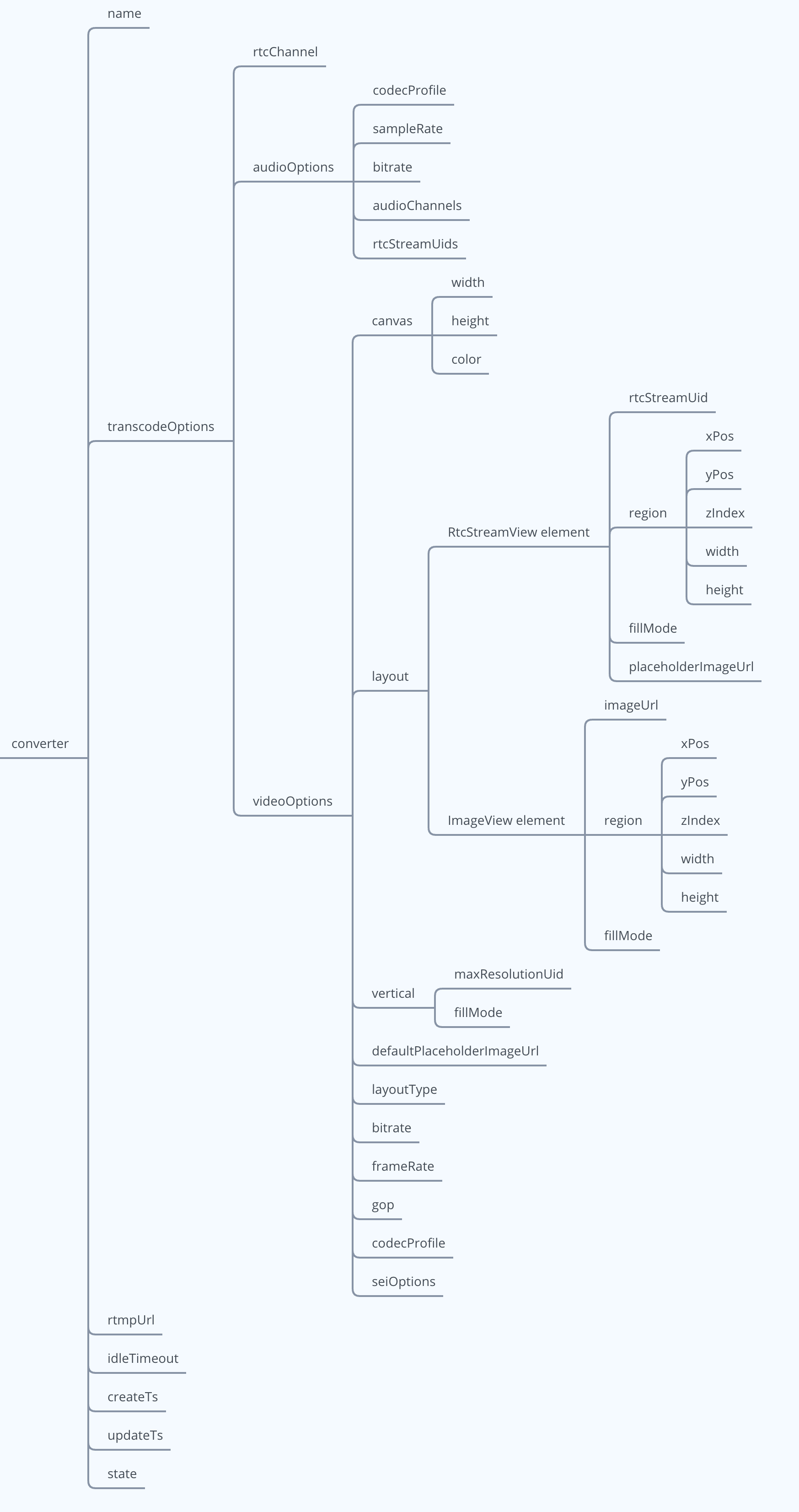
Details of these fields are shown in the following table:
| Field | Type | Descriptions |
| :--------------------------------------------------------- | :---------- | :----------------------------------------------------------------------------------------------------------------------------------------------------------------------------------------- |
| name | String | The name of the Converter. |
| transcodeOptions | JSON Object | The transcoding configuration of the Converter. |
| transcodeOptions.rtcChannel | String | The Agora channel name. |
| transcodeOptions.audioOptions | JSON Object | The audio transcoding configuration of the Converter. See [audioOptions](./restful-type-definition#audiooptions) for details. |
| transcodeOptions.videoOptions | JSON Object | The video transcoding configuration of the Converter. |
| transcodeOptions.videoOptions.canvas | JSON Object | The video canvas. See [canvas](./restful-type-definition#canvas) for details. |
| transcodeOptions.videoOptions.layout | JSON Array | The content description of the video screen on the canvas. Two elements are supported: RtcStreamView and ImageView. |
| transcodeOptions.videoOptions.layout.RtcStreamView element | NA | The video screen of each user on the canvas. See [RtcStreamView](./restful-type-definition#layout) for details. |
| transcodeOptions.videoOptions.layout.ImageView element | NA | The video image on the canvas, which can be used as a watermark. See [ImageView](./restful-type-definition#layoutimageview) for details. |
| transcodeOptions.videoOptions.bitrate | Number | The encoding bitrate (Kbps) of the video. |
| transcodeOptions.videoOptions.frameRate | Number | The encoding frame rate (fps) of the video. |
| transcodeOptions.videoOptions.codec | String | The video codec type of the output video stream. |
| transcodeOptions.videoOptions.codecProfile | String | The encoding specification of the video. |
| transcodeOptions.videoOptions.seiOptions | JSON Object | The user SEI information carried in the output video stream. See [seiOptions](./restful-type-definition#seioptions) for details. |
| rtmpUrl | String | The address of Media Push. |
| idleTimeout | Number | The maximum time (seconds) that the Converter is idle. Idle means that all users corresponding to the media stream processed by the Converter have left the channel. |
| createTs | Number | The Unix timestamp(seconds) when the Converter was created. |
| state | String | The running status of the Converter:- `connecting`: Connecting to the Agora streaming server and the CDN server.
- `running`: Pushing the stream.
- `failed`: Failed to push the stream. |
If the status code is not 2XX, the request fails. The body contains a String type `message` field that describes the specific reason for the failed.
```json
{
"reason": "Resource is not found and destroyed."
}
```
**Media Push without transcoding**
If the status code is 2XX, the request is successful. The field structure is shown in the following figure:
Details of these fields are shown in the following table:
| Field name | Category | Description |
| :---------------------- | :---------- | :------------------------------------------------------------------------------------------------------------------------------------------------------------------------------------------------------------------------------------------------------------------------------------------------------- |
| name | String | The name of the Converter. |
| rawOptions | JSON Object | Media Push configuration for the Converter. |
| rawOptions.rtcChannel | String | The Agora channel name. The channel to which the stream processed by the Converter belongs. |
| rawOptions.rtcStreamUid | Number | The UID of the user to which the media stream belongs. |
| rtmpUrl | String | The CDN streaming address. |
| idleTimeOut | Number | The maximum time (s) that the Converter is idle. Idle means that all users of the corresponding media streams processed by the Converter have left the channel. When the Converter is in the idle state for longer than `idleTimeout`, the Converter is automatically destroyed and the streaming stops. |
### Response example [#response-example-2]
**Custom layout for Media Push with transcoding**
If the status code is 2XX, the request is successful.
```json
{
"name": "show68_vertical",
"transcodeOptions": {
"rtcChannel": "show68",
"audioOptions": {
"codecProfile": "HE-AAC",
"sampleRate": 48000,
"bitrate": 128,
"audioChannels": 1,
"rtcStreamUids": [
201
]
},
"videoOptions": {
"canvas": {
"width": 360,
"height": 640,
"color": 0
},
"layout": [
{
"rtcStreamUid": 201,
"region": {
"xPos": 0,
"yPos": 0,
"zIndex": 1,
"width": 360,
"height": 320
},
"fillMode": "fill",
"placeholderImageUrl": "http://example.agora.io/host_placeholder.jpg"
},
{
"rtcStreamUid": 202,
"region": {
"xPos": 0,
"yPos": 320,
"zIndex": 1,
"width": 360,
"height": 320
}
},
{
"imageUrl": "http://example.agora.io/watchmark.jpg",
"region": {
"xPos": 0,
"yPos": 0,
"zIndex": 2,
"width": 36,
"height": 64
},
"fillMode": "fit"
}
],
"codec": "H.264",
"codecProfile": "High",
"frameRate": 15,
"gop": 30,
"bitrate": 400,
"seiOptions": {}
}
},
"rtmpUrl": "rtmp://example.agora.io/live/show68",
"idleTimeout": 300,
"createTs": 1616946970,
"updateTs": 1783656785,
"state": "running"
}
```
**Vertical layout for Media Push with transcoding**
If the status code is 2XX, the request is successful.
```json
{
"name": "show68_vertical",
"transcodeOptions": {
"rtcChannel": "show68",
"audioOptions": {
"codecProfile": "HE-AAC",
"sampleRate": 48000,
"bitrate": 128,
"audioChannels": 1,
"rtcStreamUids": [
201
]
},
"videoOptions": {
"canvas": {
"width": 360,
"height": 640,
"color": 0
},
"layout": [
{
"rtcStreamUid": 201,
"region": {
"xPos": 0,
"yPos": 0,
"zIndex": 1,
"width": 360,
"height": 640
},
"fillMode": "fill",
"placeholderImageUrl": "http://example.agora.io/host_placeholder.jpg"
}
],
"codec": "H.264",
"codecProfile": "high",
"frameRate": 15,
"gop": 30,
"bitrate": 400,
"layoutType": 1,
"vertical": {
"maxResolutionUid": 201,
"fillMode": "fill",
"refreshIntervalSec": 4
},
"defaultPlaceholderImageUrl": "http://example.agora.io/host_placeholder.jpg",
"seiOptions": {
"source": {
"metadata": true,
"datastream": true,
"customized": {
"payload": "example"
}
},
"sink": {
"type": 100
}
}
}
},
"rtmpUrl": "rtmp://example.agora.io/live/show68",
"idleTimeout": 300
}
```
**Media Push without transcoding**
```json
{
"converter": {
"name": "wX8210Ce1VWVyGVHyaHA0W",
"rawOptions": {
"rtcChannel": "example",
"rtcStreamUid": XXXX
},
"rtmpUrl": "rtmp://vid-218.push.chinanetcenter.broadcastapp.agora.io/live/global",
"idleTimeout": 120
}
}
```
## List: Query the Converters of all or specified channels under a project [#list-query-the-converters-of-all-or-specified-channels-under-a-project]
### HTTP request [#http-request-4]
* Query all Converters under a project: `GET https://api.agora.io/v1/projects/{appId}/rtmp-converters`
* Query the Converter of a specified channel under a project: `GET https://api.agora.io/v1/projects/{appId}/channels/{cname}/rtmp-converters`
#### Path parameter [#path-parameter-4]
* `appId`: (Required) String. The App ID provided by Agora. You can get an App ID after creating a project in the Agora console. An App ID is the unique identification of a project.
* `cname`: (Required) String. The Agora channel name. This is the channel to which the stream processed by the Converter belongs. The maximum length of the string is 64 characters, and the following character sets (89 characters in total) are supported:
* All lowercase English letters (a-z)
* All uppercase English letters (A-Z)
* Numbers 0-9 and the space character
* "!", "#", "$", "%", "&", "(", ")", "+", "-", ":", ";", "\<", "=", ".", ">", "?", "@", "\[", "]", "^", "\_", " \{", "}", "|", "\~", ","
#### Query Parameters [#query-parameters-2]
`cursor`: (Optional) String. Cursor for paging query Converters. The value must be greater than or equal to 0.
> * You do not need to set the cursor when you initiate a `List` request for the first time. After the request is successful, the list of Converters on the first page return.
> * Each request returns information about a maximum of 500 Converters. If the number of Converters under the project exceeds 500, get the `cursor` from the response body, and pass the `cursor` in the URL of the next request. Until the value of the `cursor` field in the response body is `0`, it means that all Converters under the project or the specified channel have been queried.
The HTTPS URL using Query Parameters is as follows:
* Query all Converters under a project: `GET https://api.agora.io/v1/projects/{appId}/rtmp-converters?cursor={cursor}`
* Query the Converter of a specified channel under a project: `GET https://api.agora.io/v1/projects/{appId}/channels/{cname}/rtmp-converters?cursor={cursor}`
#### Request header [#request-header-4]
* `Content-Type`: `application/json`
* `Authorization`: The value of this field must refer to the [Authentication instructions](./restful-authentication).
* `X-Request-ID`: The UUID (Universal Unique Identifier) that identifies this **request**. Agora server generates a UUID to pass in and returns `X-Request-ID` field in the response header.
> Agora recommends that you assign a value to `X-Request-ID`. Agora server returns an `X-Custom-Request-ID` field in the response header for troubleshooting.
### HTTP response [#http-response-4]
All possible response status codes. See [Status codes](#status-codes) for details.
#### Response header [#response-header-4]
`X-Request-ID`: The UUID (Universal Unique Identifier) that identifies this request. This value is the same as the X-Request-ID in the header of this request. If there is an error in the request, print out the value in the log to troubleshoot the problem.
> If the response status code of this request is not 2XX, this field may be missing from the response header.
#### Response body [#response-body-4]
If the status code is 2XX, the request is successful. The field structure is shown in the following figure:
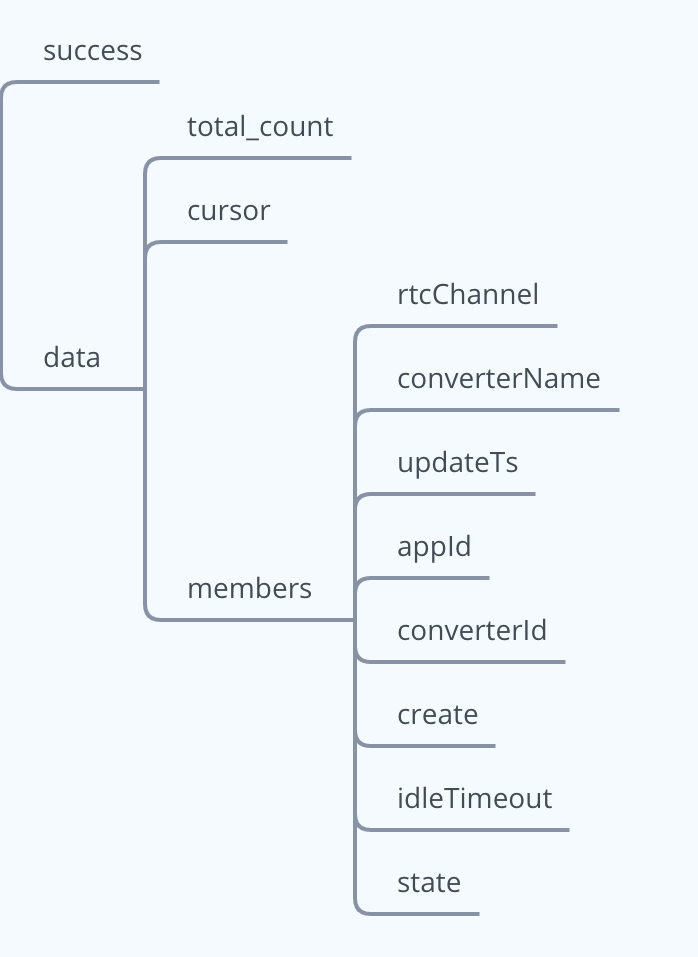 Details for these fields are shown in the following table:
| Field | Type | Descriptions |
| :--------------------------- | :---------- | :--------------------------------------------------------------------------------------------------------------------------------------------------------------------------------------------------------------- |
| `success` | Bool | The request was successful. |
| `data` | JSON Object | Returns data details. |
| `data.total_count` | String | The number of all Converters under the queried project or channel. |
| `data.cursor` | JSON | Cursor for paging query Converter information list. If the cursor is `0`, it means that all Converters under the project or the specified channel have been queried; otherwise, the query needs to be continued. |
| `data.members.rtcChannel` | String | The Agora channel name. This is the channel to which the stream processed by the Converter belongs. |
| `data.members.converterName` | String | The name of the Converter. |
| `data.members.updateTs` | Number | The Unix timestamp(seconds) when the Converter configuration was last updated. |
| `data.members.appId` | String | The **App ID** provided by Agora. You can get an App ID after creating a project in the Agora console. An App ID is the unique identification of a project. |
| `data.members.rtmpUrl` | String | The CDN streaming address. |
| `data.members.converterId` | String | The **ID** of the Converter. The unique identifier for the Converter. |
| `data.members.create` | Number | The Unix timestamp(seconds) when the Converter was created. |
| `data.members.idleTimeout` | Number | The maximum time (seconds) that the Converter is idle. Idle means that all users corresponding to the media stream processed by the Converter have left the channel. |
| `data.members.state` | String | The running status of the Converter:- `connecting`: Connecting to the Agora streaming server and the CDN server.
- `running`: Pushing the stream.
- `failed`: Failed to push the stream. |
### Response example [#response-example-3]
```json
{
"success": true,
"data": {
"total_count": 1,
"cursor": 0,
"members": [
{
"rtcChannel": "testchannel",
"status": "200",
"converterName": "wX8210XXXXWVyGVHyaHA0W",
"updateTs": "1641267823",
"appId": "abc123xxxxxxxxxxxxxxxxxxxxxxxxx",
"rtmpUrl": "rtmp://example/live/areu",
"ip": "183.131.160.244",
"converterId": "889B6D4BEC4XXXXE68CCDA978BF21350",
"create": "1641267818",
"idleTimeout": "120",
"state": "running"
}
]
}
}
```
## API call rate limits [#api-call-rate-limits]
The Agora server limits the call rate for the Media Push API by method. When a call rate exceeds its limit, the status code `429 (Too Many Requests)` is returned. If you need a higher call rate, please contact technical support.
| API | Rate limits |
| :------- | :--------------------------------------------------------------------------------------------------------------- |
| `Create` | In a project, the rate limit for the rate of creating a Converter is 50 times per second. |
| `Delete` | In a project, the rate limit for the converter destruction is 50 times per second. |
| `Update` | In a project, the rate limit for the rate of updating a specified Converter is 2 times per second. |
| `Get` | In a project, the rate limit for the rate of getting the status of a specified Converter is 50 times per second. |
## Status codes [#status-codes]
* If the status code is 2XX, the request is successful.
* If the status code is not 2XX, the request fails. Please troubleshoot the problem based on the content of the `message` field in the corresponding response message Body.
| Status codes | Possible message field content |
| :---------------------- | :---------------------------------------------------------------------------------------------------------------------------------------------------------------------------------------- |
| 200 OK | / |
| 400 Bad Request | - Invalid parameter: rtmpUrl. Replace it, and retry.
- Invalid parameter: idleTimeout. Replace it, and retry. |
| 401 Unauthorized | Invalid authentication credentials. |
| 403 Forbidden | The project lacks permission to use this function. Contact [Agora technical support](mailto\:support@agora.io). |
| 404 Not Found | Resource cannot be found/has been destroyed. |
| 409 Conflict | Resource with the same name already exists. Use the existing resource; otherwise, delete it, and create a new resource. |
| 429 Too Many Requests | Request rate limit exceeded.Resource quota limit exceeded.No available resources. |
| 500 Unknown | Internal errors. Contact Agora for assistance with troubleshooting. |
| 501 Not Implemented | The method requested has not been implemented. |
| 503 Service Unavailable | The server is temporarily overloading. Retry with a backoff strategy and contact Agora for assistance with troubleshooting.The server is temporarily down. Retry with a backoff strategy. |
| 504 Gateway Timeout | Gateway timeout. Check whether the resource is created; if not, re-create a new resource. |
## Consideration [#consideration]
This section summarizes the basic considerations for using the Media Push RESTful API:
* Please make sure that the Agora channel profile is live broadcasting.
* In case of request errors, make sure to print the values of the `X-Request-ID` and `X-Resource-ID` fields in the response header for troubleshooting.
* As explained in the name description, you should use the name parameter if only one Converter is needed in a channel.
* Set the `region` parameter to the region associated with the CDN source, as explained in the `region` parameter description.
* If the Converter is automatically destroyed due to a service failure or other reasons, Agora recommends that you create a new Converter.
* If the CDN side's pulling stream is abnormal after creating a Converter, Agora recommends that you delete the Converter and create a new one.
* When updating the same Converter multiple times, ensure that the `sequence` value is incremented, as explained in the `sequence` parameter description.
* Agora does not support performing both transcoding and non-transcoding live streaming in the same Converter. To use a different streaming mode, create a new Converter and configure it accordingly.
* In non-transcoding mode, the Converter can only forward video streams with RTMP, not transcode video streams. To ensure that CDN audiences can watch the video, use video codec formats that comply with the RTMP standard protocol, such as H.264 or H.265. If the video codec format at the streaming end is VP8, use the Converter's transcoding mode.
For more integration recommendations, see [Integration Best Practices](./integration-best-practices).
## Commonly used video profile [#commonly-used-video-profile]
Agora recommends that you use the default values when setting the video resolution, frame rate, and bitrate of the output transcoded stream. You can also refer to the following table to set the values. If you set a bitrate beyond a reasonable range, the Agora server automatically adjusts the bitrate to stay within a reasonable range.
| Resolution | Frame rate (fps) | Bitrate (Kbps) |
| :--------- | :--------------- | :------------- |
| 160 × 120 | 15 | 130 |
| 120 × 120 | 15 | 100 |
| 320 × 180 | 15 | 280 |
| 180 × 180 | 15 | 200 |
| 240 × 180 | 15 | 240 |
| 320 × 240 | 15 | 400 |
| 240 × 240 | 15 | 280 |
| 424 × 240 | 15 | 440 |
| 640 × 360 | 15 | 800 |
| 360 × 360 | 15 | 520 |
| 640 × 360 | 30 | 1200 |
| 360 × 360 | 30 | 800 |
| 480 × 360 | 15 | 640 |
| 480 × 360 | 30 | 980 |
| 640 × 480 | 15 | 1000 |
| 480 × 480 | 15 | 800 |
| 640 × 480 | 30 | 1500 |
| 480 × 480 | 30 | 1200 |
| 848 × 480 | 15 | 1220 |
| 848 × 480 | 30 | 1860 |
| 640 × 480 | 10 | 800 |
| 1280 × 720 | 15 | 2260 |
| 1280 × 720 | 30 | 3420 |
| 960 × 720 | 15 | 1820 |
| 960 × 720 | 30 | 2760 |
Details for these fields are shown in the following table:
| Field | Type | Descriptions |
| :--------------------------- | :---------- | :--------------------------------------------------------------------------------------------------------------------------------------------------------------------------------------------------------------- |
| `success` | Bool | The request was successful. |
| `data` | JSON Object | Returns data details. |
| `data.total_count` | String | The number of all Converters under the queried project or channel. |
| `data.cursor` | JSON | Cursor for paging query Converter information list. If the cursor is `0`, it means that all Converters under the project or the specified channel have been queried; otherwise, the query needs to be continued. |
| `data.members.rtcChannel` | String | The Agora channel name. This is the channel to which the stream processed by the Converter belongs. |
| `data.members.converterName` | String | The name of the Converter. |
| `data.members.updateTs` | Number | The Unix timestamp(seconds) when the Converter configuration was last updated. |
| `data.members.appId` | String | The **App ID** provided by Agora. You can get an App ID after creating a project in the Agora console. An App ID is the unique identification of a project. |
| `data.members.rtmpUrl` | String | The CDN streaming address. |
| `data.members.converterId` | String | The **ID** of the Converter. The unique identifier for the Converter. |
| `data.members.create` | Number | The Unix timestamp(seconds) when the Converter was created. |
| `data.members.idleTimeout` | Number | The maximum time (seconds) that the Converter is idle. Idle means that all users corresponding to the media stream processed by the Converter have left the channel. |
| `data.members.state` | String | The running status of the Converter:- `connecting`: Connecting to the Agora streaming server and the CDN server.
- `running`: Pushing the stream.
- `failed`: Failed to push the stream. |
### Response example [#response-example-3]
```json
{
"success": true,
"data": {
"total_count": 1,
"cursor": 0,
"members": [
{
"rtcChannel": "testchannel",
"status": "200",
"converterName": "wX8210XXXXWVyGVHyaHA0W",
"updateTs": "1641267823",
"appId": "abc123xxxxxxxxxxxxxxxxxxxxxxxxx",
"rtmpUrl": "rtmp://example/live/areu",
"ip": "183.131.160.244",
"converterId": "889B6D4BEC4XXXXE68CCDA978BF21350",
"create": "1641267818",
"idleTimeout": "120",
"state": "running"
}
]
}
}
```
## API call rate limits [#api-call-rate-limits]
The Agora server limits the call rate for the Media Push API by method. When a call rate exceeds its limit, the status code `429 (Too Many Requests)` is returned. If you need a higher call rate, please contact technical support.
| API | Rate limits |
| :------- | :--------------------------------------------------------------------------------------------------------------- |
| `Create` | In a project, the rate limit for the rate of creating a Converter is 50 times per second. |
| `Delete` | In a project, the rate limit for the converter destruction is 50 times per second. |
| `Update` | In a project, the rate limit for the rate of updating a specified Converter is 2 times per second. |
| `Get` | In a project, the rate limit for the rate of getting the status of a specified Converter is 50 times per second. |
## Status codes [#status-codes]
* If the status code is 2XX, the request is successful.
* If the status code is not 2XX, the request fails. Please troubleshoot the problem based on the content of the `message` field in the corresponding response message Body.
| Status codes | Possible message field content |
| :---------------------- | :---------------------------------------------------------------------------------------------------------------------------------------------------------------------------------------- |
| 200 OK | / |
| 400 Bad Request | - Invalid parameter: rtmpUrl. Replace it, and retry.
- Invalid parameter: idleTimeout. Replace it, and retry. |
| 401 Unauthorized | Invalid authentication credentials. |
| 403 Forbidden | The project lacks permission to use this function. Contact [Agora technical support](mailto\:support@agora.io). |
| 404 Not Found | Resource cannot be found/has been destroyed. |
| 409 Conflict | Resource with the same name already exists. Use the existing resource; otherwise, delete it, and create a new resource. |
| 429 Too Many Requests | Request rate limit exceeded.Resource quota limit exceeded.No available resources. |
| 500 Unknown | Internal errors. Contact Agora for assistance with troubleshooting. |
| 501 Not Implemented | The method requested has not been implemented. |
| 503 Service Unavailable | The server is temporarily overloading. Retry with a backoff strategy and contact Agora for assistance with troubleshooting.The server is temporarily down. Retry with a backoff strategy. |
| 504 Gateway Timeout | Gateway timeout. Check whether the resource is created; if not, re-create a new resource. |
## Consideration [#consideration]
This section summarizes the basic considerations for using the Media Push RESTful API:
* Please make sure that the Agora channel profile is live broadcasting.
* In case of request errors, make sure to print the values of the `X-Request-ID` and `X-Resource-ID` fields in the response header for troubleshooting.
* As explained in the name description, you should use the name parameter if only one Converter is needed in a channel.
* Set the `region` parameter to the region associated with the CDN source, as explained in the `region` parameter description.
* If the Converter is automatically destroyed due to a service failure or other reasons, Agora recommends that you create a new Converter.
* If the CDN side's pulling stream is abnormal after creating a Converter, Agora recommends that you delete the Converter and create a new one.
* When updating the same Converter multiple times, ensure that the `sequence` value is incremented, as explained in the `sequence` parameter description.
* Agora does not support performing both transcoding and non-transcoding live streaming in the same Converter. To use a different streaming mode, create a new Converter and configure it accordingly.
* In non-transcoding mode, the Converter can only forward video streams with RTMP, not transcode video streams. To ensure that CDN audiences can watch the video, use video codec formats that comply with the RTMP standard protocol, such as H.264 or H.265. If the video codec format at the streaming end is VP8, use the Converter's transcoding mode.
For more integration recommendations, see [Integration Best Practices](./integration-best-practices).
## Commonly used video profile [#commonly-used-video-profile]
Agora recommends that you use the default values when setting the video resolution, frame rate, and bitrate of the output transcoded stream. You can also refer to the following table to set the values. If you set a bitrate beyond a reasonable range, the Agora server automatically adjusts the bitrate to stay within a reasonable range.
| Resolution | Frame rate (fps) | Bitrate (Kbps) |
| :--------- | :--------------- | :------------- |
| 160 × 120 | 15 | 130 |
| 120 × 120 | 15 | 100 |
| 320 × 180 | 15 | 280 |
| 180 × 180 | 15 | 200 |
| 240 × 180 | 15 | 240 |
| 320 × 240 | 15 | 400 |
| 240 × 240 | 15 | 280 |
| 424 × 240 | 15 | 440 |
| 640 × 360 | 15 | 800 |
| 360 × 360 | 15 | 520 |
| 640 × 360 | 30 | 1200 |
| 360 × 360 | 30 | 800 |
| 480 × 360 | 15 | 640 |
| 480 × 360 | 30 | 980 |
| 640 × 480 | 15 | 1000 |
| 480 × 480 | 15 | 800 |
| 640 × 480 | 30 | 1500 |
| 480 × 480 | 30 | 1200 |
| 848 × 480 | 15 | 1220 |
| 848 × 480 | 30 | 1860 |
| 640 × 480 | 10 | 800 |
| 1280 × 720 | 15 | 2260 |
| 1280 × 720 | 30 | 3420 |
| 960 × 720 | 15 | 1820 |
| 960 × 720 | 30 | 2760 |