# RESTful authentication (/en/api-reference/api-ref/conversational-ai/authentication)
> For AI agents: see the complete documentation index at [llms.txt](/llms.txt).
Conversational AI REST API requests require REST authentication. You can use token authentication or Basic HTTP authentication.
Implement authentication on the server to mitigate the risk of data leakage.
## Token authentication [#token-authentication]
Token authentication uses an RTC token generated on your server using your App ID and App Certificate. To authenticate with a token, include the `Authorization` header in each request:
```text
Authorization: agora token=
```
### Prerequisites [#prerequisites]
Before you begin, get the following values from [Agora Console](https://console.agora.io/v2):
* **App ID**: A unique string that identifies your project.
* **App Certificate**: A string used to generate tokens.
Never expose your App Certificate in client-side code or public repositories. Generate tokens on your server only.
The Agora RESTful API only supports HTTPS with TLS 1.0, 1.1, or 1.2 for encrypted communication. Requests over plain HTTP are not supported and will fail to connect.
Tokens expire after a maximum of 86400 seconds.
### Using the Conversational AI SDK [#using-the-conversational-ai-sdk]
If you already use the Conversational AI SDK in your project, use the SDK token generation utility to generate tokens. The token parameters must match the agent request:
* `channelName` must match `properties.channel`.
* `agentUid` must match `properties.agent_rtc_uid`.
* To use string UIDs, pass a string value for `agentUid` and set `enable_string_uid` to `true` in the request body.
Install the SDK for your language:
Node.js
Golang
Python
```bash
npm install agora-agent-server-sdk
```
```bash
go get github.com/AgoraIO-Conversational-AI/agent-server-sdk-go
```
```bash
pip install agent-server-sdk-python
```
The following example generates a token with the Node.js SDK and uses it in the REST API `Authorization` header:
```js
const https = require('https');
const { generateConvoAIToken } = require('agora-agent-server-sdk');
// Keep these credentials on the server and never expose them to clients.
const appId = '';
const appCertificate = '';
const channelName = '';
const agentUid = '';
const tokenExpirationInSeconds = 86400;
const token = generateConvoAIToken({
appId,
appCertificate,
channelName,
account: agentUid,
tokenExpire: tokenExpirationInSeconds,
});
const data = JSON.stringify({
name: '',
pipeline_id: '',
properties: {
channel: channelName,
token,
agent_rtc_uid: agentUid,
remote_rtc_uids: [''],
enable_string_uid: false,
},
});
const options = {
hostname: 'api.agora.io',
path: `/api/conversational-ai-agent/v2/projects/${appId}/join`,
method: 'POST',
headers: {
Authorization: 'agora token=' + token,
'Content-Type': 'application/json',
'Content-Length': Buffer.byteLength(data),
},
};
const req = https.request(options, (res) => {
console.log(`Status code: ${res.statusCode}`);
res.on('data', (d) => {
process.stdout.write(d);
});
});
req.on('error', (error) => {
console.error(error);
});
req.write(data);
req.end();
```
### Using the token builder library [#using-the-token-builder-library]
The [AgoraDynamicKey repository](https://github.com/AgoraIO/Tools/tree/master/DynamicKey/AgoraDynamicKey) provides open-source token generation libraries for multiple languages.
Install the token builder library for your language:
Node.js
Golang
Python
```bash
npm install agora-token
```
```bash
go get github.com/AgoraIO/Tools/DynamicKey/AgoraDynamicKey/go/src/rtctokenbuilder2
```
```bash
git clone https://github.com/AgoraIO/Tools.git
cd Tools/DynamicKey/AgoraDynamicKey/python3/src
```
When using the token builder library, generate a combined RTC + RTM token and pass it in the `Authorization` header:
```js
const https = require('https');
const { RtcTokenBuilder, RtcRole } = require('agora-token');
const appId = '';
const appCertificate = '';
const channelName = '';
const agentUid = '';
const tokenExpirationInSeconds = 86400;
const privilegeExpirationInSeconds = 86400;
const token = RtcTokenBuilder.buildTokenWithRtm(
appId,
appCertificate,
channelName,
agentUid,
RtcRole.PUBLISHER,
tokenExpirationInSeconds,
privilegeExpirationInSeconds,
);
const options = {
hostname: 'api.agora.io',
path: `/api/conversational-ai-agent/v2/projects/${appId}/join`,
method: 'POST',
headers: {
Authorization: 'agora token=' + token,
'Content-Type': 'application/json',
},
};
https.request(options).end();
```
## Basic HTTP authentication [#basic-http-authentication]
Basic HTTP authentication uses your Agora customer ID and customer secret. Generate a Base64-encoded credential from the `customer_id:customer_secret` string, then include it in the `Authorization` header:
```text
Authorization: Basic
```
### Generate Customer ID and Customer Secret [#generate-customer-id-and-customer-secret]
To generate a set of Customer ID and Customer Secret, do the following:
1. In [Agora Console](https://console.agora.io/v2), click **Developer Toolkit** > **RESTful API**.
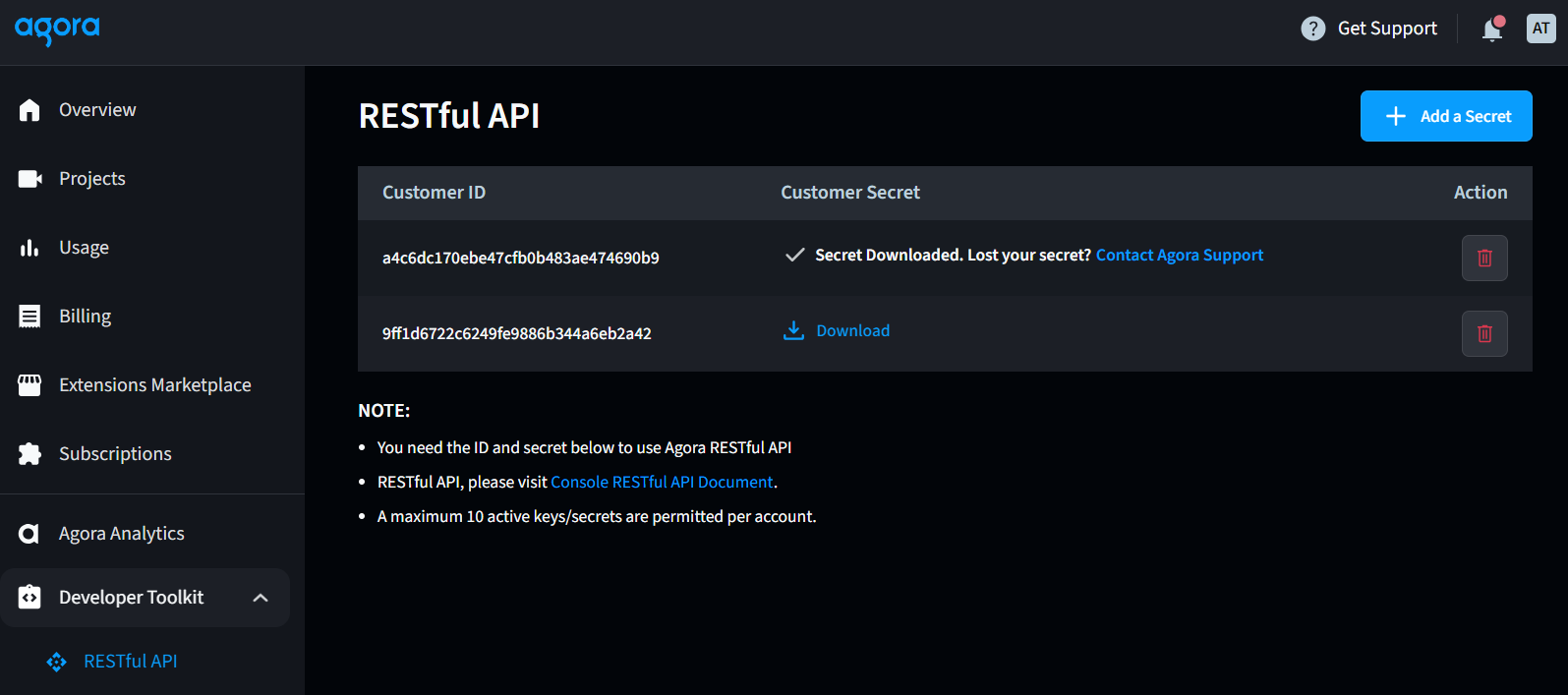
2. Click **Add a secret**, and click **OK**. A set of Customer ID and Customer Secret is generated.
3. Click **Download** in the **Customer Secret** column. Read the pop-up window carefully, and save the downloaded `key_and_secret.txt` file in a secure location.
4. Use the Customer ID and Customer Secret to generate a Base64-encoded credential, and pass the Base64-encoded credential to the `Authorization` parameter in the HTTP request header.
You can download the Customer Secret from Agora Console only once. Be sure to keep it secure.
### Generate an authorization header using a third-party tool [#generate-an-authorization-header-using-a-third-party-tool]
For testing and debugging, you can use a [third-party online tool](https://www.debugbear.com/basic-auth-header-generator) to quickly generate your Authorization header. Enter your Customer ID as the Username and your Customer Secret as the Password. Your generated header should look like this:
```text
Authorization: Basic NDI1OTQ3N2I4MzYy...YwZjA=a
```
## Related pages [#related-pages]
* [Overview](index)
* [Start a conversational AI agent](join)
* [Stop a conversational AI agent](leave)