# Dify (/en/ai/models/llm/dify)
> For AI agents: see the complete documentation index at [llms.txt](/llms.txt).
Dify is an open-source LLM application development platform that provides a unified API for multiple LLM providers with workflow orchestration and advanced features.
### Setup and Configuration [#setup-and-configuration]
To integrate Dify with Agora Conversational AI, install the plugin, configure your Agora project, and create an endpoint:
1. **Install the Dify plugin**
1. Log in to the [Dify Console](https://cloud.dify.ai).
2. Click on **Plugins** in the top navigation bar to open the Marketplace.
3. Search for the **Agora Conversational AI** plugin.
4. Click **Install** to install the plugin.
5. After installation, confirm that the plugin status is **Active** in the Installed Plugins list.
2. **Configure the Agora Console**
1. Log in to the [Agora Console](https://console.agora.io).
2. Create a new project or select an existing one.
3. Enable the **Conversational AI** feature within the selected project.
4. Record the following information for later use:
* **App ID** (unique project identifier)
* **Certificate** (optional, if enabled for enhanced security)
5. Navigate to the **RESTful API** page and generate an **API Key** and **API Secret** (required for HTTP Basic Authentication).
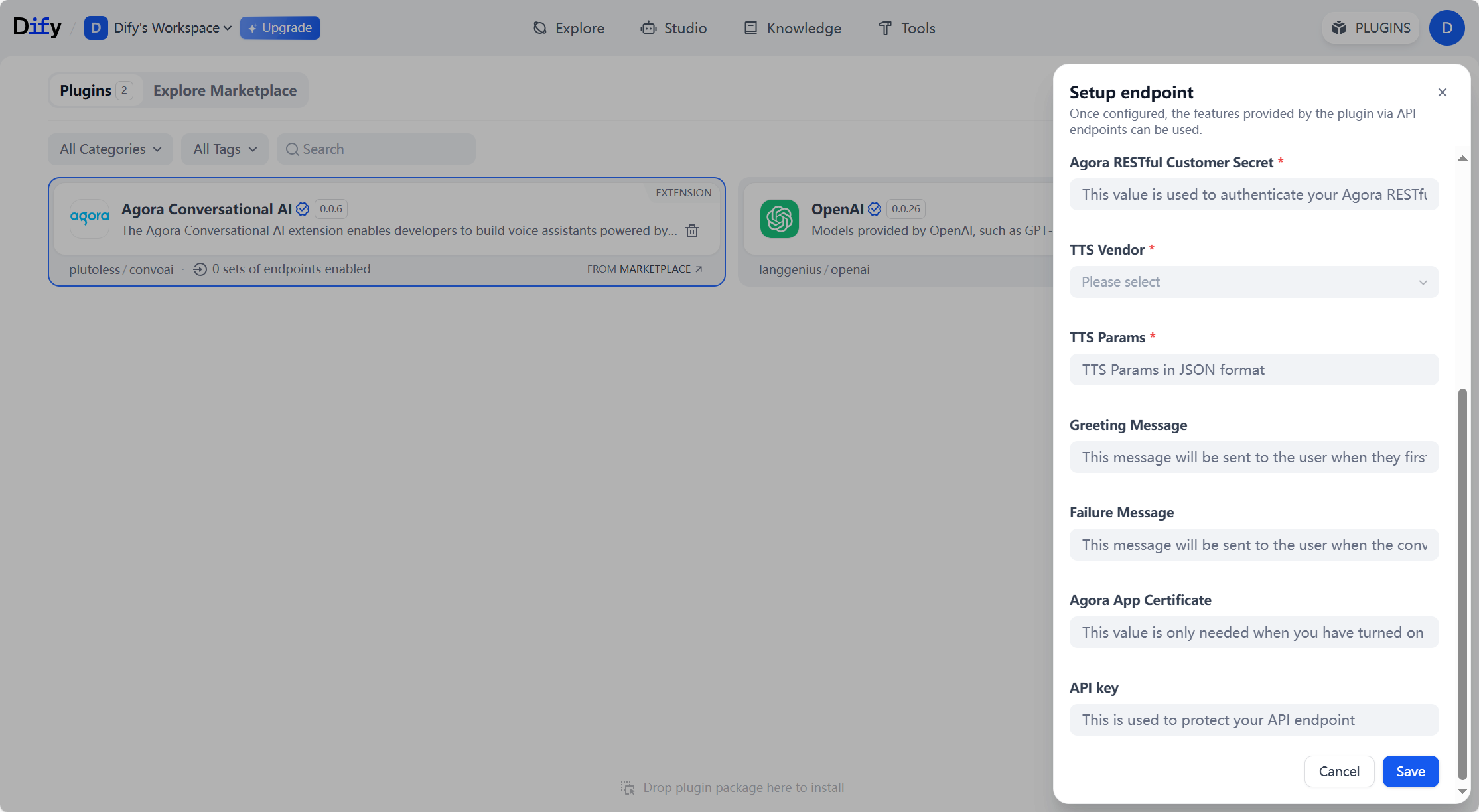
3. **Create an Endpoint in Dify**
1. In the Dify console's left-hand navigation panel, click on the **Agora Conversational AI** plugin you just installed.
2. Click **Create a new API endpoint** to open the configuration page.
3. Fill in the following details:
* **App ID** (copied from the Agora Console)
* **API Key and Secret** (copied from the Agora Console)
* **TTS** (Text-to-Speech) configuration (e.g., Azure or ElevenLabs)
4. **Save and note the endpoint details**
1. Save the endpoint configuration. Dify generates an **Endpoint URL**.
2. Note down this **Endpoint URL** and **API Key** for use in the `llm` configuration.
### Sample configuration [#sample-configuration]
The following examples show how to configure Dify LLM when starting a conversational AI agent.
Python SDK
TypeScript SDK
Go SDK
REST API
```python
from agora_agent import Agent, Dify
# client is your configured Agora client
agent = (
Agent(client)
.with_stt(...) # configure your STT vendor
.with_llm(Dify(
api_key='your-dify-api-key',
url='https://xxxxxx.ai-plugin.io/convoai/dify-completion',
model='default',
system_messages=[{'role': 'system', 'content': 'You are a helpful voice assistant.'}],
greeting_message='Hello, how can I assist you today?',
failure_message='Hold on a moment.',
max_history=32,
))
.with_tts(...) # configure your TTS vendor
)
```
```typescript
import { Agent, Dify } from 'agora-agents';
// client is your configured Agora client
const agent = new Agent({ client })
.withStt(/* configure your STT vendor */)
.withLlm(new Dify({
apiKey: 'your-dify-api-key',
url: 'https://xxxxxx.ai-plugin.io/convoai/dify-completion',
model: 'default',
systemMessages: [{ role: 'system', content: 'You are a helpful voice assistant.' }],
greetingMessage: 'Hello, how can I assist you today?',
failureMessage: 'Hold on a moment.',
maxHistory: 32,
}))
.withTts(/* configure your TTS vendor */);
```
```go
import "github.com/AgoraIO/agora-agents-go/v2/agentkit/vendors"
// client is your configured Agora client
agent := agentkit.NewAgent(client).WithStt(/* configure your STT vendor */).
WithLlm(
vendors.NewDify(vendors.DifyOptions{
APIKey: "your-dify-api-key",
URL: "https://xxxxxx.ai-plugin.io/convoai/dify-completion",
Model: "default",
SystemMessages: []map[string]interface{}{
{"role": "system", "content": "You are a helpful voice assistant."},
},
GreetingMessage: "Hello, how can I assist you today?",
FailureMessage: "Hold on a moment.",
MaxHistory: agora.Int(32),
}),
).WithTts(/* configure your TTS vendor */)
```
Use the following `llm` configuration in your request:
```json
"llm": {
"url": "https://xxxxxx.ai-plugin.io/convoai/dify-completion",
"api_key": "",
"system_messages": [
{
"role": "system",
"content": "You are a helpful voice assistant."
}
],
"max_history": 32,
"greeting_message": "Hello, how can I assist you today?",
"failure_message": "Hold on a moment.",
"params": {
"model": "default"
},
"style": "dify"
}
```
### Key parameters [#key-parameters]
Use the same API key configured in your Dify endpoint setup.
Use the custom endpoint URL from your Dify marketplace integration.
Set to `dify` to use Dify's message format and workflow processing.
Set to `default` to use the model configured in your Dify application.
For advanced configuration options, workflow setup, and detailed parameter descriptions, see the [Agora Conversational AI - Dify Marketplace](https://marketplace.dify.ai/plugins/plutoless/convoai) documentation.