# Enable services (/en/ai/device-kit/reference/enable-services)
> For AI agents: see the complete documentation index at [llms.txt](/llms.txt).
Agora's Convo AI Device Kit is based on Agora's [IoT SDK](/en/realtime-media/iot/product-overview) and [Conversational AI Engine](/en/ai).
## Manage your Agora account [#manage-your-agora-account]
Create an Agora account and project in Agora Console. Record the App ID for the project because you use it when calling Agora services and running the device kit.
## Enable Conversational AI [#enable-conversational-ai]
Before using Convo AI Device Kit, enable it for your app ID in Agora Console.
Note
The following steps apply to the new version of Agora Console. If you are using the old version, switch to the new version by clicking **Switch to the new version** at the top of the screen.
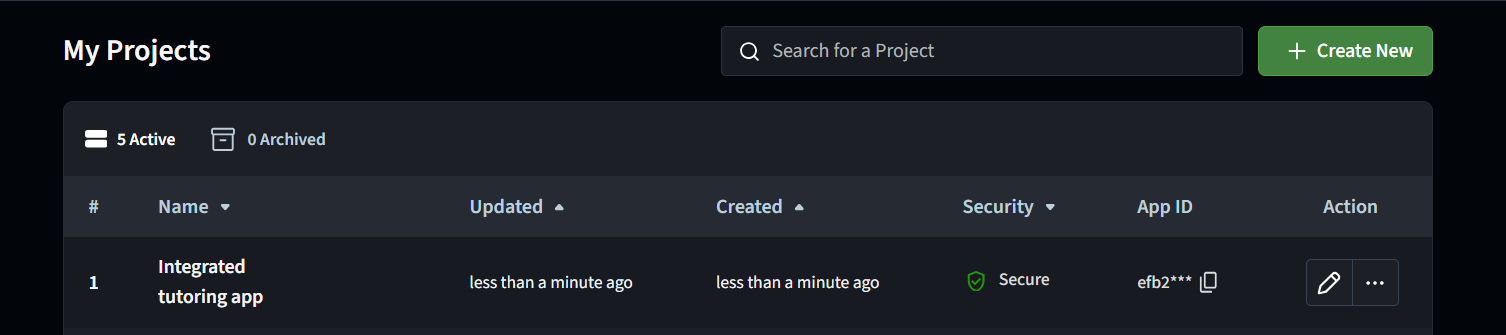
1. Navigate to the [Projects](https://api-ref.agora.io) page, locate your project in the **My Projects** list and click the associated ✏️ icon to configure it.
2. Under **All features** select **Conversational AI > Configurations** and toggle the switch to **Enable Conversational AI**.
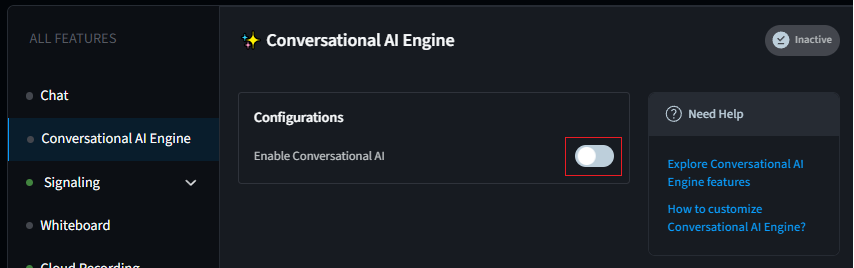
After enabling, you can call the Convo AI Device Kit RESTful API.
Convo AI Device Kit RESTful API requires REST authentication.
The following REST authentication methods are available:
* **Basic HTTP authentication**
Generate a Base64-encoded credential with the [customer ID and customer secret](#generate-customer-id-and-customer-secret) provided by Agora and pass the credential with the `Authorization` parameter in the request header.
Implement authentication on the server to mitigate the risk of data leakage.
## Implement basic HTTP authentication [#implement-basic-http-authentication]
### Generate Customer ID and Customer Secret [#generate-customer-id-and-customer-secret]
To generate a set of customer ID and customer secret, do the following:
1. In [Agora Console](https://api-ref.agora.io), click **Developer Toolkit** > **RESTful API**.
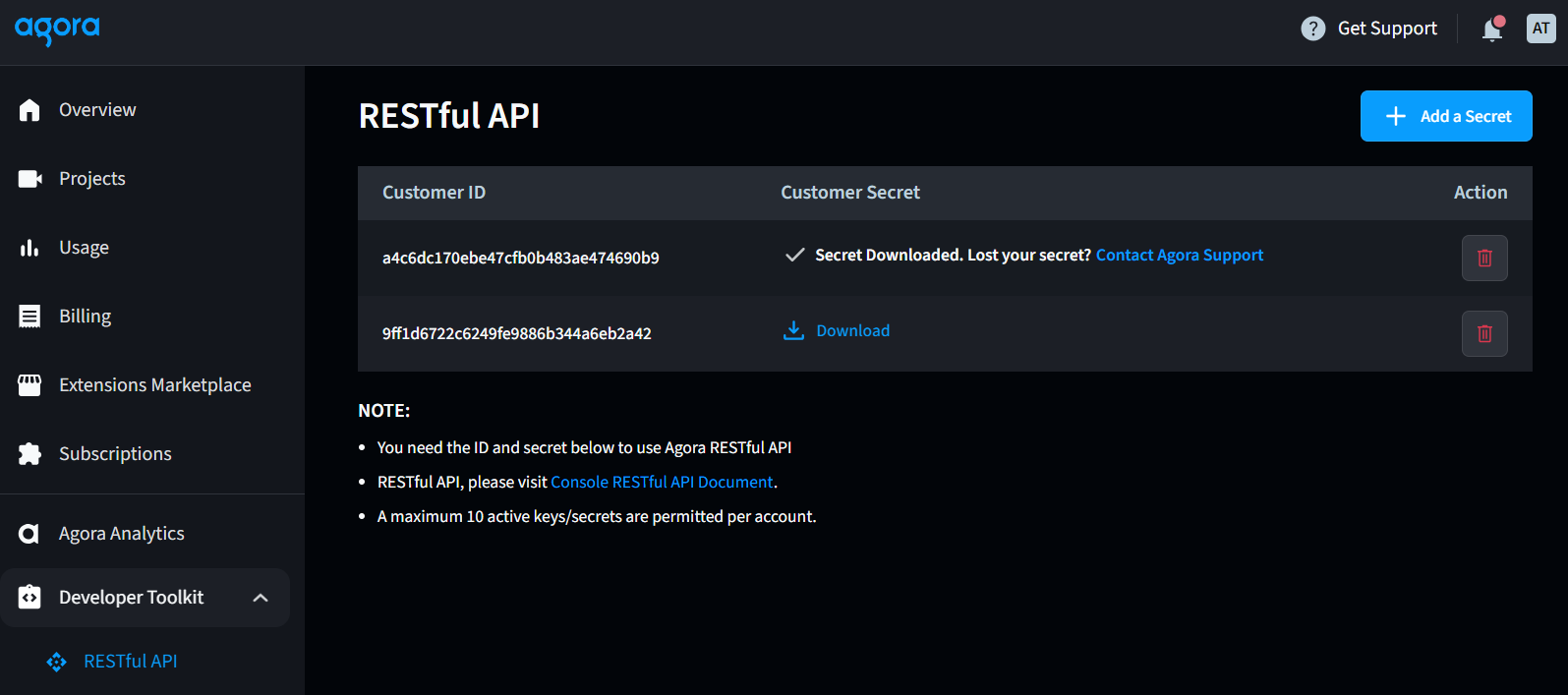
2. Click **Add a secret**, and click **OK**. A set of customer ID and customer secret is generated.
3. Click **Download** in the **Customer Secret** column. Read the pop-up window carefully, and save the downloaded `key_and_secret.txt` file in a secure location.
4. Use the customer ID (key) and customer secret (secret) to generate a Base64-encoded credential, and pass the Base64-encoded credential to the `Authorization` parameter in the HTTP request header.
You can download the customer secret from Agora Console only once. Be sure to keep it secure.
### Generate an authorization header using a third-party tool [#generate-an-authorization-header-using-a-third-party-tool]
For testing and debugging, you can use a [third-party online tool](https://www.debugbear.com/basic-auth-header-generator) to quickly generate your Authorization header. Enter your Customer ID as the Username and your Customer Secret as the Password. Your generated header should look like this:
```text
Authorization: Basic NDI1OTQ3N2I4MzYy...YwZjA=
```
### Basic authentication sample code [#basic-authentication-sample-code]
The following sample code implements basic HTTP authentication and sends a RESTful API request to get the basic information of all your current Agora projects.
The Agora RESTful API only supports HTTPS with TLS 1.0, 1.1, or 1.2 for encrypted communication. Requests over plain HTTP are not supported and will fail to connect.
Golang
Node.js
PHP
Python
Java
C#
```go
package main
import (
"encoding/base64"
"fmt"
"io/ioutil"
"net/http"
"strings"
)
// HTTPS basic authentication example in Golang using the Agora Server RESTful API
func main() {
// Customer ID
customerKey := "Your customer ID"
// Customer secret
customerSecret := "Your customer secret"
// Concatenate customer key and customer secret and use base64 to encode the concatenated string
plainCredentials := customerKey + ":" + customerSecret
base64Credentials := base64.StdEncoding.EncodeToString([]byte(plainCredentials))
url := "https://api.agora.io/dev/v1/projects"
method := "GET"
payload := strings.NewReader(``)
client := &http.Client {
}
req, err := http.NewRequest(method, url, payload)
if err != nil {
fmt.Println(err)
return
}
// Add Authorization header
req.Header.Add("Authorization", "Basic " + base64Credentials)
req.Header.Add("Content-Type", "application/json")
// Send HTTP request
res, err := client.Do(req)
if err != nil {
fmt.Println(err)
return
}
defer res.Body.Close()
body, err := ioutil.ReadAll(res.Body)
if err != nil {
fmt.Println(err)
return
}
fmt.Println(string(body))
}
```
```javascript
// HTTP basic authentication example in Node.js using the Agora Server RESTful API
const https = require('https')
// Customer ID
const customerKey = "Your customer ID"
// Customer secret
const customerSecret = "Your customer secret"
// Concatenate customer key and customer secret and use base64 to encode the concatenated string
const plainCredential = customerKey + ":" + customerSecret
// Encode with base64
encodedCredential = Buffer.from(plainCredential).toString('base64')
authorizationField = "Basic " + encodedCredential
// Set request parameters
const options = {
hostname: 'api.agora.io',
port: 443,
path: '/dev/v1/projects',
method: 'GET',
headers: {
'Authorization':authorizationField,
'Content-Type': 'application/json'
}
}
// Create request object and send request
const req = https.request(options, res => {
console.log(`Status code: ${res.statusCode}`)
res.on('data', d => {
process.stdout.write(d)
})
})
req.on('error', error => {
console.error(error)
})
req.end()
```
```php
'https://api.agora.io/dev/v1/projects',
CURLOPT_RETURNTRANSFER => true,
CURLOPT_ENCODING => '',
CURLOPT_MAXREDIRS => 10,
CURLOPT_TIMEOUT => 0,
CURLOPT_FOLLOWLOCATION => true,
CURLOPT_HTTP_VERSION => CURL_HTTP_VERSION_1_1,
CURLOPT_CUSTOMREQUEST => 'GET',
CURLOPT_HTTPHEADER => [
$authHeader,
'Content-Type: application/json',
],
]);
// Execute cURL request
$response = curl_exec($curl);
// Check for cURL errors
if ($response === false) {
echo "Error in cURL: " . curl_error($curl);
} else {
// Output the response
echo $response;
}
// Close cURL session
curl_close($curl);
?>
```
```python
# -- coding utf-8 --
# Python 3
# HTTP basic authentication example in Python using the Agora Server RESTful API
import base64
import http.client
# Customer ID
customer_key = "Your customer ID"
# Customer secret
customer_secret = "Your customer secret"
# Concatenate customer key and customer secret and use base64 to encode the concatenated string
credentials = customer_key + ":" + customer_secret
# Encode with base64
base64_credentials = base64.b64encode(credentials.encode("utf8"))
credential = base64_credentials.decode("utf8")
# Create connection object with basic URL
conn = http.client.HTTPSConnection("api.agora.io")
payload = ""
# Create Header object
headers = {}
# Add Authorization field
headers['Authorization'] = 'basic ' + credential
headers['Content-Type'] = 'application/json'
# Send request
conn.request("GET", "/dev/v1/projects", payload, headers)
res = conn.getresponse()
data = res.read()
print(data.decode("utf-8"))
```
```java
import java.io.IOException;
import java.net.URI;
import java.net.http.HttpClient;
import java.net.http.HttpRequest;
import java.net.http.HttpResponse;
import java.util.Base64;
// HTTP basic authentication example in Java using the Agora Server RESTful API
public class Base64Encoding {
public static void main(String[] args) throws IOException, InterruptedException {
// Customer ID
final String customerKey = "Your customer ID";
// Customer secret
final String customerSecret = "Your customer secret";
// Concatenate customer key and customer secret and use base64 to encode the concatenated string
String plainCredentials = customerKey + ":" + customerSecret;
String base64Credentials = new String(Base64.getEncoder().encode(plainCredentials.getBytes()));
// Create authorization header
String authorizationHeader = "Basic " + base64Credentials;
HttpClient client = HttpClient.newHttpClient();
// Create HTTP request object
HttpRequest request = HttpRequest.newBuilder()
.uri(URI.create("https://api.agora.io/dev/v1/projects"))
.GET()
.header("Authorization", authorizationHeader)
.header("Content-Type", "application/json")
.build();
// Send HTTP request
HttpResponse response = client.send(request,
HttpResponse.BodyHandlers.ofString());
System.out.println(response.body());
}
}
```
```csharp
using System;
using System.IO;
using System.Net;
using System.Text;
// HTTP basic authentication example in C# using the Agora Server RESTful API
namespace Examples.System.Net
{
public class WebRequestPostExample
{
public static void Main()
{
// Customer ID
string customerKey = "Your customer ID";
// Customer secret
string customerSecret = "Your customer secret";
// Concatenate customer key and customer secret and use base64 to encode the concatenated string
string plainCredential = customerKey + ":" + customerSecret;
// Encode with base64
var plainTextBytes = Encoding.UTF8.GetBytes(plainCredential);
string encodedCredential = Convert.ToBase64String(plainTextBytes);
// Create authorization header
string authorizationHeader = "Authorization: Basic " + encodedCredential;
// Create request object
WebRequest request = WebRequest.Create("https://api.agora.io/dev/v1/projects");
request.Method = "GET";
// Add authorization header
request.Headers.Add(authorizationHeader);
request.ContentType = "application/json";
WebResponse response = request.GetResponse();
Console.WriteLine(((HttpWebResponse)response).StatusDescription);
using (Stream dataStream = response.GetResponseStream())
{
StreamReader reader = new StreamReader(dataStream);
string responseFromServer = reader.ReadToEnd();
Console.WriteLine(responseFromServer);
}
response.Close();
}
}
}
```