# Start and stop an agent (/en/ai/build/start-stop-agent)
> For AI agents: see the complete documentation index at [llms.txt](/llms.txt).
This page describes how to call the Conversational AI Engine APIs to start and stop an AI agent.
## Understand the tech [#understand-the-tech]
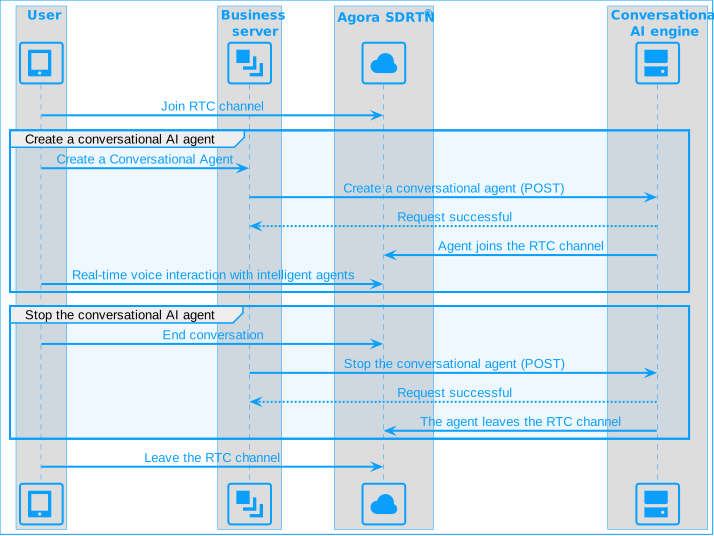
A user joins a channel and triggers your business server to start an agent via the Conversational AI Engine API. The agent joins the same channel and communicates with the user through voice, using the specified LLM, TTS service, and Agora’s low-latency Software-Defined Real-Time Network (SDRTN®). When the conversation ends, the business server stops the agent and the user leaves the channel.
Conversational AI Engine workflow
## Prerequisites [#prerequisites]
Use the [Agora CLI](/en/introduction/agora-cli) to create or select an Agora project, enable RTC and Conversational AI, verify project readiness, and export local credentials:
```bash
agora login
agora project create conv-ai-tutorial --feature rtc --feature convoai
agora project use conv-ai-tutorial
agora project doctor --feature convoai
agora project env --format shell --with-secrets
```
You also need:
* A client app that can join an Agora RTC channel, such as the [Voice Calling](../../realtime-media/voice/quickstart) or [Video Calling](../../realtime-media/video/quickstart) quickstart.
## Install the SDK [#install-the-sdk]
Select your preferred language and install the corresponding SDK.
Python SDK
TypeScript SDK
Go SDK
```sh
pip install agora-agents
```
```sh
npm install agora-agents
```
```sh
go get github.com/AgoraIO/agora-agents-go/v2@v2.2.0
```
## Implementation [#implementation]
This section introduces the basic RESTful API requests you use to start and stop a conversational AI agent. In a production environment, implement these requests on your business server.
### Start a conversational AI agent [#start-a-conversational-ai-agent]
Call the `join` endpoint to create an agent instance that joins an Agora channel. This example uses [managed mode](/en/ai/build/custom-model-integration/managed-mode) for ASR, LLM, and TTS, so you don't need to supply your own provider API keys. If you want to use your own API key (BYOK) instead, see the vendor pages under Models, for example [Deepgram](/en/ai/models/asr/deepgram).
Python SDK
TypeScript SDK
Go SDK
REST API
```python
from agora_agent import Agent, Agora, Area, DeepgramSTT, OpenAI, MiniMaxTTS
client = Agora(
area=Area.US,
app_id='your-app-id',
app_certificate='your-app-certificate',
)
# Omit API keys to use Agora-managed models for ASR, LLM, and TTS.
agent = (
Agent(client)
.with_stt(DeepgramSTT(
model='nova-3',
language='en-US',
))
.with_llm(OpenAI(
model='gpt-4o-mini',
system_messages=[{'role': 'system', 'content': 'You are a helpful chatbot.'}],
greeting_message='Hello, how can I help you?',
failure_message="Sorry, I don't know how to answer this question.",
max_history=10,
))
.with_tts(MiniMaxTTS(
model='speech-2.6-turbo',
voice_id='English_captivating_female1',
))
)
session = agent.create_session(
channel='your_channel_name',
agent_uid='0',
remote_uids=['1002'],
name='unique_name',
idle_timeout=120,
)
agent_id = session.start()
print(f'Agent started: {agent_id}')
```
```typescript
import { Agent, AgoraClient, Area, DeepgramSTT, OpenAI, MiniMaxTTS } from 'agora-agents';
const client = new AgoraClient({
area: Area.US,
appId: 'your-app-id',
appCertificate: 'your-app-certificate',
});
// Omit API keys to use Agora-managed models for ASR, LLM, and TTS.
const agent = new Agent({ client })
.withStt(new DeepgramSTT({
model: 'nova-3',
language: 'en-US',
}))
.withLlm(new OpenAI({
model: 'gpt-4o-mini',
systemMessages: [{ role: 'system', content: 'You are a helpful chatbot.' }],
greetingMessage: 'Hello, how can I help you?',
failureMessage: 'Sorry, I don't know how to answer this question.',
maxHistory: 10,
}))
.withTts(new MiniMaxTTS({
model: 'speech-2.6-turbo',
voiceId: 'English_captivating_female1',
}));
const session = agent.createSession({
channel: 'your_channel_name',
agentUid: '0',
remoteUids: ['1002'],
name: 'unique_name',
idleTimeout: 120,
});
const agentId = await session.start();
console.log('Agent started:', agentId);
```
```go
package main
import (
"context"
"fmt"
"log"
Agora "github.com/AgoraIO/agora-agents-go/v2"
"github.com/AgoraIO/agora-agents-go/v2/agentkit"
"github.com/AgoraIO/agora-agents-go/v2/agentkit/vendors"
"github.com/AgoraIO/agora-agents-go/v2/option"
)
func main() {
ctx := context.Background()
idleTimeout := 120
client := agentkit.NewAgoraClient(agentkit.AgoraClientOptions{
Area: option.AreaUS,
AppID: "your-app-id",
AppCertificate: "your-app-certificate",
})
// Omit API keys to use Agora-managed models for ASR, LLM, and TTS.
agent := agentkit.NewAgent(client).WithStt(
vendors.NewDeepgramSTT(vendors.DeepgramSTTOptions{
Model: "nova-3",
Language: "en-US",
}),
).WithLlm(
vendors.NewOpenAI(vendors.OpenAIOptions{
Model: "gpt-4o-mini",
SystemMessages: []map[string]interface{}{
{"role": "system", "content": "You are a helpful chatbot."},
},
GreetingMessage: "Hello, how can I help you?",
FailureMessage: "Sorry, I don't know how to answer this question.",
MaxHistory: Agora.Int(10),
}),
).WithTts(
vendors.NewMiniMaxTTS(vendors.MiniMaxTTSOptions{
Model: "speech-2.6-turbo",
VoiceID: "English_captivating_female1",
}),
)
session := agent.CreateSession(agentkit.CreateSessionOptions{
Channel: "your_channel_name",
AgentUID: "0",
RemoteUIDs: []string{"1002"},
Name: "unique_name",
IdleTimeout: &idleTimeout,
})
agentID, err := session.Start(ctx)
if err != nil {
log.Fatal(err)
}
fmt.Println("Agent started:", agentID)
}
```
For the Curl request, pass in the `channel` name and `token` for agent authentication. To generate your base64-encoded credentials, see [RESTful authentication](/en/api-reference/api-ref/conversational-ai/authentication).
Set `credential_mode` to `"managed"` in the `asr`, `llm`, and `tts` blocks to use Agora-managed credentials instead of your own API keys.
```bash
curl --request POST \
--url https://api.agora.io/api/conversational-ai-agent/v2/projects/:appid/join \
--header 'Authorization: Basic ' \
--header 'Content-Type: application/json' \
--data '
{
"name": "unique_name",
"properties": {
"channel": "",
"token": "",
"agent_rtc_uid": "0",
"remote_rtc_uids": ["1002"],
"enable_string_uid": false,
"idle_timeout": 120,
"asr": {
"credential_mode": "managed",
"vendor": "deepgram",
"params": {
"url": "wss://api.deepgram.com/v1/listen",
"model": "nova-3",
"language": "en-US"
}
},
"llm": {
"credential_mode": "managed",
"vendor": "openai",
"style": "openai",
"url": "https://api.openai.com/v1/chat/completions",
"system_messages": [
{
"role": "system",
"content": "You are a helpful chatbot."
}
],
"greeting_message": "Hello, how can I help you?",
"failure_message": "Sorry, I don't know how to answer this question.",
"max_history": 10,
"params": {
"model": "gpt-4o-mini"
}
},
"tts": {
"credential_mode": "managed",
"vendor": "minimax",
"params": {
"url": "wss://api.minimax.io/ws/v1/t2a_v2",
"model": "speech-2.6-turbo",
"voice_setting": {
"voice_id": "English_captivating_female1"
}
}
}
}
}'
```
If the request is successful, you receive the following response:
```json
// 200 OK
{
"agent_id": "1NT29X10YHxxxxxWJOXLYHNYB",
"create_ts": 1737111452,
"status": "RUNNING"
}
```
If the request is successful, the agent ID is returned. Store the agent ID to manage the agent in subsequent calls.
### Stop the conversational AI agent [#stop-the-conversational-ai-agent]
To end the conversation with the AI agent, call the `leave` endpoint. This causes the agent to leave the Agora channel.
Python SDK
TypeScript SDK
Go SDK
REST API
```python
session.stop()
```
```typescript
await session.stop();
```
```go
if err := session.Stop(ctx); err != nil {
log.Fatal(err)
}
```
```bash
curl --request POST \
--url https://api.agora.io/api/conversational-ai-agent/v2/projects/:appid/agents/:agentId/leave \
--header 'Authorization: Basic '
```
If the request is successful, the server responds with a `200 OK` status and an empty JSON object.
```json
// 200 OK
{}
```
Info
The number of Peak Concurrent Users (PCU) allowed to call the server API under a single App ID is limited to 20. If you need to increase this limit, please [contact technical support](mailto\:support@agora.io).
## Reference [#reference]
This section contains content that completes the information on this page, or points you to documentation that explains other aspects of this product.
* [Use managed mode](/en/ai/build/custom-model-integration/managed-mode)
### API reference [#api-reference]
* [Start a conversational AI agent](/en/api-reference/api-ref/conversational-ai/join)
* [Stop a conversational AI agent](/en/api-reference/api-ref/conversational-ai/leave)
* [Update agent configuration](/en/api-reference/api-ref/conversational-ai/update)
* [Query agent status](/en/api-reference/api-ref/conversational-ai/query)
* [Retrieve a list of agents](/en/api-reference/api-ref/conversational-ai/list)