# Memory for Multi-Turn Conversations (/en/ai/build/shape-the-conversation/short-term-memory)
> For AI agents: see the complete documentation index at [llms.txt](/llms.txt).
Short-term memory enables your conversational agent to maintain context and coherence by storing structured conversation data during a session. This includes not only message content and roles, but also turn tracking, interruption handling, timestamps, and source metadata.
Built on the OpenAI Chat Completions format with conversational AI extensions, short-term memory integrates seamlessly with large language models while providing flexibility for custom implementations, long-term storage, and dynamic memory updates.
This guide shows you how to access, use, and implement short-term memory in your applications.
Info
This guide applies to Conversational AI Engine version 1.4 and above.
## Understand the tech [#understand-the-tech]
Conversational AI Engine stores short-term memory in JSON format, following the [OpenAI Chat Completions](https://platform.openai.com/docs/api-reference/chat) structure. The following example shows the data structure:
```json
{
"contents": [
{
"role": "assistant",
"content": "How can I help you today?",
"turn_id": 1,
"timestamp": 1678901234,
"metadata": {
"source": "greeting"
}
},
{
"role": "user",
"content": "Can you tell me a joke?",
"turn_id": 2,
"timestamp": 1678901235,
"metadata": {
"source": "asr",
"user": "user123"
}
},
{
"role": "assistant",
"content": "Why did the scarecrow ",
"turn_id": 2,
"timestamp": 1678901236,
"metadata": {
"interrupted": true,
"interrupt_timestamp": 1678905225,
"original": "Why did the scarecrow win an award? Because he was outstanding in his field!",
"source": "llm"
}
},
{
"role": "user",
"content": "You know what? Tell me a story instead.",
"turn_id": 3,
"timestamp": 1678905235,
"metadata": {
"source": "asr",
"user": "user123"
}
},
{
"role": "assistant",
"content": "Once upon a time in a land far away, there lived a brave knight who fought dragons and saved princesses.",
"turn_id": 3,
"timestamp": 1678905236,
"metadata": {
"source": "llm"
}
},
{
"role": "assistant",
"content": "Are you still there?",
"turn_id": 4,
"timestamp": 1678905236,
"metadata": {
"source": "command"
}
}
]
}
```
Each message contains both standard OpenAI fields and enhanced fields that provide additional context for conversational AI scenarios:
* **OpenAI standard fields**:
* `role`: Specifies the message sender's role in the conversation. Only `user` and `assistant` (agent) are supported in short-term memory. `system` messages are not included.
* `content`: The specific text content. Currently, short-term memory does not consider multimodal input.
* **Conversational AI Engine extensions**:
* `turn_id`: Dialogue turn identifier. Starts from `0` and increments with each dialogue turn between the user and agent.
* `timestamp`: The timestamp of the corresponding message, with millisecond accuracy.
* `metadata`: Metadata of the message containing the following fields:
* `source`: Indicates how the message was generated:
| Value | Description | `user`
message | `assistant`
message |
| ------------- | -------------------------------------- | :-----------------: | :----------------------: |
| `asr` | Speech recognition result | ✓ | ✗ |
| `message` | Text message | ✓ | ✗ |
| `command` | Messages generated by RESTful API call | ✓ | ✓ |
| `llm` | Large Language Model | ✗ | ✓ |
| `greeting` | Greeting message | ✗ | ✓ |
| `llm_failure` | LLM call failed | ✗ | ✓ |
| `silence` | Silent reminder message | ✗ | ✓ |
* `interrupted`: Whether this `assistant` message was interrupted by human voice:
* `true`: This message was interrupted.
* `false` (default): This message was not interrupted. The field is hidden when `false`.
* `interrupt_timestamp`: The timestamp when the agent message was interrupted, with millisecond precision. Only exists when `interrupted` is `true`.
* `original`: The complete content actually generated by the LLM. Only exists when `interrupted` is `true`.
## Access short-term memory [#access-short-term-memory]
Conversational AI Engine provides the following methods to access short-term memory:
* **During agent runtime**: Call the [Retrieve agent history](/en/api-reference/api-ref/conversational-ai/history) API to retrieve the agent's complete short-term memory in JSON format. This API returns all short-term memory stored during the agent's lifecycle.
* **After agent stops**: Agora sends short-term memory to your business server through the message notification service. For details, see [Notification event types](../../reference/event-types#103-agent-history).
## Pass memory content to the LLM [#pass-memory-content-to-the-llm]
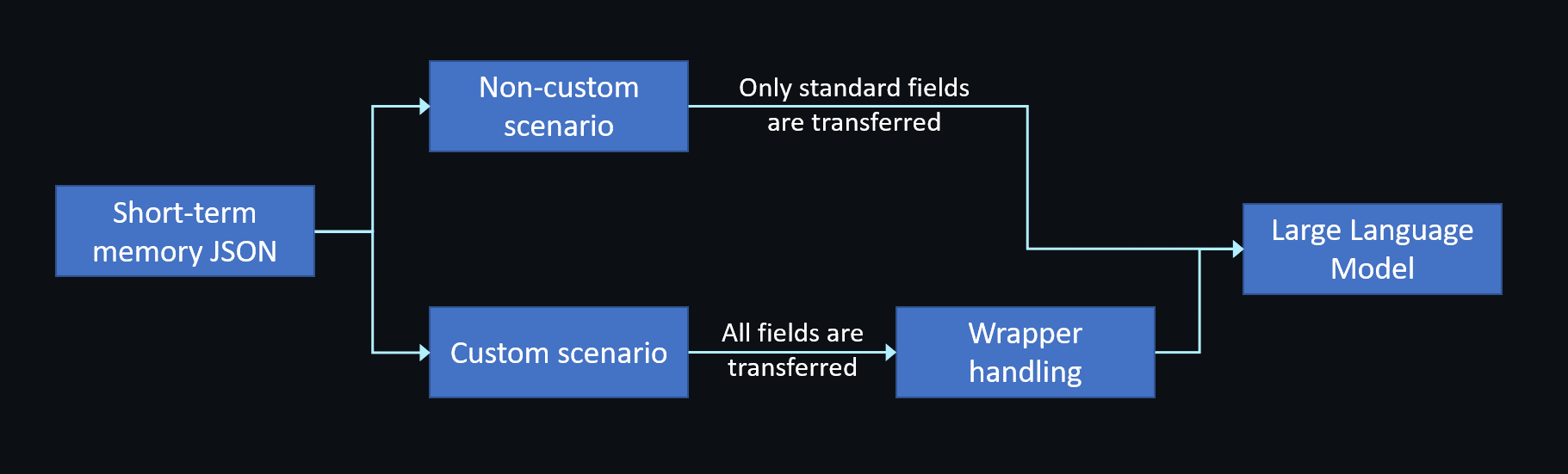
Depending on the `llm.vendor` field you specify when creating the agent, Conversational AI Engine uses different strategies to pass memory content to the LLM.
### Non-custom scenario [#non-custom-scenario]
When `llm.vendor` is not `"custom"`, the engine only transfers the OpenAI standard fields (`role` and `content`) from short-term memory to ensure compatibility.
```json
{
"messages": [
{
"role": "assistant",
"content": "How can I help you today?"
},
{
"role": "user",
"content": "Can you tell me a joke?"
},
{
"role": "assistant",
"content": "Why did the scarecrow "
},
{
"role": "user",
"content": "You know what? Tell me a story instead."
},
{
"role": "assistant",
"content": "Once upon a time in a land far away, there lived a brave knight who fought dragons and saved princesses."
},
{
"role": "assistant",
"content": "Are you still there?"
}
]
}
```
### Custom scenario [#custom-scenario]
When `llm.vendor` is set to `"custom"`, the engine transmits all fields in short-term memory to the LLM. You can implement a wrapper to filter or merge extended fields as needed. For implementation details, see [Custom LLM](../custom-model-integration/custom-llm).
**Example use cases:**
* **Add timestamps**: Include message timestamps in the `content` field
* **Add user context**: Prepend user information to the `content` field
* **Handle interruptions**: Provide the complete `original` content for interrupted messages
Combine these enhancements with `system_messages` to give your LLM deeper conversational awareness, allowing it to maintain user context and gracefully handle interrupted responses.
```json
{
"messages": [
{
"role": "assistant",
"content": "How can I help you today?",
"turn_id": 1,
"timestamp": 1678901234,
"metadata": {
"source": "greeting"
}
},
{
"role": "user",
"content": "Can you tell me a joke?",
"turn_id": 2,
"timestamp": 1678901235,
"metadata": {
"source": "asr",
"user": "user123"
}
},
{
"role": "assistant",
"content": "Why did the scarecrow ",
"turn_id": 2,
"timestamp": 1678901236,
"metadata": {
"interrupted": true,
"interrupt_timestamp": 1678905225,
"original": "Why did the scarecrow win an award? Because he was outstanding in his field!",
"source": "llm"
}
},
{
"role": "user",
"content": "You know what? Tell me a story instead.",
"turn_id": 3,
"timestamp": 1678905235,
"metadata": {
"source": "asr",
"user": "user123"
}
},
{
"role": "assistant",
"content": "Once upon a time in a land far away, there lived a brave knight who fought dragons and saved princesses.",
"turn_id": 3,
"timestamp": 1678905236,
"metadata": {
"source": "llm"
}
},
{
"role": "assistant",
"content": "Are you still there?",
"turn_id": 4,
"timestamp": 1678905236,
"metadata": {
"source": "command"
}
}
],
"turn_id": 4,
"timestamp": 1678905236,
"interruptable": true,
"model": "xxxx"
}
```
## Convert to long-term memory [#convert-to-long-term-memory]
Short-term memory disappears when the agent stops. To preserve this data:
1. **Store short-term memory**: Save the short-term memory to your server after the agent stops.
2. **Inject into new sessions**: When creating a new agent, use `llm.system_messages` to inject either the original memory content or a summarized version.
The following example shows how to inject summarized memory content using the `system_messages` array:
```json
[
{
"role": "system",
"content": "You are a helpful assistant. xxx"
},
{
"role": "system",
"content": "Previously, user has talked about their favorite hobbies with some key topics: xxx"
}
]
```
## Update memory at runtime [#update-memory-at-runtime]
Starting with version 1.4, you can call the [Update agent configuration](/en/api-reference/api-ref/conversational-ai/update) API to update the agent's `llm.system_messages` field while the agent is running. This enables you to update the memory content dynamically.