# Connect your own LLM service (/en/ai/build/custom-model-integration/custom-llm)
> For AI agents: see the complete documentation index at [llms.txt](/llms.txt).
In Conversational AI Engine interaction scenarios, your use case may require a custom large language model (Custom LLM). This document explains how to integrate a custom LLM into Agora's Conversational AI Engine.
## Understand the tech [#understand-the-tech]
Agora's Conversational AI Engine interacts with LLM services using the OpenAI API protocol. To integrate a custom LLM, you need to provide an HTTP service compatible with the OpenAI API, capable of handling requests and responses in the OpenAI API format.
This approach enables you to implement additional custom functionalities, including but not limited to:
* **Retrieval-Augmented Generation (RAG)**: Allows the model to retrieve information from a specific knowledge base.
* **Multimodal Capabilities**: Enables the model to generate output in both text and audio formats.
* **Tool Invocation**: Allows the model to call external tools.
* **Function Calling**: Enables the model to return structured data in the form of function calls.
## Prerequisites [#prerequisites]
* Implemented the basic logic for interacting with a conversational AI agent by following the [quickstart](../../get-started/quickstart).
* Set up access to a custom LLM service.
* Prepared a vector database or retrieval system if using Retrieval-Augmented Generation (RAG).
## Implementation [#implementation]
Take the following steps to integrate your custom LLM into Agora's Conversational AI Engine.
### Create an OpenAI API-compatible service [#create-an-openai-api-compatible-service]
To integrate successfully with Agora's Conversational AI Engine, your custom LLM service must provide an interface compatible with the OpenAI Chat Completions API. The key requirements include:
* **Endpoint**: A request-handling endpoint, such as `https://your-custom-llm-service/chat/completions`.
* **Request format**: Must accept request parameters adhering to the OpenAI API protocol.
* **Response format**: Should return OpenAI API-compatible responses and support the Server-Sent Events (SSE) standard for streaming.
The following example demonstrates how to implement an OpenAI API-compliant interface:
Python
Go
Node.js
```python name=1
class TextContent(BaseModel):
type: str = "text"
text: str
class ImageContent(BaseModel):
type: str = "image"
image_url: HttpUrl
class AudioContent(BaseModel):
type: str = "input_audio"
input_audio: Dict[str, str]
class ToolFunction(BaseModel):
name: str
description: Optional[str]
parameters: Optional[Dict]
strict: bool = False
class Tool(BaseModel):
type: str = "function"
function: ToolFunction
class ToolChoice(BaseModel):
type: str = "function"
function: Optional[Dict]
class ResponseFormat(BaseModel):
type: str = "json_schema"
json_schema: Optional[Dict[str, str]]
class SystemMessage(BaseModel):
role: str = "system"
content: Union[str, List[str]]
class UserMessage(BaseModel):
role: str = "user"
content: Union[str, List[Union[TextContent, ImageContent, AudioContent]]]
class AssistantMessage(BaseModel):
role: str = "assistant"
content: Union[str, List[TextContent]] = None
audio: Optional[Dict[str, str]] = None
tool_calls: Optional[List[Dict]] = None
class ToolMessage(BaseModel):
role: str = "tool"
content: Union[str, List[str]]
tool_call_id: str
# Define the complete request format
class ChatCompletionRequest(BaseModel):
context: Optional[Dict] = None # Context information
model: Optional[str] = None # Model name being used
messages: List[Union[SystemMessage, UserMessage, AssistantMessage, ToolMessage]] # List of messages
response_format: Optional[ResponseFormat] = None # Response format
modalities: List[str] = ["text"] # Default modality is text
audio: Optional[Dict[str, str]] = None # Assistant's audio response
tools: Optional[List[Tool]] = None # List of tools
tool_choice: Optional[Union[str, ToolChoice]] = "auto" # Tool selection
parallel_tool_calls: bool = True # Whether to call tools in parallel
stream: bool = True # Default to streaming response
stream_options: Optional[Dict] = None # Streaming options
@app.post("/chat/completions")
async def create_chat_completion(request: ChatCompletionRequest):
try:
logger.info(f"Received request: {request.model_dump_json()}")
client = AsyncOpenAI(api_key=os.getenv("YOUR_LLM_API_KEY"))
response = await client.chat.completions.create(
model=request.model,
messages=request.messages, # Directly use request messages
tool_choice=(
request.tool_choice if request.tools and request.tool_choice else None
),
tools=request.tools if request.tools else None,
modalities=request.modalities,
audio=request.audio,
response_format=request.response_format,
stream=request.stream,
stream_options=request.stream_options,
)
if not request.stream:
raise HTTPException(
status_code=400, detail="chat completions require streaming"
)
async def generate():
try:
async for chunk in response:
logger.debug(f"Received chunk: {chunk}")
yield f"data: {json.dumps(chunk.to_dict())}\n\n"
yield "data: [DONE]\n\n"
except asyncio.CancelledError:
logger.info("Request was cancelled")
raise
return StreamingResponse(generate(), media_type="text/event-stream")
except asyncio.CancelledError:
logger.info("Request was cancelled")
raise HTTPException(status_code=499, detail="Request was cancelled")
except Exception as e:
traceback_str = "".join(traceback.format_tb(e.__traceback__))
error_message = f"{str(e)}\
{traceback_str}"
logger.error(error_message)
raise HTTPException(status_code=500, detail=error_message)
```
```go name=2
type (
AudioContent struct {
InputAudio map[string]string `json:"input_audio"`
Type string `json:"type"`
}
// Complete request format
ChatCompletionRequest struct {
// Assistant's audio reply
Audio map[string]string `json:"audio,omitempty"`
// Context information
Context map[string]any `json:"context,omitempty"`
// Message list
Messages []Message `json:"messages"`
// Default uses text modality
Modalities []string `json:"modalities"`
// Model name to use
Model string `json:"model,omitempty"`
// Whether to call tools in parallel
ParallelToolCalls bool `json:"parallel_tool_calls"`
// Response format
ResponseFormat *ResponseFormat `json:"response_format,omitempty"`
// Whether to use streaming response
Stream bool `json:"stream"`
// Streaming options
StreamOptions map[string]any `json:"stream_options,omitempty"`
// Tool selection strategy, default value is "auto"
ToolChoice any `json:"tool_choice,omitempty"`
// Tool list
Tools []Tool `json:"tools,omitempty"`
}
ImageContent struct {
ImageURL string `json:"image_url"`
Type string `json:"type"`
}
Message struct {
Audio map[string]string `json:"audio,omitempty"`
Content any `json:"content"`
Role string `json:"role"`
ToolCallID string `json:"tool_call_id,omitempty"`
ToolCalls []map[string]any `json:"tool_calls,omitempty"`
}
ResponseFormat struct {
JSONSchema map[string]string `json:"json_schema,omitempty"`
Type string `json:"type"`
}
TextContent struct {
Text string `json:"text"`
Type string `json:"type"`
}
Tool struct {
Function ToolFunction `json:"function"`
Type string `json:"type"`
}
ToolChoice struct {
Function map[string]any `json:"function,omitempty"`
Type string `json:"type"`
}
ToolFunction struct {
Description string `json:"description,omitempty"`
Name string `json:"name"`
Parameters map[string]any `json:"parameters,omitempty"`
Strict bool `json:"strict"`
}
)
var waitingMessages = []string{
"Just a moment, I'm thinking...",
"Let me think about that for a second...",
"Good question, let me find out...",
}
// Chat Completion Server
type Server struct {
client *openai.Client
logger *slog.Logger
}
// Create a new server instance
func NewServer(apiKey string) *Server {
return &Server{
client: openai.NewClient(apiKey),
logger: slog.New(slog.NewJSONHandler(os.Stdout, nil)),
}
}
// Handle Chat Completion endpoint
func (s *Server) handleChatCompletion(c *gin.Context) {
var request ChatCompletionRequest
if err := c.ShouldBindJSON(&request); err != nil {
s.sendError(c, http.StatusBadRequest, err)
return
}
if !request.Stream {
s.sendError(c, http.StatusBadRequest, fmt.Errorf("chat completions require streaming"))
return
}
// Set SSE headers
c.Header("Content-Type", "text/event-stream")
responseChan := make(chan any, 100)
errorChan := make(chan error, 1)
go func() {
messages := make([]openai.ChatCompletionMessage, len(request.Messages))
for i, msg := range request.Messages {
if strContent, ok := msg.Content.(string); ok {
messages[i] = openai.ChatCompletionMessage{
Role: msg.Role,
Content: strContent,
}
}
}
req := openai.ChatCompletionRequest{
Model: request.Model,
Messages: messages,
Stream: true,
}
if len(request.Tools) > 0 {
tools := make([]openai.Tool, len(request.Tools))
for i, tool := range request.Tools {
tools[i] = openai.Tool{
Type: openai.ToolTypeFunction,
Function: &openai.FunctionDefinition{
Name: tool.Function.Name,
Description: tool.Function.Description,
Parameters: tool.Function.Parameters,
},
}
}
req.Tools = tools
}
stream, err := s.client.CreateChatCompletionStream(c.Request.Context(), req)
if err != nil {
errorChan <- err
return
}
defer stream.Close()
for {
response, err := stream.Recv()
if err == io.EOF {
break
}
if err != nil {
errorChan <- err
return
}
responseChan <- response
}
close(responseChan)
}()
for {
select {
case chunk, ok := <-responseChan:
if !ok {
c.SSEvent("data", "[DONE]")
return
}
data, _ := json.Marshal(chunk)
c.SSEvent("data", string(data))
case err := <-errorChan:
s.logger.Error("Error in chat completion stream", "err", err)
s.sendError(c, http.StatusInternalServerError, err)
return
}
}
}
// Send error response to client
func (s *Server) sendError(c *gin.Context, status int, err error) {
c.JSON(status, gin.H{"detail": err.Error()})
}
func main() {
// Initialize server
server := NewServer(os.Getenv("YOUR_LLM_API_KEY"))
// Initialize Gin router
r := gin.Default()
// Set routes
r.POST("/chat/completions", server.handleChatCompletion)
// Start server
r.Run(":8000")
}
```
```js
const express = require('express');
const OpenAI = require('openai');
// Initialize OpenAI client
const openai = new OpenAI({
apiKey: process.env.YOUR_LLM_API_KEY,
});
// Initialize Express app
const app = express();
app.use(express.json());
// Configure logging
const logger = {
info: (message) => console.log('INFO: ' + message),
debug: (message) => console.log('DEBUG: ' + message),
error: (message, error) => console.error('ERROR: ' + message, error),
};
// Chat Completions endpoint
app.post('/chat/completions', async (req, res) => {
try {
logger.info('Received request: ' + JSON.stringify(req.body));
const {
model,
messages,
modalities = ['text'],
tools,
tool_choice,
response_format,
audio,
stream = true,
stream_options,
} = req.body;
if (!stream) {
return res
.status(400)
.json({ detail: 'chat completions require streaming' });
}
// Set SSE headers
res.setHeader('Content-Type', 'text/event-stream');
res.setHeader('Cache-Control', 'no-cache');
res.setHeader('Connection', 'keep-alive');
// Create OpenAI streaming completion
const completion = await openai.chat.completions.create({
model,
messages,
tools: tools ? tools : undefined,
tool_choice: tools && tool_choice ? tool_choice : undefined,
modalities,
audio,
response_format,
stream: true,
stream_options,
});
// Stream the response
for await (const chunk of completion) {
logger.debug('Received chunk: ' + JSON.stringify(chunk));
res.write('data: ' + JSON.stringify(chunk) + '\n\n');
}
// End the stream
res.write('data: [DONE]\n\n');
res.end();
} catch (error) {
logger.error('Chat completion error:', error);
if (!res.headersSent) {
const errorDetail = error.message + '\n' + (error.stack || '');
return res.status(500).json({ detail: errorDetail });
}
res.write('data: ' + JSON.stringify({ error: error.message }) + '\n\n');
res.write('data: [DONE]\n\n');
res.end();
}
});
// Start server
const PORT = process.env.PORT || 8000;
app.listen(PORT, () => {
logger.info('Server running on port ' + PORT);
});
```
### Configure Conversational AI Engine [#configure-conversational-ai-engine]
To configure the agent to use your custom LLM service, update the LLM configuration as follows:
Python SDK
TypeScript SDK
Go SDK
REST API
```python
from agora_agent import CustomLLM
# ... other agent configuration ...
.with_llm(CustomLLM(
api_key='your-llm-api-key',
base_url='https://your-custom-llm-service/chat/completions',
model='your-model-name',
system_messages=[{'role': 'system', 'content': 'You are a helpful assistant.'}],
))
# ... continue with .with_tts() and .create_session() ...
```
```typescript
import { CustomLLM } from 'agora-agents';
// ... other agent configuration ...
.withLlm(new CustomLLM({
apiKey: 'your-llm-api-key',
url: 'https://your-custom-llm-service/chat/completions',
model: 'your-model-name',
systemMessages: [{ role: 'system', content: 'You are a helpful assistant.' }],
}))
// ... continue with .withTts() and .createSession() ...
```
```go
// ... other agent configuration ...
.WithLlm(
vendors.NewCustomLLM(vendors.CustomLLMOptions{
APIKey: "your-llm-api-key",
BaseURL: "https://your-custom-llm-service/chat/completions",
Model: "your-model-name",
SystemMessages: []map[string]interface{}{
{"role": "system", "content": "You are a helpful assistant."},
},
}),
)
// ... continue with .WithTts() and .CreateSession() ...
```
```json
{
"llm": {
"url": "https://your-custom-llm-service/chat/completions",
"api_key": "your-llm-api-key",
"system_messages": [
{
"role": "system",
"content": "You are a helpful assistant."
}
]
}
}
```
Info
If accessing your custom LLM service requires identity verification, provide the authentication information in the `api_key` field.
## Advanced features [#advanced-features]
To integrate advanced features such as Retrieval-Augmented Generation and generating outputs in multimodal forms, refer to the following sections.
### Retrieval-Augmented Generation [#retrieval-augmented-generation]
To improve the accuracy and relevance of the agent's responses, use the Retrieval-Augmented Generation (RAG) feature. This feature allows your custom LLM to retrieve information from a specific knowledge base and use the retrieved results as context for generating responses.
The following example simulates the process of retrieving and returning content from a knowledge base and creates the `/rag/chat/completions` endpoint to incorporate RAG retrieval results when generating responses with the LLM.
Python
Go
Node.js
```python
async def perform_rag_retrieval(messages: Optional[Dict]) -> str:
"""
Retrieve relevant content from the knowledge base using the RAG model.
Args:
messages: The original message list.
Returns:
str: The retrieved text content.
"""
# TODO: Implement the actual RAG retrieval logic.
# You can choose the first or last message from the message list as the query,
# then send the query to the RAG model to retrieve relevant content.
# Return the retrieval result.
return "This is relevant content retrieved from the knowledge base."
def refact_messages(context: str, messages: Optional[Dict] = None) -> Optional[Dict]:
"""
Modify the message list by adding the retrieved context to the original messages.
Args:
context: The retrieved context.
messages: The original message list.
Returns:
List: The modified message list.
"""
# TODO: Implement the actual message modification logic.
# This should add the retrieved context to the original message list.
return messages
# Random waiting messages.
waiting_messages = [
"Just a moment, I'm thinking...",
"Let me think about that for a second...",
"Good question, let me find out...",
]
@app.post("/rag/chat/completions")
async def create_rag_chat_completion(request: ChatCompletionRequest):
try:
logger.info(f"Received RAG request: {request.model_dump_json()}")
if not request.stream:
raise HTTPException(
status_code=400, detail="chat completions require streaming"
)
async def generate():
# First, send a "please wait" prompt.
waiting_message = {
"id": "waiting_msg",
"choices": [
{
"index": 0,
"delta": {
"role": "assistant",
"content": random.choice(waiting_messages),
},
"finish_reason": None,
}
],
}
yield f"data: {json.dumps(waiting_message)}\n\n"
# Perform RAG retrieval.
retrieved_context = await perform_rag_retrieval(request.messages)
# Modify messages.
refacted_messages = refact_messages(retrieved_context, request.messages)
# Request LLM completion.
client = AsyncOpenAI(api_key=os.getenv(""))
response = await client.chat.completions.create(
model=request.model,
messages=refacted_messages,
tool_choice=(
request.tool_choice
if request.tools and request.tool_choice
else None
),
tools=request.tools if request.tools else None,
modalities=request.modalities,
audio=request.audio,
response_format=request.response_format,
stream=True, # Force streaming.
stream_options=request.stream_options,
)
try:
async for chunk in response:
logger.debug(f"Received RAG chunk: {chunk}")
yield f"data: {json.dumps(chunk.to_dict())}\n\n"
yield "data: [DONE]\n\n"
except asyncio.CancelledError:
logger.info("RAG stream was cancelled")
raise
return StreamingResponse(generate(), media_type="text/event-stream")
except asyncio.CancelledError:
logger.info("RAG request was cancelled")
raise HTTPException(status_code=499, detail="Request was cancelled")
except Exception as e:
traceback_str = "".join(traceback.format_tb(e.__traceback__))
error_message = f"{str(e)}\
{traceback_str}"
logger.error(error_message)
raise HTTPException(status_code=500, detail=error_message)
```
```go
// Handle RAG Chat Completion endpoint
func (s *Server) handleRAGChatCompletion(c *gin.Context) {
var request ChatCompletionRequest
if err := c.ShouldBindJSON(&request); err != nil {
s.sendError(c, http.StatusBadRequest, err)
return
}
if !request.Stream {
s.sendError(c, http.StatusBadRequest, fmt.Errorf("chat completions require streaming"))
return
}
// Set SSE headers
c.Header("Content-Type", "text/event-stream")
// First send a "please wait" prompt
waitingMsg := map[string]any{
"id": "waiting_msg",
"choices": []map[string]any{
{
"index": 0,
"delta": map[string]any{
"role": "assistant",
"content": waitingMessages[rand.Intn(len(waitingMessages))],
},
"finish_reason": nil,
},
},
}
data, _ := json.Marshal(waitingMsg)
c.SSEvent("data", string(data))
// Perform RAG retrieval
retrievedContext, err := s.performRAGRetrieval(request.Messages)
if err != nil {
s.logger.Error("Failed to perform RAG retrieval", "err", err)
s.sendError(c, http.StatusInternalServerError, err)
return
}
// Adjust messages
refactedMessages := s.refactMessages(retrievedContext, request.Messages)
// Convert messages to OpenAI format
messages := make([]openai.ChatCompletionMessage, len(refactedMessages))
for i, msg := range refactedMessages {
if strContent, ok := msg.Content.(string); ok {
messages[i] = openai.ChatCompletionMessage{
Role: msg.Role,
Content: strContent,
}
}
}
req := openai.ChatCompletionRequest{
Model: request.Model,
Messages: messages,
Stream: true,
}
stream, err := s.client.CreateChatCompletionStream(c.Request.Context(), req)
if err != nil {
s.sendError(c, http.StatusInternalServerError, err)
return
}
defer stream.Close()
for {
response, err := stream.Recv()
if err == io.EOF {
break
}
if err != nil {
s.sendError(c, http.StatusInternalServerError, err)
return
}
data, _ := json.Marshal(response)
c.SSEvent("data", string(data))
}
c.SSEvent("data", "[DONE]")
}
// performRAGRetrieval uses the RAG model to retrieve relevant content from the knowledge base based on the message list.
//
// messages: Contains the original message list.
//
// Returns the retrieved text content and any errors that occurred during retrieval.
func (s *Server) performRAGRetrieval(messages []Message) (string, error) {
// TODO: Implement actual RAG retrieval logic
// You may need to select the first or last message from the message list as a query based on specific requirements, then send the query to the RAG model to retrieve relevant content
// Return retrieval results
return "This is relevant content retrieved from the knowledge base.", nil
}
// refactMessages adjusts the message list, adding the retrieved context to the original message list.
//
// context: Contains the retrieved context.
// messages: Contains the original message list.
//
// Returns the adjusted message list.
func (s *Server) refactMessages(context string, messages []Message) []Message {
// TODO: Implement actual message adjustment logic
// This should add the retrieved context to the original message list
// Only return original messages
return messages
}
```
```js
/**
* Retrieve relevant content from the knowledge base using the RAG model.
*
* @param {Array} messages - The original message list.
* @returns {Promise} The retrieved text content.
*/
async function performRagRetrieval(messages) {
// TODO: Implement the actual RAG retrieval logic.
// You can choose the first or last message from the message list as the query,
// then send the query to the RAG model to retrieve relevant content.
// Return the retrieval result.
return 'This is relevant content retrieved from the knowledge base.';
}
/**
* Modify the message list by adding the retrieved context to the original messages.
*
* @param {string} context - The retrieved context.
* @param {Array} messages - The original message list.
* @returns {Array} The modified message list.
*/
function refactMessages(context, messages) {
// TODO: Implement the actual message modification logic.
// This should add the retrieved context to the original message list.
return messages;
}
// Random waiting messages
const waitingMessages = [
"Just a moment, I'm thinking...",
'Let me think about that for a second...',
'Good question, let me find out...',
];
// RAG Chat Completions endpoint
app.post('/rag/chat/completions', async (req, res) => {
try {
logger.info('Received RAG request: ' + JSON.stringify(req.body));
const {
model,
messages,
modalities = ['text'],
tools,
tool_choice,
response_format,
audio,
stream = true,
stream_options,
} = req.body;
if (!stream) {
return res
.status(400)
.json({ detail: 'chat completions require streaming' });
}
// Set SSE headers
res.setHeader('Content-Type', 'text/event-stream');
res.setHeader('Cache-Control', 'no-cache');
res.setHeader('Connection', 'keep-alive');
// First, send a "please wait" prompt
const waitingMessage = {
id: 'waiting_msg',
choices: [
{
index: 0,
delta: {
role: 'assistant',
content:
waitingMessages[
Math.floor(Math.random() * waitingMessages.length)
],
},
finish_reason: null,
},
],
};
res.write('data: ' + JSON.stringify(waitingMessage) + '\n\n');
// Perform RAG retrieval
const retrievedContext = await performRagRetrieval(messages);
// Modify messages
const refactedMessages = refactMessages(retrievedContext, messages);
// Request LLM completion
const completion = await openai.chat.completions.create({
model,
messages: refactedMessages,
tools: tools ? tools : undefined,
tool_choice: tools && tool_choice ? tool_choice : undefined,
modalities,
audio,
response_format,
stream: true,
stream_options,
});
// Stream the response
for await (const chunk of completion) {
logger.debug('Received RAG chunk: ' + JSON.stringify(chunk));
res.write('data: ' + JSON.stringify(chunk) + '\n\n');
}
// End the stream
res.write('data: [DONE]\n\n');
res.end();
} catch (error) {
logger.error('RAG chat completion error:', error);
if (!res.headersSent) {
const errorDetail = error.message + '\n' + (error.stack || '');
return res.status(500).json({ detail: errorDetail });
}
res.write('data: ' + JSON.stringify({ error: error.message }) + '\n\n');
res.write('data: [DONE]\n\n');
res.end();
}
});
```
When calling the POST method to [Start a conversational AI agent](/en/api-reference/api-ref/conversational-ai/join), simply point the LLM URL to your RAG interface:
```json
{
"llm": {
"url": "http://your-custom-llm-service/rag/chat/completions",
"api_key": ""
"system_messages": [
{
"role": "system",
"content": "Please answer the user's question based on the following retrieved information: ..."
}
]
}
}
```
Info
If accessing your custom LLM service requires identity verification, provide the authentication information in the `api_key` field.
### Multimodal capabilities [#multimodal-capabilities]
Conversational AI Engine supports LLMs in generating output in multimodal formats, including text and audio. You can create dedicated multimodal interfaces to meet personalized requirements. For more information about using audio output, see [Audio output mode](audio-output).
The following example demonstrates how to read text and audio files and send them to an LLM to generate an audio response.
Python
Go
Node.js
```python
async def read_text_file(file_path: str) -> str:
"""
Read a text file and return its content
Args:
file_path: Path to the text file
Returns:
str: Content of the text file
"""
async with aiofiles.open(file_path, "r") as file:
content = await file.read()
return content
async def read_pcm_file(
file_path: str, sample_rate: int, duration_ms: int
) -> List[bytes]:
"""
Read a PCM file and return a list of audio chunks
Args:
file_path: Path to the PCM file
sample_rate: Sampling rate of the audio
duration_ms: Duration of each audio chunk in milliseconds
Returns:
List: List of audio chunks
"""
async with aiofiles.open(file_path, "rb") as file:
content = await file.read()
chunk_size = int(sample_rate * 2 * (duration_ms / 1000))
return [content[i : i + chunk_size] for i in range(0, len(content), chunk_size)]
@app.post("/audio/chat/completions")
async def create_audio_chat_completion(request: ChatCompletionRequest):
try:
logger.info(f"Received audio request: {request.model_dump_json()}")
if not request.stream:
raise HTTPException(
status_code=400, detail="chat completions require streaming"
)
# Example usage, reading text and audio files
# Please replace with your actual logic
text_file_path = "./file.txt"
pcm_file_path = "./file.pcm"
sample_rate = 16000 # Example sampling rate
duration_ms = 40 # 40ms audio chunk
text_content = await read_text_file(text_file_path)
audio_chunks = await read_pcm_file(pcm_file_path, sample_rate, duration_ms)
async def generate():
try:
# Send text content
audio_id = uuid.uuid4().hex
text_message = {
"id": uuid.uuid4().hex,
"choices": [
{
"index": 0,
"delta": {
"audio": {
"id": audio_id,
"transcript": text_content,
},
},
"finish_reason": None,
}
],
}
yield f"data: {json.dumps(text_message)}\n\n"
# Send audio chunks
for chunk in audio_chunks:
audio_message = {
"id": uuid.uuid4().hex,
"choices": [
{
"index": 0,
"delta": {
"audio": {
"id": audio_id,
"data": base64.b64encode(chunk).decode("utf-8"),
},
},
"finish_reason": None,
}
],
}
yield f"data: {json.dumps(audio_message)}\n\n"
yield "data: [DONE]\n\n"
except asyncio.CancelledError:
logger.info("Audio stream was cancelled")
raise
return StreamingResponse(generate(), media_type="text/event-stream")
except asyncio.CancelledError:
logger.info("Audio request was cancelled")
raise HTTPException(status_code=499, detail="Request was cancelled")
except Exception as e:
traceback_str = "".join(traceback.format_tb(e.__traceback__))
error_message = f"{str(e)}\
{traceback_str}"
logger.error(error_message)
raise HTTPException(status_code=500, detail=error_message)
```
```go
// Handle Audio Chat Completion endpoint
func (s *Server) handleAudioChatCompletion(c *gin.Context) {
var request ChatCompletionRequest
if err := c.ShouldBindJSON(&request); err != nil {
s.sendError(c, http.StatusBadRequest, err)
return
}
if !request.Stream {
s.sendError(c, http.StatusBadRequest, fmt.Errorf("chat completions require streaming"))
return
}
// Set SSE headers
c.Header("Content-Type", "text/event-stream")
// Read text and audio files
textContent, err := s.readTextFile("./file.txt")
if err != nil {
s.logger.Error("Failed to read text file", "err", err)
s.sendError(c, http.StatusInternalServerError, err)
return
}
sampleRate := 16000 // Example sample rate
durationMs := 40 // 40ms chunks
audioChunks, err := s.readPCMFile("./file.pcm", sampleRate, durationMs)
if err != nil {
s.logger.Error("Failed to read PCM file", "err", err)
s.sendError(c, http.StatusInternalServerError, err)
return
}
// Send text content
audioID := uuid.New().String()
textMessage := map[string]any{
"id": uuid.New().String(),
"choices": []map[string]any{
{
"index": 0,
"delta": map[string]any{
"audio": map[string]any{
"id": audioID,
"transcript": textContent,
},
},
"finish_reason": nil,
},
},
}
data, _ := json.Marshal(textMessage)
c.SSEvent("data", string(data))
// Send audio chunks
for _, chunk := range audioChunks {
audioMessage := map[string]any{
"id": uuid.New().String(),
"choices": []map[string]any{
{
"index": 0,
"delta": map[string]any{
"audio": map[string]any{
"id": audioID,
"data": base64.StdEncoding.EncodeToString(chunk),
},
},
"finish_reason": nil,
},
},
}
data, _ := json.Marshal(audioMessage)
c.SSEvent("data", string(data))
}
c.SSEvent("data", "[DONE]")
}
// readPCMFile reads a PCM file and returns audio chunks.
//
// filePath: Specifies the path to the PCM file.
// sampleRate: Specifies the sampling rate of the audio.
// durationMs: Specifies the duration of each audio chunk in milliseconds.
//
// Returns a list of audio chunks and any errors that occurred during reading.
func (s *Server) readPCMFile(filePath string, sampleRate int, durationMs int) ([][]byte, error) {
data, err := os.ReadFile(filePath)
if err != nil {
return nil, fmt.Errorf("failed to read PCM file: %w", err)
}
chunkSize := int(float64(sampleRate) * 2 * float64(durationMs) / 1000.0)
if chunkSize == 0 {
return nil, fmt.Errorf("invalid chunk size: sample rate %d, duration %dms", sampleRate, durationMs)
}
chunks := make([][]byte, 0, len(data)/chunkSize+1)
for i := 0; i < len(data); i += chunkSize {
end := i + chunkSize
if end > len(data) {
end = len(data)
}
chunks = append(chunks, data[i:end])
}
return chunks, nil
}
// readTextFile reads a text file and returns its content.
//
// filePath: Specifies the path to the text file.
//
// Returns the content of the text file and any errors that occurred during reading.
func (s *Server) readTextFile(filePath string) (string, error) {
data, err := os.ReadFile(filePath)
if err != nil {
return "", fmt.Errorf("failed to read text file: %w", err)
}
return string(data), nil
}
```
```js
const fs = require('fs').promises;
const { randomUUID } = require('crypto');
/**
* Read a text file and return its content
* @param {string} filePath - Path to the text file
* @returns {Promise} Content of the text file
*/
async function readTextFile(filePath) {
const content = await fs.readFile(filePath, 'utf8');
return content;
}
/**
* Read a PCM file and return a list of audio chunks
* @param {string} filePath - Path to the PCM file
* @param {number} sampleRate - Sampling rate of the audio
* @param {number} durationMs - Duration of each audio chunk in milliseconds
* @returns {Promise} List of audio chunks
*/
async function readPCMFile(filePath, sampleRate, durationMs) {
const content = await fs.readFile(filePath);
const chunkSize = Math.floor(sampleRate * 2 * (durationMs / 1000));
const chunks = [];
for (let i = 0; i < content.length; i += chunkSize) {
chunks.push(content.slice(i, i + chunkSize));
}
return chunks;
}
// Audio Chat Completions endpoint
app.post('/audio/chat/completions', async (req, res) => {
try {
logger.info('Received audio request: ' + JSON.stringify(req.body));
const {
model,
messages,
modalities = ['text'],
tools,
tool_choice,
response_format,
audio,
stream = true,
stream_options,
} = req.body;
if (!stream) {
return res
.status(400)
.json({ detail: 'chat completions require streaming' });
}
// Set SSE headers
res.setHeader('Content-Type', 'text/event-stream');
res.setHeader('Cache-Control', 'no-cache');
res.setHeader('Connection', 'keep-alive');
// Example usage, reading text and audio files
// Please replace with your actual logic
const textFilePath = './file.txt';
const pcmFilePath = './file.pcm';
const sampleRate = 16000; // Example sampling rate
const durationMs = 40; // 40ms audio chunk
const textContent = await readTextFile(textFilePath);
const audioChunks = await readPCMFile(pcmFilePath, sampleRate, durationMs);
// Generate audio ID for this response
const audioId = randomUUID();
// Send text content
const textMessage = {
id: randomUUID(),
choices: [
{
index: 0,
delta: {
audio: {
id: audioId,
transcript: textContent,
},
},
finish_reason: null,
},
],
};
res.write('data: ' + JSON.stringify(textMessage) + '\n\n');
// Send audio chunks
for (const chunk of audioChunks) {
const audioMessage = {
id: randomUUID(),
choices: [
{
index: 0,
delta: {
audio: {
id: audioId,
data: chunk.toString('base64'),
},
},
finish_reason: null,
},
],
};
res.write('data: ' + JSON.stringify(audioMessage) + '\n\n');
}
res.write('data: [DONE]\n\n');
res.end();
} catch (error) {
logger.error('Audio chat completion error:', error);
if (!res.headersSent) {
const errorDetail = error.message + '\n' + (error.stack || '');
return res.status(500).json({ detail: errorDetail });
}
res.write('data: ' + JSON.stringify({ error: error.message }) + '\n\n');
res.write('data: [DONE]\n\n');
res.end();
}
});
```
To configure the agent to use your audio endpoint, update the LLM configuration as follows:
Python SDK
TypeScript SDK
Go SDK
REST API
```python
from agora_agent import CustomLLM
# ... other agent configuration ...
.with_llm(CustomLLM(
api_key='your-llm-api-key',
base_url='https://your-custom-llm-service/audio/chat/completions',
model='your-model-name',
input_modalities=['text'],
output_modalities=['text', 'audio'],
system_messages=[{'role': 'system', 'content': 'You are a helpful assistant.'}],
))
# ... continue with .with_tts() and .create_session() ...
```
```typescript
import { CustomLLM } from 'agora-agents';
// ... other agent configuration ...
.withLlm(new CustomLLM({
apiKey: 'your-llm-api-key',
url: 'https://your-custom-llm-service/audio/chat/completions',
model: 'your-model-name',
inputModalities: ['text'],
outputModalities: ['text', 'audio'],
systemMessages: [{ role: 'system', content: 'You are a helpful assistant.' }],
}))
// ... continue with .withTts() and .createSession() ...
```
```go
// ... other agent configuration ...
.WithLlm(
vendors.NewCustomLLM(vendors.CustomLLMOptions{
APIKey: "your-llm-api-key",
BaseURL: "https://your-custom-llm-service/audio/chat/completions",
Model: "your-model-name",
InputModalities: []string{"text"},
OutputModalities: []string{"text", "audio"},
SystemMessages: []map[string]interface{}{
{"role": "system", "content": "You are a helpful assistant."},
},
}),
)
// ... continue with .WithTts() and .CreateSession() ...
```
```json
{
"llm": {
"url": "https://your-custom-llm-service/audio/chat/completions",
"api_key": "your-llm-api-key",
"input_modalities": ["text"],
"output_modalities": ["text", "audio"],
"system_messages": [
{
"role": "system",
"content": "You are a helpful assistant."
}
]
}
}
```
### Control agent behavior using first-packet metadata [#control-agent-behavior-using-first-packet-metadata]
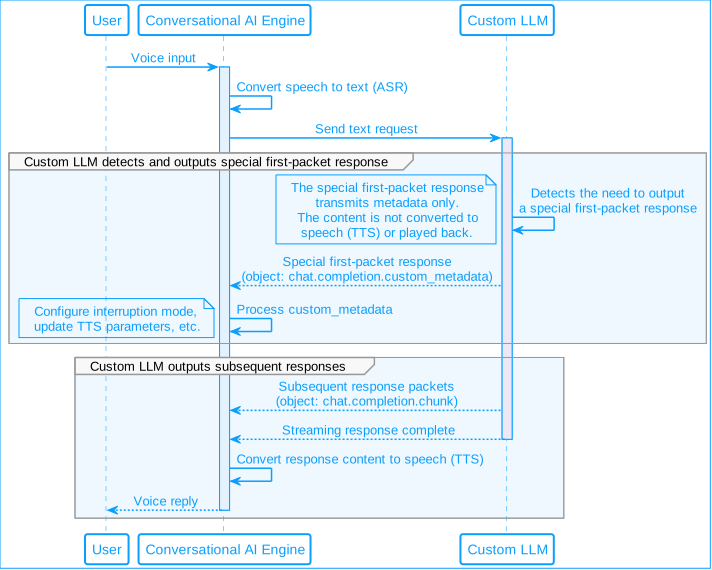
In streaming response (SSE) scenarios, a single LLM response is segmented into multiple chunks for transmission. Agora's Conversational AI Engine supports processing a special first-chunk response where `object` is `chat.completion.custom_metadata`, and uses the `metadata` field in that response to control the following agent behaviors:
* [Configure whether the TTS broadcast can be interrupted](#configure-llm-response-interruption)
* [Update TTS parameters in real time](#update-tts-parameters-in-real-time)
To use these features, modify your custom LLM service to output a special first-chunk response that meets the Conversational AI Engine's requirements. The diagram below shows how the engine processes this metadata chunk before handling the rest of the response.
#### Configure LLM response interruption [#configure-llm-response-interruption]
The Conversational AI Engine supports letting the custom LLM determine whether a response can be interrupted by the user. This is particularly useful for long-running tasks, such as querying a database or calling an external API, where the agent must remain responsive while the task completes in the background.
When the custom LLM initiates a long-running task, it sends a `custom_metadata` packet to the Conversational AI Engine with `interruptable` set to `false`, followed by a `chat.completion.chunk` response containing a filler phrase, for example "Just a moment, I'm processing your request". The Conversational AI Engine passes the filler phrase to TTS and plays it to the user while the task completes in the background. Setting `interruptable` to `false` prevents user speech from interrupting the TTS broadcast of the filler phrase.
In your custom LLM service, output a first-chunk response with the following structure:
```json
{
"id": "response-id",
"object": "chat.completion.custom_metadata",
"choices": [],
"metadata": {
"interruptable": false
}
}
```
The `interruptable` field configures whether the TTS broadcast of this LLM response can be interrupted by user speech. Set it to `false` to prevent interruption, `true` to allow it, or omit it to leave the current interruption mode unchanged.
Caution
The Conversational AI Engine only processes the first chunk response where `object` is `chat.completion.custom_metadata` and ignores the content in `choices`. Subsequent responses are treated as normal responses and do not support metadata configuration. Ensure that the content requiring TTS broadcast is generated in the second and subsequent responses.
**ASR behavior during non-interruptible responses**
Setting `interruptable` to `false` does not disable automatic speech recognition (ASR). The engine continues to capture and transcribe user speech during TTS playback, but holds the transcript and does not process it until TTS finishes. This means:
* If a user speaks during a non-interruptible TTS broadcast, their speech is not lost. It is queued and processed after playback ends.
* For long-running tasks, you are responsible for managing the agent's state outside the response lifecycle. Consider how your application should handle queued speech: for example, whether to process it normally, discard it, or use it to cancel the background task.
#### Update TTS parameters in real time [#update-tts-parameters-in-real-time]
The Conversational AI Engine supports real-time TTS parameter updates during a conversation, enabling a more immersive interactive experience. This feature is useful when the agent needs to adjust its voice dynamically based on user input, for example when a user requests a different voice or when the LLM detects a change in the user's mood and adjusts volume, pitch, or speech rate accordingly.
When the LLM determines that TTS parameters need to be updated, modify your custom LLM service to output a first-chunk response with the following structure:
```json
{
"id": "response-id",
"object": "chat.completion.custom_metadata",
"choices": [],
"metadata": {
"tts_params": {
"params": {
"voice_type": "female_1",
"rate": 1.1
}
}
}
}
```
The `tts_params.params` field specifies the TTS parameters to update. For the available parameters, refer to your TTS vendor's official documentation.
## Reference [#reference]
This section contains content that completes the information on this page, or points you to documentation that explains other aspects to this product.
### Sample project [#sample-project]
Agora provides open source sample projects on GitHub for your reference. Download the project or view the source code for a more complete example.
* [Python](https://github.com/AgoraIO-Community/Conversational-AI-Server-Sample/tree/main/python/custom_llm)
* [Go](https://github.com/AgoraIO-Community/Conversational-AI-Server-Sample/tree/main/golang/custom_llm)
* [Node.js](https://github.com/AgoraIO-Community/Conversational-AI-Server-Sample/tree/main/node/custom_llm)
### Interface standards [#interface-standards]
Custom LLM services must be compatible with the OpenAI Chat Completions API interface standard:
* **Request format**: Contains parameters such as model, message, and tool call configuration.
* **Response format**: Contains the response generated by the model, metadata, and other information
* **Streaming response**: Compliant with the SSE (Server-Sent Events) specification
For detailed interface standards, please refer to:
* [OpenAI Chat Completions API documentation](https://platform.openai.com/docs/api-reference/chat)
* [Conversational AI Engine API Documentation](/en/api-reference/api-ref/conversational-ai/join)