# Build a backend and client from scratch (/en/ai/build/custom-model-integration/build-server-client)
> For AI agents: see the complete documentation index at [llms.txt](/llms.txt).
This guide walks through building the full Conversational AI stack from scratch: a server that issues tokens and manages agent sessions, and a browser client that captures microphone audio and streams live transcripts. You end up with the same structure as the official [Next.js](https://github.com/AgoraIO-Conversational-AI/agent-quickstart-nextjs) and [Python](https://github.com/AgoraIO-Conversational-AI/agent-quickstart-python) starter repos, but with every step explained.
If you want to hear an agent speak in under five minutes, follow the [Voice AI quickstart](../../get-started/quickstart) guide.
Info
This project uses Agora-managed presets, so no vendor API keys are required to complete this tutorial. If you prefer to switch to your own vendor accounts, see the documentation for your chosen [ASR](../../models/asr/deepgram), [LLM](../../models/llm/openai), and [TTS](../../models/tts/minimax) providers.
## What you will build [#what-you-will-build]
A complete client-server app:
* **Backend**: Three HTTP endpoints:
* `POST /api/token`: Issues RTC and RTM tokens for a given channel and UID
* `POST /api/invite-agent`: Starts the agent using the Agora Agent SDK
* `POST /api/stop-conversation`: Stops the agent by ID
* **Frontend**: A Next.js page that:
* Requests microphone permission
* Joins the Agora channel using the RTC SDK
* Fetches a token from your backend
* Calls `invite-agent` to bring the agent into the channel
* Renders live transcripts from RTM
* Calls `stop-conversation` on page unload
The architecture looks like this:
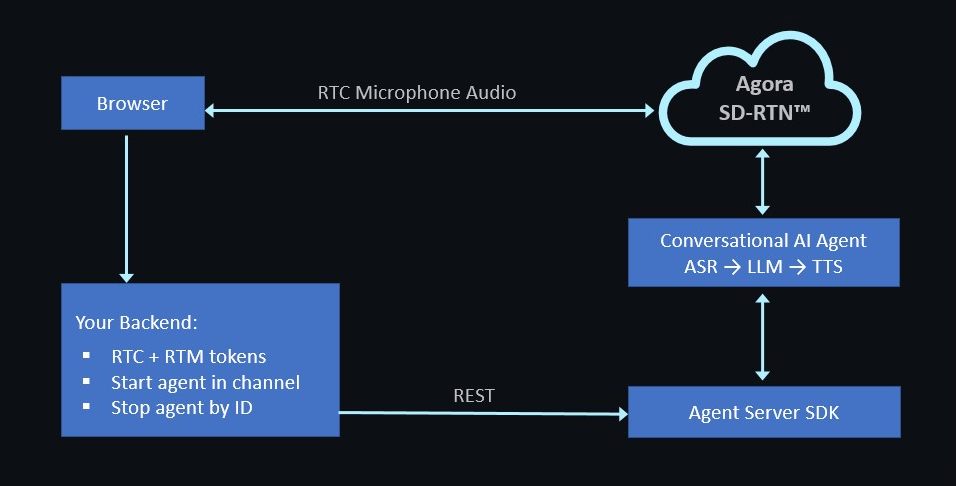
The backend never touches audio, and the browser never embeds your App Certificate. This clean separation is the reason you need a backend.
## Prerequisites [#prerequisites]
* An active [Agora account](https://console.agora.io).
* `git` and a terminal.
* One of the following language runtimes:
* **Node.js 20 LTS or later** with `pnpm` for TypeScript
* **Python 3.11 or later** with `uv` or `pip`
* **Go 1.22 or later**
* A modern browser with microphone access
## Set up your environment [#set-up-your-environment]
This section walks you through installing the Agora CLI and scaffolding your project.
### Install the Agora CLI [#install-the-agora-cli]
The Agora CLI is the recommended way to bootstrap a new Agora project. Use it to create projects, enable features, write credentials to `.env` files, and run diagnostics.
To install the Agora CLI, log in, and create a project with Conversational AI enabled:
```bash
npm install -g agoraio-cli
agora login
agora project create conv-ai-tutorial --feature rtc --feature convoai
agora project use conv-ai-tutorial
```
Confirm that the CLI can read your credentials:
```bash
agora project env --shell
```
```bash
AGORA_APP_ID=your_app_id_here
AGORA_APP_CERTIFICATE=your_certificate_here
```
Keep this terminal open. You will reuse these credentials in both the backend and frontend steps.
### Scaffold the repo [#scaffold-the-repo]
Select the tab for your preferred language.
TypeScript
Python
Go
For TypeScript, the backend and frontend live in the same Next.js app.
1. Scaffold a Next.js app with TypeScript, the App Router, Tailwind CSS, and ESLint, then install the required Agora packages:
```bash
pnpm dlx create-next-app@latest conv-ai-tutorial --typescript --app --tailwind --eslint --src-dir=false --import-alias='@/*'
cd conv-ai-tutorial
pnpm add agora-agents agora-rtc-sdk-ng agora-rtm-sdk agora-token
```
* `agora-agents`: Starts and stops agent sessions from the backend
* `agora-rtc-sdk-ng`: Handles mic capture and RTC channel joining in the browser
* `agora-rtm-sdk`: Receives live transcript messages from the agent
* `agora-token`: Generates RTC and RTM tokens
2. Write your Agora credentials to `.env.local`:
```bash
eval "$(agora project env --shell)"
cat > .env.local <
For Python, the backend and frontend are separate apps in a single monorepo.
1. Scaffold the monorepo, create a Python virtual environment, and install the required packages:
```bash
mkdir conv-ai-tutorial && cd conv-ai-tutorial
git init
# Backend
mkdir server-python && cd server-python
python -m venv .venv
source .venv/bin/activate # Windows: .venv\Scripts\activate
pip install fastapi 'uvicorn[standard]' agora-agents agora-token-builder python-dotenv
cd ..
# Frontend
pnpm dlx create-next-app@latest web-client --typescript --app --tailwind --eslint --src-dir=false --import-alias='@/*'
cd web-client
pnpm add agora-rtc-sdk-ng agora-rtm-sdk
cd ..
```
* `agora-agents`: Starts and stops agent sessions from the backend
* `agora-token-builder`: Generates RTC and RTM tokens
* `agora-rtc-sdk-ng`: Handles mic capture and RTC channel joining in the browser
* `agora-rtm-sdk`: Receives live transcript messages from the agent
2. Write your Agora credentials to the backend and frontend environment files:
```bash
eval "$(agora project env --shell)"
# Backend environment
cat > server-python/.env < web-client/.env.local <
Coming soon
The Go backend walkthrough is not yet available. It will mirror the Python path: a standalone backend on port 8000, a Next.js web client on port 3000, and the same three HTTP endpoints.
In the meantime, use the [Voice AI quickstart](../../get-started/quickstart) for a Go agent walkthrough that runs as a single process without a frontend.
## Build the backend [#build-the-backend]
The backend exposes three endpoints, one for each operation the frontend needs.
TypeScript
Python
Go
### Generate tokens [#generate-tokens]
Endpoint: `POST /api/token`
This endpoint builds an RTC token and an RTM token for the browser client. It is the only place the App Certificate is used.
```ts
// app/api/token/route.ts
import { NextRequest, NextResponse } from 'next/server';
import { RtcTokenBuilder, RtcRole, RtmTokenBuilder } from 'agora-token';
const APP_ID = process.env.NEXT_PUBLIC_AGORA_APP_ID!;
const APP_CERTIFICATE = process.env.NEXT_AGORA_APP_CERTIFICATE!;
const TOKEN_TTL_SECONDS = 60 * 60; // 1 hour
export async function POST(req: NextRequest) {
const { channel, uid } = await req.json();
if (!channel || typeof uid !== 'number') {
return NextResponse.json({ error: 'channel and numeric uid required' }, { status: 400 });
}
const expireAt = Math.floor(Date.now() / 1000) + TOKEN_TTL_SECONDS;
const rtcToken = RtcTokenBuilder.buildTokenWithUid(
APP_ID,
APP_CERTIFICATE,
channel,
uid,
RtcRole.PUBLISHER,
expireAt,
expireAt,
);
const rtmToken = RtmTokenBuilder.buildToken(
APP_ID,
APP_CERTIFICATE,
String(uid),
expireAt,
);
return NextResponse.json({ rtcToken, rtmToken, expireAt });
}
```
### Start an agent session [#start-an-agent-session]
Endpoint: `POST /api/invite-agent`
This endpoint uses the Agora Agent SDK to configure an agent and start a session. The STT, LLM, and TTS configurations use Agora-managed presets and therefore do not require an `apiKey`.
```ts
// app/api/invite-agent/route.ts
import { NextRequest, NextResponse } from 'next/server';
import {
AgoraClient,
Agent,
Area,
DeepgramSTT,
ExpiresIn,
MiniMaxTTS,
OpenAI,
} from 'agora-agents';
const client = new AgoraClient({
area: Area.US,
appId: process.env.NEXT_PUBLIC_AGORA_APP_ID!,
appCertificate: process.env.NEXT_AGORA_APP_CERTIFICATE!,
});
const AGENT_UID = 123456;
export async function POST(req: NextRequest) {
const { channel } = await req.json();
if (!channel) {
return NextResponse.json({ error: 'channel required' }, { status: 400 });
}
const agent = new Agent({
client,
instructions: 'You are a friendly support agent for Acme Corp. Keep answers under 30 seconds.',
greeting: 'Hi there! How can I help you today?',
failureMessage: 'Sorry, I had trouble hearing that. Could you repeat?',
maxHistory: 50,
advancedFeatures: { enable_rtm: true, enable_tools: false },
parameters: { data_channel: 'rtm', enable_error_message: true },
})
.withStt(new DeepgramSTT({ model: 'nova-3', language: 'en' }))
.withLlm(new OpenAI({ model: 'gpt-4o-mini', maxHistory: 15 }))
.withTts(
new MiniMaxTTS({
model: 'speech_2_6_turbo',
voiceId: 'English_captivating_female1',
}),
);
const session = agent.createSession({
channel,
agentUid: AGENT_UID,
remoteUids: ['*'],
name: 'support-agent',
idleTimeout: 30,
expiresIn: ExpiresIn.hours(1),
});
try {
const { agentId } = await session.start();
return NextResponse.json({ agentId, agentUid: AGENT_UID });
} catch (err: unknown) {
const message = err instanceof Error ? err.message : String(err);
return NextResponse.json({ error: `start failed: ${message}` }, { status: 502 });
}
}
```
### Stop an agent session [#stop-an-agent-session]
Endpoint: `POST /api/stop-conversation`
This endpoint stops a running agent session by ID.
```ts
// app/api/stop-conversation/route.ts
import { NextRequest, NextResponse } from 'next/server';
import { AgoraClient, Area } from 'agora-agents';
const client = new AgoraClient({
area: Area.US,
appId: process.env.NEXT_PUBLIC_AGORA_APP_ID!,
appCertificate: process.env.NEXT_AGORA_APP_CERTIFICATE!,
});
export async function POST(req: NextRequest) {
const { agentId } = await req.json();
if (!agentId) {
return NextResponse.json({ error: 'agentId required' }, { status: 400 });
}
try {
await client.agents.leave(agentId);
return NextResponse.json({ stopped: true });
} catch (err: unknown) {
const message = err instanceof Error ? err.message : String(err);
return NextResponse.json({ error: `stop failed: ${message}` }, { status: 502 });
}
}
```
All backend code lives in `server-python/main.py`.
### Generate tokens [#generate-tokens-1]
Endpoint: `POST /api/token`
This endpoint generates an RTC token and an RTM token for the browser client. It is the only place the App Certificate is used.
```python
# server-python/main.py
import os
import time
from fastapi import FastAPI, HTTPException
from fastapi.middleware.cors import CORSMiddleware
from pydantic import BaseModel
from dotenv import load_dotenv
from agora_token_builder import RtcTokenBuilder, RtmTokenBuilder
load_dotenv()
APP_ID = os.environ["APP_ID"]
APP_CERTIFICATE = os.environ["APP_CERTIFICATE"]
TOKEN_TTL_SECONDS = 60 * 60
app = FastAPI()
app.add_middleware(
CORSMiddleware,
allow_origins=["http://localhost:3000"],
allow_methods=["POST"],
allow_headers=["*"],
)
class TokenRequest(BaseModel):
channel: str
uid: int
@app.post("/api/token")
def token(body: TokenRequest):
expire_at = int(time.time()) + TOKEN_TTL_SECONDS
rtc_token = RtcTokenBuilder.buildTokenWithUid(
APP_ID,
APP_CERTIFICATE,
body.channel,
body.uid,
role=1,
privilegeExpiredTs=expire_at,
)
rtm_token = RtmTokenBuilder.buildToken(
APP_ID,
APP_CERTIFICATE,
str(body.uid),
role=1,
privilegeExpiredTs=expire_at,
)
return {"rtcToken": rtc_token, "rtmToken": rtm_token, "expireAt": expire_at}
```
### Start an agent session [#start-an-agent-session-1]
Endpoint: `POST /api/invite-agent`
This endpoint uses the Agora Agent SDK to configure an agent and start a session in the caller's channel. The STT, LLM, and TTS configurations use Agora-managed presets and therefore do not require an `api_key`.
Add the following to `main.py`:
```python
from agora_agent import (
Agora,
Agent,
Area,
DeepgramSTT,
MiniMaxTTS,
OpenAI,
expires_in_hours,
)
agora_client = Agora(
area=Area.US,
app_id=APP_ID,
app_certificate=APP_CERTIFICATE,
)
AGENT_UID = 123456
class InviteRequest(BaseModel):
channel: str
@app.post("/api/invite-agent")
def invite_agent(body: InviteRequest):
agent = (
Agent(
agora_client,
instructions="You are a friendly support agent for Acme Corp. Keep answers under 30 seconds.",
greeting="Hi there! How can I help you today?",
failure_message="Sorry, I had trouble hearing that. Could you repeat?",
max_history=50,
advanced_features={"enable_rtm": True, "enable_tools": False},
parameters={"data_channel": "rtm", "enable_error_message": True},
)
.with_stt(DeepgramSTT(model="nova-3", language="en"))
.with_llm(OpenAI(model="gpt-4o-mini", max_history=15))
.with_tts(
MiniMaxTTS(
model="speech_2_6_turbo",
voice_id="English_captivating_female1",
)
)
)
session = agent.create_session(
channel=body.channel,
agent_uid=AGENT_UID,
remote_uids=["*"],
name="support-agent",
idle_timeout=30,
expires_in=expires_in_hours(1),
)
try:
result = session.start()
return {"agentId": result.agent_id, "agentUid": AGENT_UID}
except Exception as exc:
raise HTTPException(status_code=502, detail=f"start failed: {exc}")
```
### Stop an agent session [#stop-an-agent-session-1]
Endpoint: `POST /api/stop-conversation`
This endpoint stops a running agent session by ID.
Add the following to `main.py`:
```python
class StopRequest(BaseModel):
agentId: str
@app.post("/api/stop-conversation")
def stop_conversation(body: StopRequest):
try:
agora_client.agents.leave(body.agentId)
return {"stopped": True}
except Exception as exc:
raise HTTPException(status_code=502, detail=f"stop failed: {exc}")
```
To start the backend:
```bash
cd server-python
uvicorn main:app --reload --port 8000
```
Swagger docs are available at `http://localhost:8000/docs`.
Coming soon
The Go backend walkthrough is not yet available. It will mirror the Python path: a standalone backend on port 8000, a Next.js web client on port 3000, and the same three HTTP endpoints.
In the meantime, see the [Voice AI quickstart](../../get-started/quickstart) guide to get started with Go.
## Build the frontend [#build-the-frontend]
The frontend is the same Next.js app for all three backends. The only difference is whether it calls its own API routes for TypeScript or a separate backend on port `8000` for Python and Go.
### A basic API client [#a-basic-api-client]
Create `lib/api.ts` to give the frontend a single place to manage the backend URL and endpoint calls.
```ts
// lib/api.ts
const BACKEND = process.env.NEXT_PUBLIC_BACKEND_URL ?? '';
async function post(path: string, body: object): Promise {
const res = await fetch(`${BACKEND}${path}`, {
method: 'POST',
headers: { 'Content-Type': 'application/json' },
body: JSON.stringify(body),
});
if (!res.ok) {
throw new Error(`${path} failed: ${res.status} ${await res.text()}`);
}
return res.json() as Promise;
}
export type TokenResponse = {
rtcToken: string;
rtmToken: string;
expireAt: number;
};
export type InviteResponse = {
agentId: string;
agentUid: number;
};
export const api = {
token: (channel: string, uid: number) =>
post('/api/token', { channel, uid }),
invite: (channel: string) =>
post('/api/invite-agent', { channel }),
stop: (agentId: string) =>
post<{ stopped: boolean }>('/api/stop-conversation', { agentId }),
};
```
For TypeScript, `NEXT_PUBLIC_BACKEND_URL` is not set in `.env.local`, so calls go to same-origin routes like `/api/token`. For Python and Go, it is set to `http://localhost:8000` in the scaffold step, so calls go to the external backend.
### Create the RTC and RTM hook [#create-the-rtc-and-rtm-hook]
Create `hooks/useConvoAgent.ts`. This hook joins the RTC channel for audio, connects to RTM for transcripts, and exposes `start()` and `stop()` functions to the UI.
```ts
// hooks/useConvoAgent.ts
'use client';
import { useCallback, useRef, useState } from 'react';
import AgoraRTC, {
IAgoraRTCClient,
IMicrophoneAudioTrack,
} from 'agora-rtc-sdk-ng';
import { RTMClient, RTMEvents } from 'agora-rtm-sdk';
import { api } from '@/lib/api';
type TranscriptLine = { role: 'user' | 'agent'; text: string; final: boolean };
export function useConvoAgent(channel: string, uid: number) {
const rtcRef = useRef(null);
const micRef = useRef(null);
const rtmRef = useRef(null);
const agentIdRef = useRef(null);
const [connected, setConnected] = useState(false);
const [transcripts, setTranscripts] = useState([]);
const [error, setError] = useState(null);
const start = useCallback(async () => {
try {
const { rtcToken, rtmToken } = await api.token(channel, uid);
const appId = process.env.NEXT_PUBLIC_AGORA_APP_ID!;
// 1. Join RTC and publish the mic
const rtc = AgoraRTC.createClient({ mode: 'rtc', codec: 'vp8' });
await rtc.join(appId, channel, rtcToken, uid);
const mic = await AgoraRTC.createMicrophoneAudioTrack();
await rtc.publish(mic);
rtc.on('user-published', async (user, mediaType) => {
if (mediaType === 'audio') {
await rtc.subscribe(user, mediaType);
user.audioTrack?.play();
}
});
rtcRef.current = rtc;
micRef.current = mic;
// 2. Join RTM for transcripts
const rtm = new RTMClient({ appId, userId: String(uid) });
await rtm.login({ token: rtmToken });
await rtm.subscribe(channel);
rtm.addEventListener('message', (e: RTMEvents.MessageEvent) => {
try {
const payload = JSON.parse(e.message as string);
if (payload.type === 'transcript') {
setTranscripts((prev) => [
...prev,
{ role: payload.role, text: payload.text, final: payload.final },
]);
}
} catch {
// Ignore non-JSON RTM messages for this tutorial.
}
});
rtmRef.current = rtm;
// 3. Ask the backend to bring the agent into the channel
const { agentId } = await api.invite(channel);
agentIdRef.current = agentId;
setConnected(true);
} catch (e) {
setError(e instanceof Error ? e.message : String(e));
}
}, [channel, uid]);
const stop = useCallback(async () => {
try {
if (agentIdRef.current) {
await api.stop(agentIdRef.current);
}
} finally {
micRef.current?.stop();
micRef.current?.close();
await rtcRef.current?.leave();
await rtmRef.current?.logout();
agentIdRef.current = null;
rtcRef.current = null;
micRef.current = null;
rtmRef.current = null;
setConnected(false);
}
}, []);
return { connected, transcripts, error, start, stop };
}
```
The hook follows the same structure as `components/ConversationComponent.tsx` in the [Next.js starter repo](https://github.com/AgoraIO-Conversational-AI/agent-quickstart-nextjs).
### Build the client UI [#build-the-client-ui]
Create `app/page.tsx` as the main UI. It renders a start and stop button plus a live transcript list.
```tsx
// app/page.tsx
'use client';
import { useConvoAgent } from '@/hooks/useConvoAgent';
const CHANNEL = 'support-room-123';
const USER_UID = 111222;
export default function Home() {
const { connected, transcripts, error, start, stop } = useConvoAgent(
CHANNEL,
USER_UID,
);
return (
))}
);
}
```
The page has no state library or design system. It provides just enough UI to verify that the backend is working.
### Handle page unload (optional) [#handle-page-unload-optional]
Add this effect inside `app/page.tsx` to stop the agent cleanly when the user closes the tab, rather than waiting for the 30-second idle timeout.
```ts
// Inside the page, after useConvoAgent(...)
useEffect(() => {
const onUnload = () => {
if (connected) stop();
};
window.addEventListener('beforeunload', onUnload);
return () => window.removeEventListener('beforeunload', onUnload);
}, [connected, stop]);
```
## Test and validate [#test-and-validate]
Start the app and verify that the agent joins, responds, and stops cleanly.
### Run the app [#run-the-app]
TypeScript
Python
Go
```bash
pnpm dev
```
Open `http://localhost:3000`, click **Start conversation**, allow microphone access, and speak.
Start the backend and frontend in two separate terminals:
```bash
# Terminal 1: Backend
cd server-python
source .venv/bin/activate
uvicorn main:app --reload --port 8000
```
```bash
# Terminal 2: Frontend
cd web-client
pnpm dev
```
Open `http://localhost:3000`.
Coming soon
The Go walkthrough is not yet available.
See the [Voice AI quickstart](../../get-started/quickstart) guide in the meantime.
### Verify the integration [#verify-the-integration]
A healthy run passes all three checks:
| Check | How to verify | Time budget |
| ------------------------ | ------------------------------------------------------------------------------------------------------------------ | ------------------------- |
| Agent joined the channel | The `invite-agent` response resolves with an `agentId`, and the agent emits a greeting in RTC within two seconds. | \< 2 s |
| Transcripts stream | `transcripts` state updates as you speak, and partial lines are marked `final: false`. | \< 500 ms partial latency |
| Stop is clean | After **Stop**, the backend returns `{ stopped: true }`, and the Convo AI engine logs `STATE=STOPPED, reason=API`. | Immediate |
If you run into problems, first run the CLI diagnostic:
```bash
agora project doctor
```
This checks for credential errors, feature-enablement issues, and network reachability problems.
## Troubleshooting [#troubleshooting]
| Symptom | Likely cause | Fix |
| ---------------------------------------------- | ------------------------------------------------------------------------------- | -------------------------------------------------------------------------------------------------------------------------------------------- |
| `Error: /api/token failed: 500` in the browser | Backend cannot read the `APP_CERTIFICATE` environment variable. | Confirm `.env.local` for TypeScript or `server-python/.env` for Python contains the variable and that the server loaded the file on startup. |
| `invalid token` from the RTC join | Clock skew between token generation and channel join. | RTC tokens are time-sensitive. Regenerate a token on each `start()` call to avoid expiry issues. |
| Agent never speaks but `agentId` is returned | Conversational AI feature is not enabled on the Agora project. | Run `agora project feature list`. If `convoai` is missing, rerun `agora project create --feature convoai` or enable it in the Agora Console. |
| No transcripts in RTM | `enable_rtm` is not set, or `data_channel` is set to `stream` instead of `rtm`. | Confirm `advancedFeatures.enable_rtm: true` and `parameters.data_channel: 'rtm'` in the agent config. |
| CORS error in the browser for Python | FastAPI CORS middleware does not include your frontend origin. | Add `http://localhost:3000` to `allow_origins` in `main.py`. |
| Agent greets itself in a loop | No echo cancellation on the device. | Use headphones, or set `parameters.enable_aec: true`. |
| `unauthorized` error on `agora login` in CI | The SSO browser flow cannot open on a headless machine. | Use `agora login --device` for the device-code flow. |
| Chrome blocks microphone access | `getUserMedia` is not available on non-localhost HTTP origins. | Test on `http://localhost:3000` exactly, not `http://127.0.0.1` or a LAN IP. |
## Next steps [#next-steps]
Now that you have a working agent, explore the following topics:
* [Integrate an MLLM](../../models/mllm/openai): Replace the cascading STT -> LLM -> TTS pipeline with a single real-time model.
* [Transmit custom information](../shape-the-conversation/custom-information): Guide the agent with user-specific context to personalize responses.
* [Integrate short-term memory](../shape-the-conversation/short-term-memory): Help the agent maintain context across a conversation.
* [Webhooks](../handle-runtime-events/webhooks): Receive agent event notifications in real time.
* [Use managed mode](managed-mode): Use Agora-managed provider credentials instead of configuring API keys for each model.
* [Optimize conversation latency](../../best-practices/optimize-latency): Tune LLM, ASR, and TTS components for lower end-to-end latency.